Don't miss your chance to take the Fabric Data Engineer (DP-700) exam on us!
Learn moreWe've captured the moments from FabCon & SQLCon that everyone is talking about, and we are bringing them to the community, live and on-demand. Starts on April 14th. Register now
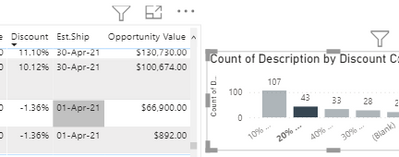
Hello Community: I am trying to understand why the negative percent (discount) values are creeping into my table below. I have this measure used in the chart below, and when I select the 20% or Less column, it is working correctly, however there are some negative percentages that show up in the table which is dynamically being filtered from the column chart.
Is there something wrong with my SWITCH statement?
Solved! Go to Solution.
@HotChilli That was a good tip and got me in the right direction. Added a few more statements and perfecto. This was the final measure that allowed for the correct grouping whether in a column chart or table.
Investigate which cohort negative discounts get assigned to.
The easiest way is to add a table visual with discount and discount cohort. (as long as they don't aggregate).
Which cohort do you expect?
@HotChilli That was a good tip and got me in the right direction. Added a few more statements and perfecto. This was the final measure that allowed for the correct grouping whether in a column chart or table.
If you have recently started exploring Fabric, we'd love to hear how it's going. Your feedback can help with product improvements.
A new Power BI DataViz World Championship is coming this June! Don't miss out on submitting your entry.
Share feedback directly with Fabric product managers, participate in targeted research studies and influence the Fabric roadmap.
| User | Count |
|---|---|
| 56 | |
| 40 | |
| 36 | |
| 19 | |
| 18 |
| User | Count |
|---|---|
| 70 | |
| 69 | |
| 38 | |
| 35 | |
| 23 |