Join us at FabCon Atlanta from March 16 - 20, 2026, for the ultimate Fabric, Power BI, AI and SQL community-led event. Save $200 with code FABCOMM.
Register now!The Power BI Data Visualization World Championships is back! Get ahead of the game and start preparing now! Learn more
Hi,
Below Switch statement works for me but I need to include else then the result is a text value.
So
If 'powerbi114 cmQualifications'[qualificationId] = 3892 or 4036 or 4038 then
Expiry Date = "Does not Expire"
Anyway I can modify below Switch to include this?
Solved! Go to Solution.
Hi @Qotsa
Sorry, my bad, all your conditions result in number and your else is text.
You will need to convert all the values you return to text using CONVERT() or FORMAT( 1, "") or return number in ELSE condition
Hi @Qotsa
Else is the last argument like
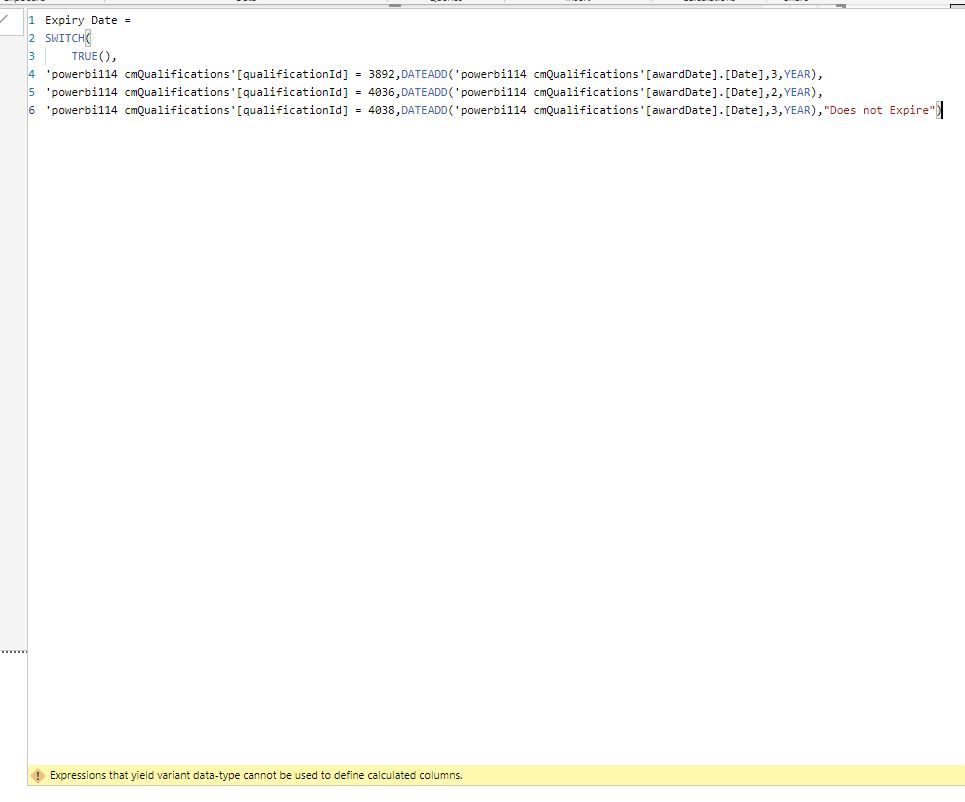
Expiry Date =
SWITCH(
TRUE(),
'powerbi114 cmQualifications'[qualificationId] = 3892,DATEADD('powerbi114 cmQualifications'[awardDate].[Date],3,YEAR),
'powerbi114 cmQualifications'[qualificationId] = 4036,DATEADD('powerbi114 cmQualifications'[awardDate].[Date],2,YEAR),
'powerbi114 cmQualifications'[qualificationId] = 4038,DATEADD('powerbi114 cmQualifications'[awardDate].[Date],3,YEAR),
"ELSE SOMTHING")
Thanks for reply.
I should have said I tried that but getting this error - Expressions that yield variant data-type cannot be used to define calculated columns.
Hi @Qotsa
Sorry, my bad, all your conditions result in number and your else is text.
You will need to convert all the values you return to text using CONVERT() or FORMAT( 1, "") or return number in ELSE condition
Perfect. Thank you.
Check out the November 2025 Power BI update to learn about new features.
Advance your Data & AI career with 50 days of live learning, contests, hands-on challenges, study groups & certifications and more!
| User | Count |
|---|---|
| 57 | |
| 44 | |
| 42 | |
| 21 | |
| 17 |
| User | Count |
|---|---|
| 183 | |
| 114 | |
| 93 | |
| 62 | |
| 45 |