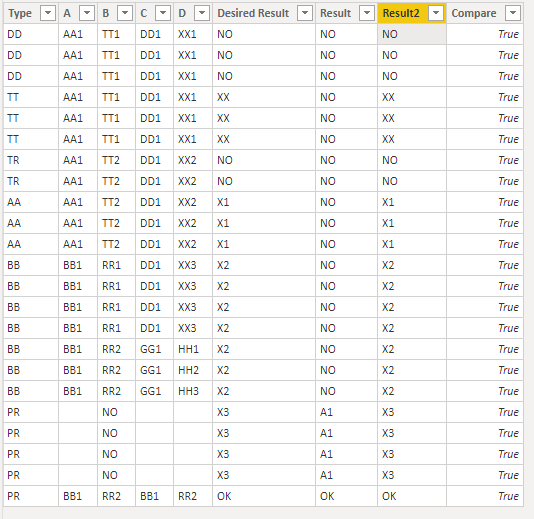
I have 5 columns are A,B,C,D and type. Those 5 columns are contain number and text or number or text.
If column A&B and C&D are matched then return "Ok" and if column A&B and C&D are not matched then return "No" and if column A&B or C&D are blanks then return "Blanks".
If AB is blank and CD is not blanks in this case I need a result "A1". If CD is blank and AB is not blanks then I need a result "A1" as well.
I am applying blow mentioned DAX formula and I would like to add type column in same DAX code to get the final result.
Any advise how can I added type column in exciting DAX code or alternative way.
Result = var AB = [A]&[B]var CD = [C]&[D] return SWITCH( TRUE(), (ISBLANK(AB) || AB = "") && (ISBLANK(CD) || CD = ""),
BLANK(), (ISBLANK(AB) || AB = "") || (ISBLANK(CD) || CD = ""), "A1", AB = CD, "OK", "NO")
Fillter range and result:
If type is TTT then XX
if type is AA then X1
If type is BB then X2
If type is PR then X3
TYPEABCDDESIRED RESULTResult
| DD | AA1 | TT1 | DD1 | XX1 | NO | NO |
| DD | AA1 | TT1 | DD1 | XX1 | NO | NO |
| DD | AA1 | TT1 | DD1 | XX1 | NO | NO |
| TT | AA1 | TT1 | DD1 | XX1 | XX | NO |
| TT | AA1 | TT1 | DD1 | XX1 | XX | NO |
| TT | AA1 | TT1 | DD1 | XX1 | XX | NO |
| TR | AA1 | TT2 | DD1 | XX2 | NO | NO |
| TR | AA1 | TT2 | DD1 | XX2 | NO | NO |
| AA | AA1 | TT2 | DD1 | XX2 | X1 | NO |
| AA | AA1 | TT2 | DD1 | XX2 | X1 | NO |
| AA | AA1 | TT2 | DD1 | XX2 | X1 | NO |
| BB | BB1 | RR1 | DD1 | XX3 | X2 | NO |
| BB | BB1 | RR1 | DD1 | XX3 | X2 | NO |
| BB | BB1 | RR1 | DD1 | XX3 | X2 | NO |
| BB | BB1 | RR1 | DD1 | XX3 | X2 | NO |
| BB | BB1 | RR2 | GG1 | HH1 | X2 | NO |
| BB | BB1 | RR2 | GG1 | HH2 | X2 | NO |
| BB | BB1 | RR2 | GG1 | HH3 | X2 | NO |
| PR | | NO | | | X3 | A1 |
| PR | | NO | | | X3 | A1 |
| PR | | NO | | | X3 | A1 |
| PR | | NO | | | X3 | A1 |
| PR | BB1 | RR2 | BB1 | RR2 | OK | OK |