This is best Fabric, Power BI, SQL and AI community event. How do we know? The last event sold out! Save €200 with code FABCMTY200.
Register nowJuly 28 - August 9 | Final Round of the Power BI Dataviz World Championships. This is your chance. Learn more
Solved! Go to Solution.
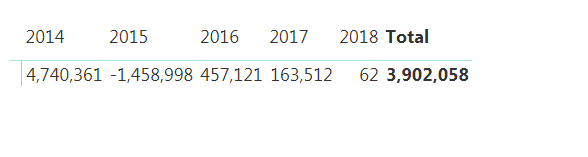
Based on the results you are showing, the column "Switch Logic" should equal "Switch" for all the records of year 2017. The column "technicalperiodcode" should be of type number and not text
Then the following DAX should get you the right results:
Measure =
SUMX (
SUMMARIZE (
Data,
Data[technicalyear],
Data[Switch Logic]
),
SWITCH (
[Switch Logic],
"Pre-Switch", CALCULATE (
SUM ( Data[AmountInReportingCurrency] ),
Data[Level4TransactionTypeDescription] = "Inward Estimated Premium"
) - CALCULATE (
SUM ( Data[AmountInReportingCurrency] ),
Data[Level4TransactionTypeDescription] = "Inward Unearned Premium Reserve"
),
"Post-Switch", CALCULATE (
SUM ( Data[AmountInReportingCurrency] ),
Data[Level4TransactionTypeDescription] = "Inward Booked Premium"
),
"Switch", CALCULATE (
SUM ( Data[AmountInReportingCurrency] ),
ALL ( Data ),
Data[technicalyear] <= EARLIER ( Data[technicalyear] ),
Data[Level4TransactionTypeDescription] = "Inward Booked Premium"
) - CALCULATE (
SUM ( Data[AmountInReportingCurrency] ),
ALL ( Data ),
Data[technicalyear] <= EARLIER ( Data[technicalyear] ),
Data[Level4TransactionTypeDescription] = "Inward Estimated Premium"
)
)
)
Did I answer your question correctly? Mark my answer as a solution!
Proud to be a Datanaut!

Based on the results you are showing, the column "Switch Logic" should equal "Switch" for all the records of year 2017. The column "technicalperiodcode" should be of type number and not text
Then the following DAX should get you the right results:
Measure =
SUMX (
SUMMARIZE (
Data,
Data[technicalyear],
Data[Switch Logic]
),
SWITCH (
[Switch Logic],
"Pre-Switch", CALCULATE (
SUM ( Data[AmountInReportingCurrency] ),
Data[Level4TransactionTypeDescription] = "Inward Estimated Premium"
) - CALCULATE (
SUM ( Data[AmountInReportingCurrency] ),
Data[Level4TransactionTypeDescription] = "Inward Unearned Premium Reserve"
),
"Post-Switch", CALCULATE (
SUM ( Data[AmountInReportingCurrency] ),
Data[Level4TransactionTypeDescription] = "Inward Booked Premium"
),
"Switch", CALCULATE (
SUM ( Data[AmountInReportingCurrency] ),
ALL ( Data ),
Data[technicalyear] <= EARLIER ( Data[technicalyear] ),
Data[Level4TransactionTypeDescription] = "Inward Booked Premium"
) - CALCULATE (
SUM ( Data[AmountInReportingCurrency] ),
ALL ( Data ),
Data[technicalyear] <= EARLIER ( Data[technicalyear] ),
Data[Level4TransactionTypeDescription] = "Inward Estimated Premium"
)
)
)
Did I answer your question correctly? Mark my answer as a solution!
Proud to be a Datanaut!
Join us in Barcelona for FabCon and SQLCon, the Fabric, Power BI, SQL, and AI community event. Save €200 with code FABCMTY200.
Check out the July 2026 Power BI update to learn about new features.
| User | Count |
|---|---|
| 25 | |
| 23 | |
| 20 | |
| 18 | |
| 14 |
| User | Count |
|---|---|
| 24 | |
| 20 | |
| 20 | |
| 20 | |
| 19 |