cancel
Showing results for 
Search instead for 
Did you mean: 

We've captured the moments from FabCon & SQLCon that everyone is talking about, and we are bringing them to the community, live and on-demand. Starts on April 14th. Register now

Reply
Anonymous
Not applicable

Switch between measures?

I would like to re-create in Power BI a pivot table I've created in Excel. Sample Data - https://drive.google.com/open?id=1TyEioklmd_MUEzkq03NeGZ6TA0BW-_su The metric I am trying to re-create is the "Earned" metric, which is highlighted in the attached workbook. Here is how it works. The switch period is 201706. Prior to the switch period, the formula for the value is Estimated Premium minus Unearned Premium Reserve. In the switch period, the formula for the value is the difference between the cumulative booked premium and the cumulative estimated premium. After the switch period, the formula for the value is equal to the Booked Premium. I figured I could create 3 measures and then switch between them, but I am not having very much luck. Is anyone able to assist? Kind regards, Sergio
1 ACCEPTED SOLUTION
LivioLanzo
Solution Sage
Solution Sage

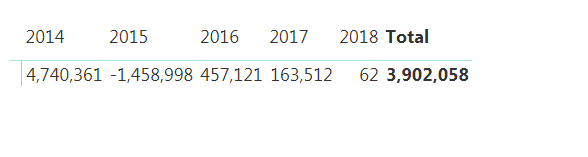
Based on the results you are showing, the column "Switch Logic" should equal "Switch" for all the records of year 2017. The column "technicalperiodcode" should be of type number and not text


Then the following DAX should get you the right results:


Measure =
SUMX (
    SUMMARIZE (
        Data,
        Data[technicalyear],
        Data[Switch Logic]
    ),
    SWITCH (
        [Switch Logic],
        "Pre-Switch"CALCULATE (
            SUM ( Data[AmountInReportingCurrency] ),
            Data[Level4TransactionTypeDescription] = "Inward Estimated Premium"
        ) - CALCULATE (
                SUM ( Data[AmountInReportingCurrency] ),
                Data[Level4TransactionTypeDescription] = "Inward Unearned Premium Reserve"
            ),
        "Post-Switch"CALCULATE (
            SUM ( Data[AmountInReportingCurrency] ),
            Data[Level4TransactionTypeDescription] = "Inward Booked Premium"
        ),
        "Switch"CALCULATE (
            SUM ( Data[AmountInReportingCurrency] ),
            ALL ( Data ),
            Data[technicalyear] <= EARLIER ( Data[technicalyear] ),
            Data[Level4TransactionTypeDescription] = "Inward Booked Premium"
        ) - CALCULATE (
                SUM ( Data[AmountInReportingCurrency] ),
                ALL ( Data ),
                Data[technicalyear] <= EARLIER ( Data[technicalyear] ),
                Data[Level4TransactionTypeDescription] = "Inward Estimated Premium"
            )
    )
)


Did I answer your question correctly? Mark my answer as a solution!


Proud to be a Datanaut!  

View solution in original post

2 REPLIES 2
LivioLanzo
Solution Sage
Solution Sage

Based on the results you are showing, the column "Switch Logic" should equal "Switch" for all the records of year 2017. The column "technicalperiodcode" should be of type number and not text


Then the following DAX should get you the right results:


Measure =
SUMX (
    SUMMARIZE (
        Data,
        Data[technicalyear],
        Data[Switch Logic]
    ),
    SWITCH (
        [Switch Logic],
        "Pre-Switch"CALCULATE (
            SUM ( Data[AmountInReportingCurrency] ),
            Data[Level4TransactionTypeDescription] = "Inward Estimated Premium"
        ) - CALCULATE (
                SUM ( Data[AmountInReportingCurrency] ),
                Data[Level4TransactionTypeDescription] = "Inward Unearned Premium Reserve"
            ),
        "Post-Switch"CALCULATE (
            SUM ( Data[AmountInReportingCurrency] ),
            Data[Level4TransactionTypeDescription] = "Inward Booked Premium"
        ),
        "Switch"CALCULATE (
            SUM ( Data[AmountInReportingCurrency] ),
            ALL ( Data ),
            Data[technicalyear] <= EARLIER ( Data[technicalyear] ),
            Data[Level4TransactionTypeDescription] = "Inward Booked Premium"
        ) - CALCULATE (
                SUM ( Data[AmountInReportingCurrency] ),
                ALL ( Data ),
                Data[technicalyear] <= EARLIER ( Data[technicalyear] ),
                Data[Level4TransactionTypeDescription] = "Inward Estimated Premium"
            )
    )
)


Did I answer your question correctly? Mark my answer as a solution!


Proud to be a Datanaut!  

Anonymous
Not applicable

This is extremely helpful and did the trick. Thank you @LivioLanzo!

Helpful resources

Announcements
New to Fabric survey Carousel

New to Fabric Survey

If you have recently started exploring Fabric, we'd love to hear how it's going. Your feedback can help with product improvements.

Power BI DataViz World Championships carousel

Power BI DataViz World Championships - June 2026

A new Power BI DataViz World Championship is coming this June! Don't miss out on submitting your entry.

Join our Fabric User Panel

Join our Fabric User Panel

Share feedback directly with Fabric product managers, participate in targeted research studies and influence the Fabric roadmap.

March Power BI Update Carousel

Power BI Community Update - March 2026

Check out the March 2026 Power BI update to learn about new features.