cancel
Showing results for 
Search instead for 
Did you mean: 

The Power BI Data Visualization World Championships is back! Get ahead of the game and start preparing now! Learn more

Reply
rajibmahmud
Helper III
Helper III

Switch between Discrete & YTD

Hi,


I have below data in system which is in Discrete month.


 JanFebMar
Sales101114
Profit566


My requirement is to create a slicer of Discrete & YTD and switch between Discrete and YTD data based on that.

2 ACCEPTED SOLUTIONS
v-qiuyu-msft
Community Support
Community Support

Hi @rajibmahmud,


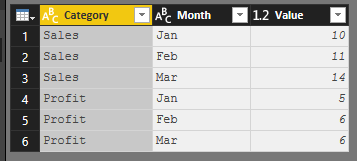
Regarding the sample data you provided, we need to Unpivot columns "Jan","Feb","Mar" to one column like below in Query Editor. 


w1.PNG


Then create a column to return month value:


MonthNum = SWITCH('Table1'[Month],"Jan",1,"Feb",2,"Mar",3)


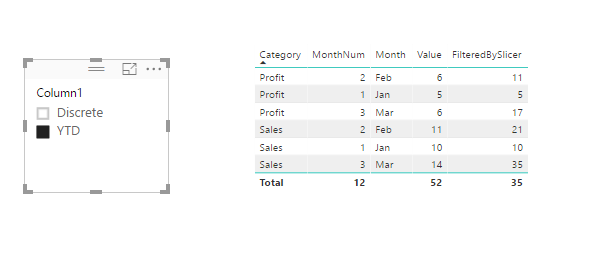
Create a new table which store two values "Discrete" and "YTD". Then create a measure:


FilteredBySlicer = IF(LASTNONBLANK('Table2'[Column1],"")="Discrete",SUM(Table1[Value]),IF(LASTNONBLANK('Table2'[Column1],"")="YTD",CALCULATE(SUM(Table1[Value]),FILTER(ALL('Table1'),'Table1'[Category]=MAX('Table1'[Category]) && 'Table1'[MonthNum]<=MAX('Table1'[MonthNum]))),0))


w2.PNGw3.PNG

For details, see attchached pbix file. 


Best Regards,
Qiuyun Yu 


Community Support Team _ Qiuyun Yu
If this post helps, then please consider Accept it as the solution to help the other members find it more quickly.

View solution in original post

Hi @rajibmahmud,


Nope. Please go through detail information about LASTNONBLANK Function (DAX) and HASONEVALUE Function (DAX)


Best Regards,
Qiuyun Yu 

Community Support Team _ Qiuyun Yu
If this post helps, then please consider Accept it as the solution to help the other members find it more quickly.

View solution in original post

3 REPLIES 3
v-qiuyu-msft
Community Support
Community Support

Hi @rajibmahmud,


Regarding the sample data you provided, we need to Unpivot columns "Jan","Feb","Mar" to one column like below in Query Editor. 


w1.PNG


Then create a column to return month value:


MonthNum = SWITCH('Table1'[Month],"Jan",1,"Feb",2,"Mar",3)


Create a new table which store two values "Discrete" and "YTD". Then create a measure:


FilteredBySlicer = IF(LASTNONBLANK('Table2'[Column1],"")="Discrete",SUM(Table1[Value]),IF(LASTNONBLANK('Table2'[Column1],"")="YTD",CALCULATE(SUM(Table1[Value]),FILTER(ALL('Table1'),'Table1'[Category]=MAX('Table1'[Category]) && 'Table1'[MonthNum]<=MAX('Table1'[MonthNum]))),0))


w2.PNGw3.PNG

For details, see attchached pbix file. 


Best Regards,
Qiuyun Yu 


Community Support Team _ Qiuyun Yu
If this post helps, then please consider Accept it as the solution to help the other members find it more quickly.

Thanks alot.


I never used LASTNONBLANK before, can it be replaced with Hasonevalue?

Hi @rajibmahmud,


Nope. Please go through detail information about LASTNONBLANK Function (DAX) and HASONEVALUE Function (DAX)


Best Regards,
Qiuyun Yu 

Community Support Team _ Qiuyun Yu
If this post helps, then please consider Accept it as the solution to help the other members find it more quickly.

Helpful resources

Announcements
Power BI DataViz World Championships

Power BI Dataviz World Championships

The Power BI Data Visualization World Championships is back! Get ahead of the game and start preparing now!

December 2025 Power BI Update Carousel

Power BI Monthly Update - December 2025

Check out the December 2025 Power BI Holiday Recap!

FabCon Atlanta 2026 carousel

FabCon Atlanta 2026

Join us at FabCon Atlanta, March 16-20, for the ultimate Fabric, Power BI, AI and SQL community-led event. Save $200 with code FABCOMM.