Join us at FabCon Atlanta from March 16 - 20, 2026, for the ultimate Fabric, Power BI, AI and SQL community-led event. Save $200 with code FABCOMM.
Register now!The Power BI Data Visualization World Championships is back! Get ahead of the game and start preparing now! Learn more
Hi,
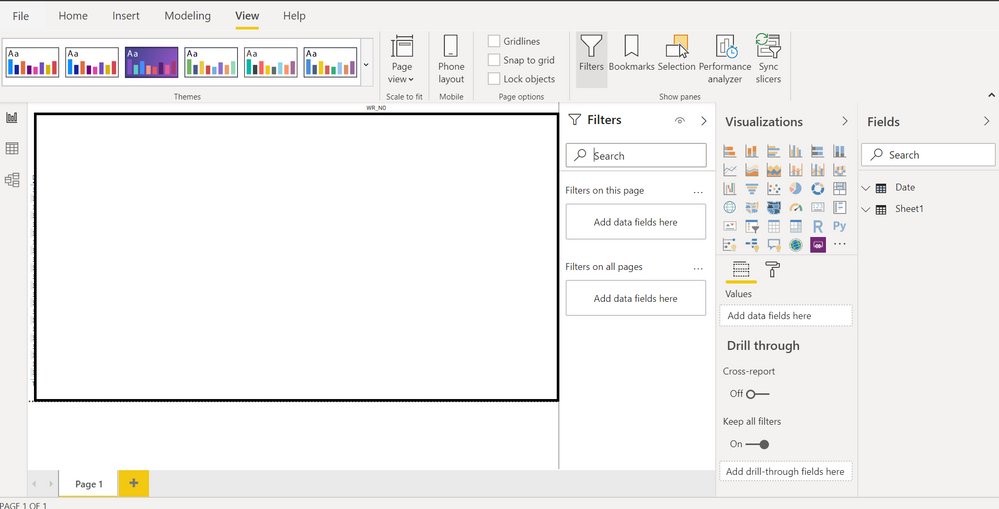
My switch themes button is missing from the Home tab. I have tried to resolve the issue by selecting the customize a current theme and have closed off power bi and restarted it again but to no avail.
Thanking you in advance.
Solved! Go to Solution.
@Anonymous
Refer to the solution given in :
https://community.powerbi.com/t5/Desktop/Switch-Theme-button-missing-from-ribbon/m-p/147121
OR check
New newer version themes are under view
@Anonymous
Refer to the solution given in :
https://community.powerbi.com/t5/Desktop/Switch-Theme-button-missing-from-ribbon/m-p/147121
OR check
New newer version themes are under view
The Power BI Data Visualization World Championships is back! Get ahead of the game and start preparing now!
| User | Count |
|---|---|
| 38 | |
| 36 | |
| 33 | |
| 31 | |
| 28 |
| User | Count |
|---|---|
| 129 | |
| 88 | |
| 79 | |
| 68 | |
| 63 |