cancel
Showing results for 
Search instead for 
Did you mean: 

The Power BI Data Visualization World Championships is back! Get ahead of the game and start preparing now! Learn more

Reply
Anonymous
Not applicable

Switch Measures values in chart

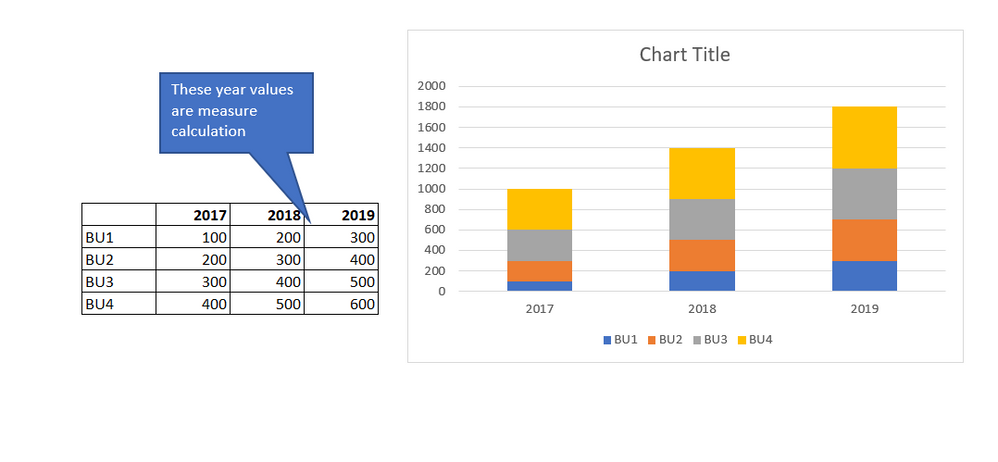
I calculcated measures for 2017, 2018, 2019 for some business units. see sample table below. Using this table, i need to create a stacked column chart.  (Axis should be year 2017, 2018, 2019) and stacked bar should be BU..  The challenge here is my year values are calculated from measures which can't drag under legend. so how to solve this case?Power bI query.PNG

Looking forward to hear back..

Many thanks,

Sankar 

1 ACCEPTED SOLUTION
Anonymous
Not applicable

Thank for your comments. I got a solution from the below link..


https://radacad.com/dax-measure-in-the-axis-of-the-power-bi-report

View solution in original post

2 REPLIES 2
v-jingzhang
Community Support
Community Support

Hi @Anonymous , measures cannot be set as legend or axis. To approach the stacked column chart you expect, it seems Axis should be years, Legend should be BU and Values should be the measure.

v-jingzhang_1-1600682063779.png


Best Regards,

Community Support Team _ Jing Zhang

If this post helps, please consider Accept it as the solution to help other members find it.

Anonymous
Not applicable

Thank for your comments. I got a solution from the below link..


https://radacad.com/dax-measure-in-the-axis-of-the-power-bi-report

Helpful resources

Announcements
Power BI DataViz World Championships

Power BI Dataviz World Championships

The Power BI Data Visualization World Championships is back! Get ahead of the game and start preparing now!

December 2025 Power BI Update Carousel

Power BI Monthly Update - December 2025

Check out the December 2025 Power BI Holiday Recap!

FabCon Atlanta 2026 carousel

FabCon Atlanta 2026

Join us at FabCon Atlanta, March 16-20, for the ultimate Fabric, Power BI, AI and SQL community-led event. Save $200 with code FABCOMM.