Share feedback directly with Fabric product managers, participate in targeted research studies and influence the Fabric roadmap.
Sign up nowGet Fabric certified for FREE! Don't miss your chance! Learn more
Hello All,
I try to make a Switch in my graph to % Vs Absolute, I check this video SWITCH between PERCENTAGE and ABSOLUTE VALUES in one visual I Calculation Groups in Power BI - YouTu... It's ok with Tabular Editor. But When a change the Format String Expression % & Absolute, all my table in PowerBI was impacted ... Someone can help me ?
Solved! Go to Solution.
Hi, @Vanessa250919
Thank you for your information.
it is quite difficult to check.
If it is OK with you, please share your sample pbix file's link.
thanks.
Hi, @Vanessa250919
Please correct me if I wrongly understood your question.
I think Absolute Measure also needs to have a separate format, like "#,##0.00"
If it is OK with you, please share your sample pbix file's link, then I can try to have a look into it to come up with a correct measure.
Thank you.
Hi, My name is Jihwan Kim.
If this post helps, then please consider accept it as the solution to help other members find it faster, and give a big thumbs up.
Linkedin: https://www.linkedin.com/in/jihwankim1975/
Hello and thanks for your help.
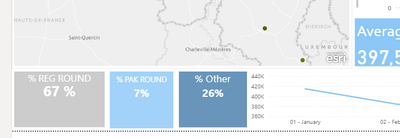
I will show you, my dashboard is like that :
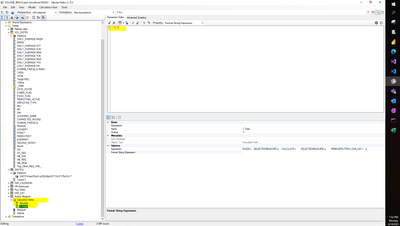
And if I change in tabular editor My measure (calculation group) like that :
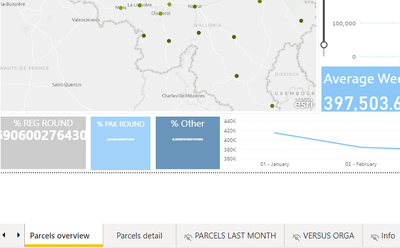
All my dashboard change :
I don't understand Why
Hi, @Vanessa250919
Thank you for your information.
it is quite difficult to check.
If it is OK with you, please share your sample pbix file's link.
thanks.
Share feedback directly with Fabric product managers, participate in targeted research studies and influence the Fabric roadmap.
| User | Count |
|---|---|
| 63 | |
| 62 | |
| 42 | |
| 19 | |
| 16 |
| User | Count |
|---|---|
| 118 | |
| 106 | |
| 38 | |
| 28 | |
| 28 |