cancel
Showing results for 
Search instead for 
Did you mean: 

The Power BI Data Visualization World Championships is back! Get ahead of the game and start preparing now! Learn more

Reply
ErikPettersson
Frequent Visitor

Supertricky modelling..

Hi!


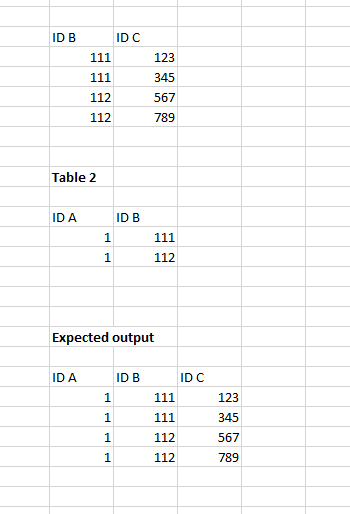
I'm encountered a bit of trick problem and would be open to suggestions how to work around it. I have 2 tables (see below) that I need to match. However, the only common denominater contains multiples on both sides. However, in the first table I have an unique ID that I would like to add to the second table (I can do this exercise in Excel of course but I would like to keep it clean in the queary). See below for what I'm looking for:


Power_Bi.PNG

1 ACCEPTED SOLUTION
v-frfei-msft
Community Support
Community Support

Hi @ErikPettersson,


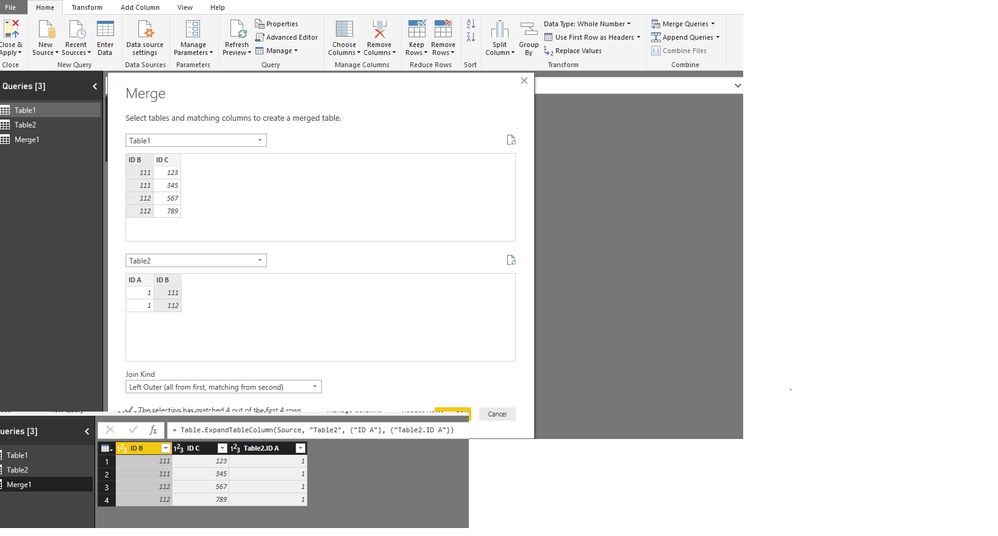
Based on my test, we can merget the two tables in power query based on the column ID B.


MMM.png


Here is the M code for your reference.

let
    Source = Table.NestedJoin(Table1,{"ID B"},Table2,{"ID B"},"Table2",JoinKind.LeftOuter),
    #"Expanded Table2" = Table.ExpandTableColumn(Source, "Table2", {"ID A"}, {"Table2.ID A"})
in
    #"Expanded Table2"

For more details, please check the pbix as attached.


https://www.dropbox.com/s/f0d3fd6xaafy2n6/merge.pbix?dl=0


Regards,

Frank

Community Support Team _ Frank
If this post helps, then please consider Accept it as the solution to help the others find it more quickly.

View solution in original post

5 REPLIES 5
v-frfei-msft
Community Support
Community Support

Hi @ErikPettersson,


Based on my test, we can merget the two tables in power query based on the column ID B.


MMM.png


Here is the M code for your reference.

let
    Source = Table.NestedJoin(Table1,{"ID B"},Table2,{"ID B"},"Table2",JoinKind.LeftOuter),
    #"Expanded Table2" = Table.ExpandTableColumn(Source, "Table2", {"ID A"}, {"Table2.ID A"})
in
    #"Expanded Table2"

For more details, please check the pbix as attached.


https://www.dropbox.com/s/f0d3fd6xaafy2n6/merge.pbix?dl=0


Regards,

Frank

Community Support Team _ Frank
If this post helps, then please consider Accept it as the solution to help the others find it more quickly.

Hi @ErikPettersson,


Does that make sense? If so, kindly mark my answer as a solution to close the case.


Regards,
Frank

Community Support Team _ Frank
If this post helps, then please consider Accept it as the solution to help the others find it more quickly.
Anonymous
Not applicable

You could get a unique list of values from the column you want by creating a new query.


Heres a video


https://www.youtube.com/watch?v=vAvQ8pCnWDk


Hope this helps 🙂

Well, I need to create the C-column because I need it when connecting other tables

Anonymous
Not applicable

Can you post an image of your data model? Will be easier to understand.

Helpful resources

Announcements
Power BI DataViz World Championships

Power BI Dataviz World Championships

The Power BI Data Visualization World Championships is back! Get ahead of the game and start preparing now!

December 2025 Power BI Update Carousel

Power BI Monthly Update - December 2025

Check out the December 2025 Power BI Holiday Recap!

FabCon Atlanta 2026 carousel

FabCon Atlanta 2026

Join us at FabCon Atlanta, March 16-20, for the ultimate Fabric, Power BI, AI and SQL community-led event. Save $200 with code FABCOMM.