When I enter part of a sumx expression as variable instead of directly coding it in the measure, I get a different (the expected) result.
Below a simplified example. Sample data =
| Month | AccountID | BalanceTotal |
| 1 | 1001 | 500 |
| 1 | 1002 | 500 |
| 2 | 1001 | 500 |
| 2 | 1002 | 500 |
Expected result of measure
Multiply the balance of each row with the max selected month. So when both months selected, multiply each 500 with 2.
Note: I know in this simplified example I don't need sumx but can simply do sum(Balance)*calculate(max(allselected,Month)). But in the more complex real life example I do need a sumx measure and the difference is same as below.
I originally created this measure 'Balance x maxmonth':
var _sumx =
    sumx(Balances,Balances[Balance]*
        calculate(
            max(Balances[Month])
            ,ALLSELECTED(Balances[Month])
            )
        )
return
_sumx
This does not return the expected result when a visual is aggregated on month level. However if I replace the 'calculate' part of the sumx expression into a variable like below it does:
Balance x maxmonth with var =
var _maxmonth =
    calculate(
        max(Balances[Month])
        ,ALLSELECTED(Balances[Month])
        )
var _sumx =
    sumx(Balances,Balances[Balance]*
    _maxmonth
    )
return
_sumx
Results with and without variable for the calculate part of the expression:
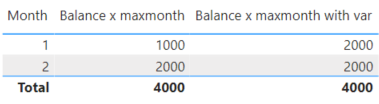
Can anyone explain why the use of a var could lead to a different result outcome?
I'm happy with the fix but want to understand this difference in behavour when using variables within a sumx expression.
Many thanks.


