FabCon is coming to Atlanta
Join us at FabCon Atlanta from March 16 - 20, 2026, for the ultimate Fabric, Power BI, AI and SQL community-led event. Save $200 with code FABCOMM.
Register now!- Power BI forums
- Get Help with Power BI
- Desktop
- Service
- Report Server
- Power Query
- Mobile Apps
- Developer
- DAX Commands and Tips
- Custom Visuals Development Discussion
- Health and Life Sciences
- Power BI Spanish forums
- Translated Spanish Desktop
- Training and Consulting
- Instructor Led Training
- Dashboard in a Day for Women, by Women
- Galleries
- Data Stories Gallery
- Themes Gallery
- Contests Gallery
- QuickViz Gallery
- Quick Measures Gallery
- Visual Calculations Gallery
- Notebook Gallery
- Translytical Task Flow Gallery
- TMDL Gallery
- R Script Showcase
- Webinars and Video Gallery
- Ideas
- Custom Visuals Ideas (read-only)
- Issues
- Issues
- Events
- Upcoming Events
The Power BI Data Visualization World Championships is back! Get ahead of the game and start preparing now! Learn more
- Power BI forums
- Forums
- Get Help with Power BI
- Desktop
- Re: Summing / Aggregating on Parent Child Hierarch...
- Subscribe to RSS Feed
- Mark Topic as New
- Mark Topic as Read
- Float this Topic for Current User
- Bookmark
- Subscribe
- Printer Friendly Page


- Mark as New
- Bookmark
- Subscribe
- Mute
- Subscribe to RSS Feed
- Permalink
- Report Inappropriate Content
Summing / Aggregating on Parent Child Hierarchies
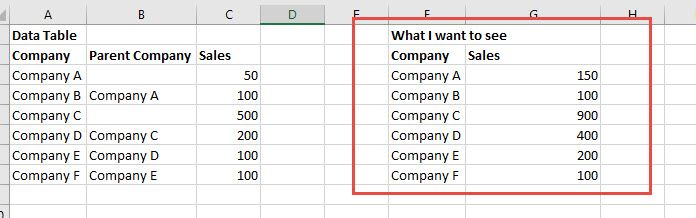
So I've been trying to figure this out using the
However, I still can't get it to show what I want.
I am looking to create a table that displays each Company and a roll up of the sales of their children. I think I am stuck at the Sales Amount Simple. I used the formula and it still only gives me the total at the node and doesn't iterate for the totals for the children. What am I doing wrong or is that doesn't work in Power BI?
Solved! Go to Solution.


- Mark as New
- Bookmark
- Subscribe
- Mute
- Subscribe to RSS Feed
- Permalink
- Report Inappropriate Content
@ap,
You may refer to measure below.
Measure =
VAR c =
    SELECTEDVALUE ( Sales[Company] )
RETURN
    CALCULATE (
        SUM ( Sales[Sales] ),
        ALLSELECTED ( Sales ),
        PATHCONTAINS ( Sales[Path], c )
    )
If this post helps, then please consider Accept it as the solution to help the other members find it more quickly.
- Mark as New
- Bookmark
- Subscribe
- Mute
- Subscribe to RSS Feed
- Permalink
- Report Inappropriate Content
@ap,
You may refer to measure below.
Measure =
VAR c =
    SELECTEDVALUE ( Sales[Company] )
RETURN
    CALCULATE (
        SUM ( Sales[Sales] ),
        ALLSELECTED ( Sales ),
        PATHCONTAINS ( Sales[Path], c )
    )
If this post helps, then please consider Accept it as the solution to help the other members find it more quickly.

- Mark as New
- Bookmark
- Subscribe
- Mute
- Subscribe to RSS Feed
- Permalink
- Report Inappropriate Content
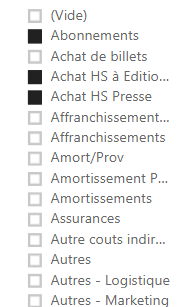
Hello, Thanks for this solution very useful.
Your solution work only if one element is selected throuht the slicer.
Do you have an idea , how can we do with more selections ?
- Mark as New
- Bookmark
- Subscribe
- Mute
- Subscribe to RSS Feed
- Permalink
- Report Inappropriate Content
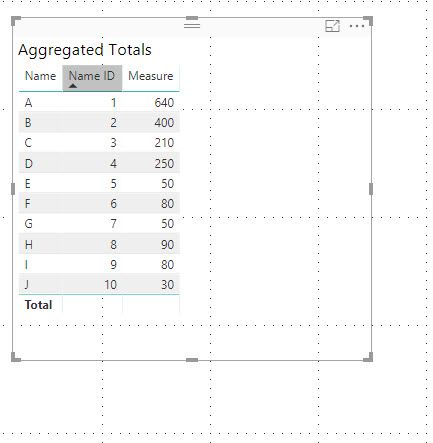
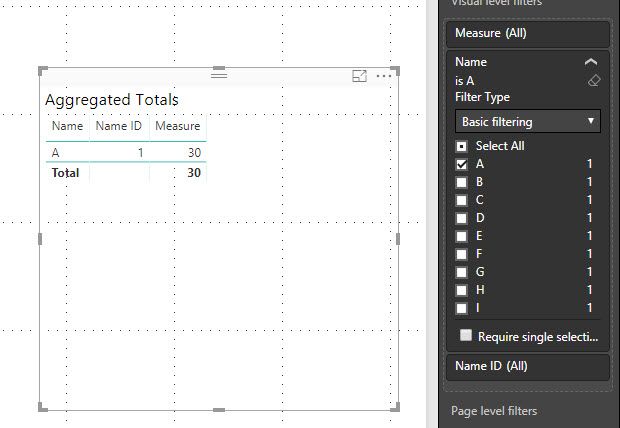
Success! Thank you so much Sam!!!! You are the man. However, I have one thing to ask. We also split our account types. So I have a need to filter some of the accounts out. However, if I click on the visual filter to only look at Client A, your measure only counts the sales as the current node.
Measure =
VAR c = SELECTEDVALUE('Hierarchy'[Name ID])
RETURN
CALCULATE(
SUM(Sales[Sales]),
ALLSELECTED(Sales),
PATHCONTAINS('Hierarchy'[ID Path],c)
)
Even though there is an AllSELECTED...doesn't that ignore any filters applied?
- Mark as New
- Bookmark
- Subscribe
- Mute
- Subscribe to RSS Feed
- Permalink
- Report Inappropriate Content
Figured it out, I used ALL instead of ALLSELECTED if I am filtering. ALLSELECTED only removes implicit filters that are generated within the same query.
Measure =
VAR c = SELECTEDVALUE('Hierarchy'[Name ID])
RETURN
CALCULATE(
SUM(Sales[Sales]),
ALL(Sales),
PATHCONTAINS('Hierarchy'[ID Path],c)
)
- Mark as New
- Bookmark
- Subscribe
- Mute
- Subscribe to RSS Feed
- Permalink
- Report Inappropriate Content
@ap,
Glad to hear that. By the way, you may help accept solution. Your contribution is highly appreciated.
If this post helps, then please consider Accept it as the solution to help the other members find it more quickly.

- Mark as New
- Bookmark
- Subscribe
- Mute
- Subscribe to RSS Feed
- Permalink
- Report Inappropriate Content
I have an 8 level hierarchy, how do I do the opposite and show a NON-aggregated value in a clustered bar chart but still maintain a hierarchy.
In my data I have each person with their own sales value and this is related to a separate table which has the parent child relationship.
- Mark as New
- Bookmark
- Subscribe
- Mute
- Subscribe to RSS Feed
- Permalink
- Report Inappropriate Content
Okay, so I also tried creating a new measure called Amount Including Children.
Amount including Children =
SUMX (
'Hierarchy',
CALCULATE(
SUM(Sales[Sales]),
FILTER(
ALL('Hierarchy'),
PATHCONTAINS('Hierarchy'[ID Path],'Hierarchy'[Name ID])
)
)
)
However, that didn't work either. For each row, I want to see if Name ID exists in the ID Name for the entire table not just at the current row, if it does count it into the Sales total...


Helpful resources

Power BI Dataviz World Championships
The Power BI Data Visualization World Championships is back! Get ahead of the game and start preparing now!

Power BI Monthly Update - December 2025
Check out the December 2025 Power BI Holiday Recap!

FabCon Atlanta 2026
Join us at FabCon Atlanta, March 16-20, for the ultimate Fabric, Power BI, AI and SQL community-led event. Save $200 with code FABCOMM.

| User | Count |
|---|---|
| 41 | |
| 38 | |
| 36 | |
| 30 | |
| 28 |


| User | Count |
|---|---|
| 129 | |
| 88 | |
| 79 | |
| 68 | |
| 63 |


