Don't miss your chance to take the Fabric Data Engineer (DP-700) exam on us!
Learn moreWe've captured the moments from FabCon & SQLCon that everyone is talking about, and we are bringing them to the community, live and on-demand. Starts on April 14th. Register now
Hi all, I've been trying to figure this out for days now with no luck online. Hopefully someone can help me.
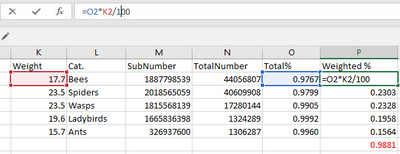
So I have a data-set of numbers I'd like to sum up by category then another calculation that gets that total category sum and times it by the weighted value of a particular category as below.
I currently have a measure that computes the following "(TotalNumber - SubNumber) / TotalNumber" : to get the "Total %", then I have a calculated column that has an if statment that says(To reference the weighted values),
Then another column:
So my question is, how can I best represent this Excel formula and calculate the total% * the weighted values then following this, show the total % (in red text on the bottom right of the screenshot) So I get my final %?
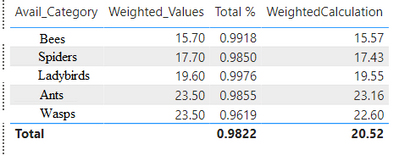
In Power BI my totals are off. But also, I'd like the percentages to be in a separate measure so I can show it in a card.
Solved! Go to Solution.
@Anonymous , It should be table or some group level
a measure
sumx( Availability_Calculations,[Total %] * [Weighted_Values])
or
sumx( values(Availability_Calculations[Avail_Category]) ,calculate([Total %] * max([Weighted_Values]) ) )
Hi, @Anonymous
You can try the following methods.
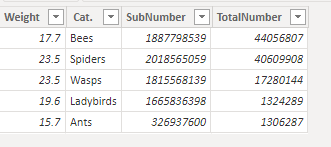
Initial data:
Measure:
Total% = DIVIDE(SUM('Table'[SubNumber])-SUM('Table'[TotalNumber]),SUM('Table'[SubNumber]))Weighted% = SUM('Table'[Weight])*[Total%]/100Measure = SUMX('Table',[Weighted%])
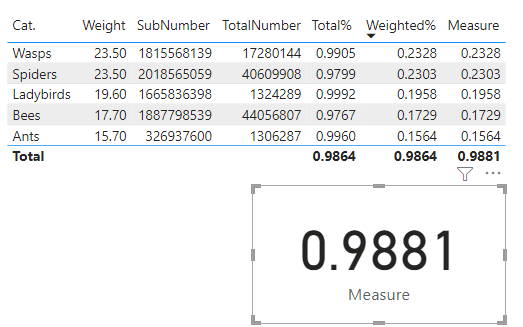
Is this the result you expect?
Best Regards,
Community Support Team _Charlotte
If this post helps, then please consider Accept it as the solution to help the other members find it more quickly.
Hi, @Anonymous
You can try the following methods.
Initial data:
Measure:
Total% = DIVIDE(SUM('Table'[SubNumber])-SUM('Table'[TotalNumber]),SUM('Table'[SubNumber]))Weighted% = SUM('Table'[Weight])*[Total%]/100Measure = SUMX('Table',[Weighted%])
Is this the result you expect?
Best Regards,
Community Support Team _Charlotte
If this post helps, then please consider Accept it as the solution to help the other members find it more quickly.
Thanks for the reply both!
If I use @amitchandak calculation of "sumx( values(Availability_Calculations[Avail_Category]) ,calculate([Total %] * max([Weighted_Values]) ) )" it shows up correctly on both the weighted% total and values and if I use @v-zhangti other calculations it works hand in hand for the other sections! Thank you both!
@Anonymous , It should be table or some group level
a measure
sumx( Availability_Calculations,[Total %] * [Weighted_Values])
or
sumx( values(Availability_Calculations[Avail_Category]) ,calculate([Total %] * max([Weighted_Values]) ) )
If you have recently started exploring Fabric, we'd love to hear how it's going. Your feedback can help with product improvements.
A new Power BI DataViz World Championship is coming this June! Don't miss out on submitting your entry.
Share feedback directly with Fabric product managers, participate in targeted research studies and influence the Fabric roadmap.
| User | Count |
|---|---|
| 52 | |
| 38 | |
| 37 | |
| 19 | |
| 18 |
| User | Count |
|---|---|
| 69 | |
| 64 | |
| 37 | |
| 32 | |
| 21 |