Join us at FabCon Atlanta from March 16 - 20, 2026, for the ultimate Fabric, Power BI, AI and SQL community-led event. Save $200 with code FABCOMM.
Register now!The Power BI Data Visualization World Championships is back! Get ahead of the game and start preparing now! Learn more
Solved! Go to Solution.
Hello
The issue was fixed with the following syntax:
Diff =
VAR Diff =
CALCULATE(SUMX('Data','Data'[EUR]) -CALCULATE(SUMX('Data','Data'[EUR]), PREVIOUSMONTH('Date Table'[Date])))
VAR Total =
CALCULATE(SUMX('Data','Data'[EUR]), FILTER('Data', 'Data'[Year/Month] = MAXX(ALL('Data'),'Data'[Year/Month]))) -CALCULATE(SUMX('Data','Data'[EUR]), PREVIOUSMONTH('Date Table'[Date]))
RETURN
IF(HASONEFILTER('Date Table'[Year-month]),Diff,Total)
Hello
The issue was fixed with the following syntax:
Diff =
VAR Diff =
CALCULATE(SUMX('Data','Data'[EUR]) -CALCULATE(SUMX('Data','Data'[EUR]), PREVIOUSMONTH('Date Table'[Date])))
VAR Total =
CALCULATE(SUMX('Data','Data'[EUR]), FILTER('Data', 'Data'[Year/Month] = MAXX(ALL('Data'),'Data'[Year/Month]))) -CALCULATE(SUMX('Data','Data'[EUR]), PREVIOUSMONTH('Date Table'[Date]))
RETURN
IF(HASONEFILTER('Date Table'[Year-month]),Diff,Total)
Hi,
Share the download link of your PBI file.
Hi @Anonymous ,
According to your description, I need more information.
Is the value showed in your snapshot 'Data'[EUR] or measure Diff, if it's measure Diff, please show the corresponding 'Data'[EUR].
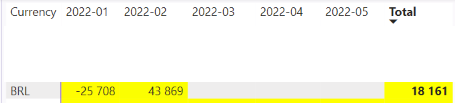
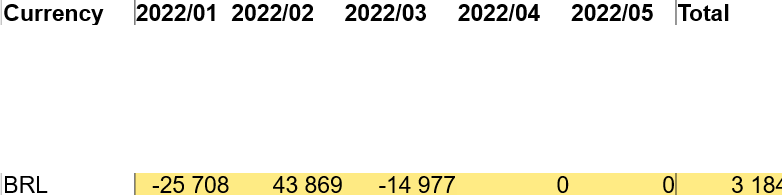
In your first snapshot, you covered the value of 2022-3, 2022-4 and 2022-5, are they blank or zero?
Waiting for your reply.
Best Regards,
Community Support Team _ kalyj
The Power BI Data Visualization World Championships is back! Get ahead of the game and start preparing now!
| User | Count |
|---|---|
| 41 | |
| 37 | |
| 35 | |
| 35 | |
| 28 |
| User | Count |
|---|---|
| 134 | |
| 101 | |
| 71 | |
| 67 | |
| 65 |