
Join us at FabCon Atlanta from March 16 - 20, 2026, for the ultimate Fabric, Power BI, AI and SQL community-led event. Save $200 with code FABCOMM.
Register now!The Power BI Data Visualization World Championships is back! Get ahead of the game and start preparing now! Learn more
Hi Experts, I am very new to Power BI and I have been struggling for days trying to accomplish a simple task I can easily get done in Excel. My sample data below
I want to filter for only "FEMALES" in "PS Group" DU, EL, and FL to show as follows:
| Grade | Females |
| DU | 3 |
| EL | 2 |
| FL | 0 |
When this is done, I want this summary to work with my report Filters/Slicers - in the case where if I choose a particular year, the values should show me the number of females per grade for that particular year
Solved! Go to Solution.
Hi, @Anonymous ;
Try to this measure.
Measure = CALCULATE(COUNT('Table'[PS group]),FILTER('Table',[Gender Ke]="Female"&&[PS group] in {"DU","FL","EL"}))
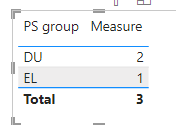
The final show:
If the slicer selects a different year, the data will change accordingly.
Best Regards,
Community Support Team _ Yalan Wu
If this post helps, then please consider Accept it as the solution to help the other members find it more quickly.
Hi, @Anonymous ;
Try to this measure.
Measure = CALCULATE(COUNT('Table'[PS group]),FILTER('Table',[Gender Ke]="Female"&&[PS group] in {"DU","FL","EL"}))
The final show:
If the slicer selects a different year, the data will change accordingly.
Best Regards,
Community Support Team _ Yalan Wu
If this post helps, then please consider Accept it as the solution to help the other members find it more quickly.
@amitchandak I don't want the summary for all the "PS Groups", I only want the summary for the 3 selected PS Groups.
The Power BI Data Visualization World Championships is back! Get ahead of the game and start preparing now!
| User | Count |
|---|---|
| 40 | |
| 35 | |
| 34 | |
| 31 | |
| 27 |
| User | Count |
|---|---|
| 135 | |
| 102 | |
| 67 | |
| 65 | |
| 56 |