
Join us at FabCon Atlanta from March 16 - 20, 2026, for the ultimate Fabric, Power BI, AI and SQL community-led event. Save $200 with code FABCOMM.
Register now!The Power BI Data Visualization World Championships is back! It's time to submit your entry. Live now!
Hi Experts, I am very new to Power BI and I have been struggling for days trying to accomplish a simple task I can easily get done in Excel. My sample data below
I want to filter for only "FEMALES" in "PS Group" DU, EL, and FL to show as follows:
| Grade | Females |
| DU | 3 |
| EL | 2 |
| FL | 0 |
When this is done, I want this summary to work with my report Filters/Slicers - in the case where if I choose a particular year, the values should show me the number of females per grade for that particular year
Solved! Go to Solution.
Hi, @Anonymous ;
Try to this measure.
Measure = CALCULATE(COUNT('Table'[PS group]),FILTER('Table',[Gender Ke]="Female"&&[PS group] in {"DU","FL","EL"}))
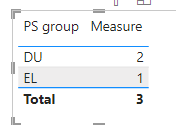
The final show:
If the slicer selects a different year, the data will change accordingly.
Best Regards,
Community Support Team _ Yalan Wu
If this post helps, then please consider Accept it as the solution to help the other members find it more quickly.
Hi, @Anonymous ;
Try to this measure.
Measure = CALCULATE(COUNT('Table'[PS group]),FILTER('Table',[Gender Ke]="Female"&&[PS group] in {"DU","FL","EL"}))
The final show:
If the slicer selects a different year, the data will change accordingly.
Best Regards,
Community Support Team _ Yalan Wu
If this post helps, then please consider Accept it as the solution to help the other members find it more quickly.
@amitchandak I don't want the summary for all the "PS Groups", I only want the summary for the 3 selected PS Groups.
The Power BI Data Visualization World Championships is back! It's time to submit your entry.
Check out the January 2026 Power BI update to learn about new features.
| User | Count |
|---|---|
| 56 | |
| 42 | |
| 41 | |
| 21 | |
| 21 |
| User | Count |
|---|---|
| 150 | |
| 106 | |
| 65 | |
| 36 | |
| 36 |