cancel
Showing results for 
Search instead for 
Did you mean: 

The Power BI Data Visualization World Championships is back! It's time to submit your entry. Live now!

Reply
Kurt4597
Helper I
Helper I

Summarized Table

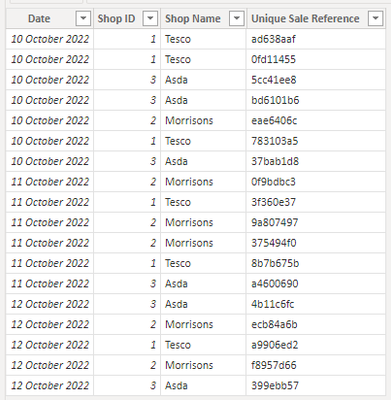
Sales Table

Kurt4597_0-1666274984157.png


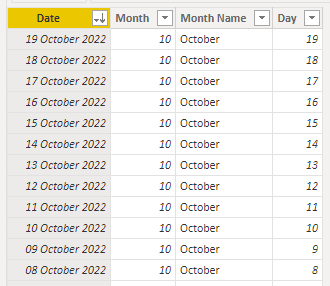
Date Table

Kurt4597_1-1666275061667.png


I would like to create a summarized table like this 
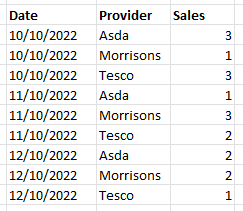
Kurt4597_2-1666275380614.png


I am able to create a summarized table for each day using the following code

DailySalesCount = SUMMARIZECOLUMNS(DateDim[Date],"DailyClickCount",DISTINCTCOUNT(Sales[Unique Sale Reference]))
But I am unable to bring the Shop name into this

Kurt4597_3-1666275427832.png


Please could somebody assist? 


Sample File https://easyupload.io/bx07gx


Thank you


1 ACCEPTED SOLUTION
mangaus1111
Solution Sage
Solution Sage

Hi @Kurt4597 ,


you have to create a table, instead of a column. Try this new script:

mangaus1111_0-1666293449668.png


View solution in original post

3 REPLIES 3
mangaus1111
Solution Sage
Solution Sage

Hi @Kurt4597 ,


you have to create a table, instead of a column. Try this new script:

mangaus1111_0-1666293449668.png


mangaus1111
Solution Sage
Solution Sage

Hi @Kurt4597 ,


try this:


ADDCOLUMNS(

                       SUMMARIZE(

                                           'Sales Table',

                                            'Date Dim'[Date],

                                           'Sales Table'[Shop Name]

                                          ),

                       "DailyClickCount",DISTINCTCOUNT(ClicksByDay[clickref])

)

Please mark this answer as solution, if it helps.


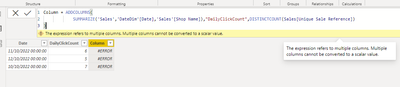
Hello, I appear to get this error message from your solution


Kurt4597_0-1666279565630.png


Helpful resources

Announcements
FabCon Atlanta 2026 carousel

FabCon Atlanta 2026

Join us at FabCon Atlanta, March 16-20, for the ultimate Fabric, Power BI, AI and SQL community-led event. Save $200 with code FABCOMM.