Get certified for free when you join Fabric Data Days 2026 and dive into Fabric, Power BI, SQL, AI, and other essential data skills.
Join nowTry your skills in the Power BI Dataviz World Championship! Round one ends June 26. Join now
Hi! I would like to create a new table that summarizes Prod. and Cust. depending on last Date (for both Prod. and Cust).
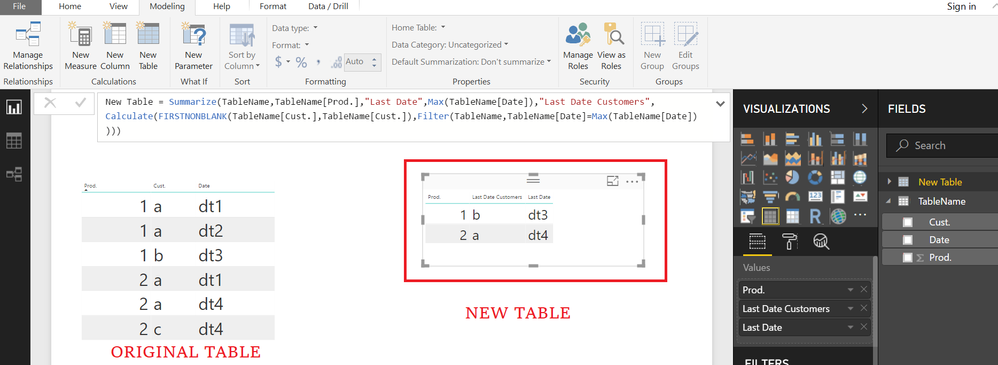
Please see an example below.
For the second Prod. there is the same date for different Cust. that's why I thought to use FirstNonBlank.
| Prod. | Cust. | Date |
| 1 | a | dt1 |
| 1 | a | dt2 |
| 1 | b | dt3 |
| 2 | a | dt1 |
| 2 | a | dt4 |
| 2 | c | dt4 |
Desired result in New Table:
| Prod. | Cust. | Date (max) |
| 1 | b | dt3 |
| 2 | a | dt4 |
Could anyone please help me? Many thanks in advance, Kind regards, est gas
Solved! Go to Solution.
Hi @estgas
Go to Modelling Tab>>>>NEW TABLE
New Table =
SUMMARIZE (
TableName,
TableName[Prod.],
"Last Date", MAX ( TableName[Date] ),
"Last Date Customers", CALCULATE (
FIRSTNONBLANK ( TableName[Cust.], TableName[Cust.] ),
FILTER ( TableName, TableName[Date] = MAX ( TableName[Date] ) )
)
)
Hi @estgas
Go to Modelling Tab>>>>NEW TABLE
New Table =
SUMMARIZE (
TableName,
TableName[Prod.],
"Last Date", MAX ( TableName[Date] ),
"Last Date Customers", CALCULATE (
FIRSTNONBLANK ( TableName[Cust.], TableName[Cust.] ),
FILTER ( TableName, TableName[Date] = MAX ( TableName[Date] ) )
)
)
Many Thank Zubair! Exactly what I was looking for!
By the way I replaced SUMMARIZE with SUMMARIZECOLUMNS assuming that is preferred according to conclusion of https://www.sqlbi.com/articles/introducing-summarizecolumns/
HI @estgas
Yes I believe
SummarizeColumns
or
combination of Summarize with AddColumns
is much faster than mere Summarize
Don't miss out on Data Days, June 15 through August 7. Learn Fabric, Power BI, SQL, AI and more.
Check out the May 2026 Power BI update to learn about new features.
| User | Count |
|---|---|
| 22 | |
| 22 | |
| 21 | |
| 20 | |
| 12 |
| User | Count |
|---|---|
| 58 | |
| 55 | |
| 42 | |
| 36 | |
| 35 |