Get Fabric certified for FREE!
Don't miss your chance to take the Fabric Data Engineer (DP-700) exam on us!
Learn more- Power BI forums
- Get Help with Power BI
- Desktop
- Service
- Report Server
- Power Query
- Mobile Apps
- Developer
- DAX Commands and Tips
- Custom Visuals Development Discussion
- Health and Life Sciences
- Power BI Spanish forums
- Translated Spanish Desktop
- Training and Consulting
- Instructor Led Training
- Dashboard in a Day for Women, by Women
- Galleries
- Data Stories Gallery
- Themes Gallery
- Contests Gallery
- QuickViz Gallery
- Quick Measures Gallery
- Visual Calculations Gallery
- Notebook Gallery
- Translytical Task Flow Gallery
- TMDL Gallery
- R Script Showcase
- Webinars and Video Gallery
- Ideas
- Custom Visuals Ideas (read-only)
- Issues
- Issues
- Events
- Upcoming Events
We've captured the moments from FabCon & SQLCon that everyone is talking about, and we are bringing them to the community, live and on-demand. Starts on April 14th. Register now
- Power BI forums
- Forums
- Get Help with Power BI
- Desktop
- Summarize
- Subscribe to RSS Feed
- Mark Topic as New
- Mark Topic as Read
- Float this Topic for Current User
- Bookmark
- Subscribe
- Printer Friendly Page


- Mark as New
- Bookmark
- Subscribe
- Mute
- Subscribe to RSS Feed
- Permalink
- Report Inappropriate Content
Summarize
Hello, I have somethng like shown below.
Days_to_come_back will have a value less than or equals 30 if at all present. Otherwise they will all be blanks.
Could you help me to get the output shown??
HAVE
ID NAME Days_to_come_back
1 Jenny
1 Jenny 13
1 Jenny
1 Jenny 12
2 Penny
3 Manny
WANT:
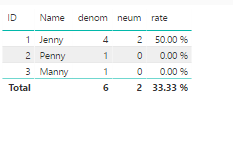
ID NAME Denom Neum Rate
1 Jenny 4 2 (2/4)*100=50.00%
2 Penny 1 0 (0/1)*100=0.00%
3 Manny 1 0 (0/1)*100=0.00%
Solved! Go to Solution.


- Mark as New
- Bookmark
- Subscribe
- Mute
- Subscribe to RSS Feed
- Permalink
- Report Inappropriate Content
@karkar wrote:
Helo smoupre,
I tried to do the denominator and all the rows gettign a value of 6
For Jenny denom should be 4 since there is 4 records
For Penny denom should be 1 since there is a single record
For Manny denom should be 1 since there is a single record
For Jenny neum should be 2 since there is 2 records for Jenny which had a value for Days_to_come_back
For Penny and Manny, Neum should be 0 since they both dont have a value under Days_to_come_back
Generally the value under Days_to_come_back if exists has a value from 1-30
You can try to create 3 measures as below
denom =
CALCULATE (
    COUNTROWS ( 'Summarize' ),
    ALLEXCEPT ( 'Summarize', 'Summarize'[ID], 'Summarize'[Name] )
)

neum =
IF (
    ISBLANK (
        COUNTROWS ( FILTER ( 'Summarize', 'Summarize'[Days_to _come_back] > 0 ) )
    ),
    0,
    COUNTROWS ( FILTER ( 'Summarize', 'Summarize'[Days_to _come_back] > 0 ) )
)
rate = [neum1]/[denom]


- Mark as New
- Bookmark
- Subscribe
- Mute
- Subscribe to RSS Feed
- Permalink
- Report Inappropriate Content
Denom = COUNTROWS('Summarize')

Neum = VAR mycount = COUNT('Summarize'[Days_to_come_back])
RETURN (IF(ISBLANK(mycount),0,mycount))

Rate = DIVIDE([Neum],[Denom])
Create a table visualization with ID, NAME, Denom, Neum and Rate.
Follow on LinkedIn
@ me in replies or I'll lose your thread!!!
Instead of a Kudo, please vote for this idea
Become an expert!: Enterprise DNA
External Tools: MSHGQM
YouTube Channel!: Microsoft Hates Greg
Latest book!: DAX For Humans
DAX is easy, CALCULATE makes DAX hard...
- Mark as New
- Bookmark
- Subscribe
- Mute
- Subscribe to RSS Feed
- Permalink
- Report Inappropriate Content
Helo smoupre,
I tried to do the denominator and all the rows gettign a value of 6
For Jenny denom should be 4 since there is 4 records
For Penny denom should be 1 since there is a single record
For Manny denom should be 1 since there is a single record
For Jenny neum should be 2 since there is 2 records for Jenny which had a value for Days_to_come_back
For Penny and Manny, Neum should be 0 since they both dont have a value under Days_to_come_back
Generally the value under Days_to_come_back if exists has a value from 1-30
- Mark as New
- Bookmark
- Subscribe
- Mute
- Subscribe to RSS Feed
- Permalink
- Report Inappropriate Content
@karkar wrote:
Helo smoupre,
I tried to do the denominator and all the rows gettign a value of 6
For Jenny denom should be 4 since there is 4 records
For Penny denom should be 1 since there is a single record
For Manny denom should be 1 since there is a single record
For Jenny neum should be 2 since there is 2 records for Jenny which had a value for Days_to_come_back
For Penny and Manny, Neum should be 0 since they both dont have a value under Days_to_come_back
Generally the value under Days_to_come_back if exists has a value from 1-30
You can try to create 3 measures as below
denom =
CALCULATE (
    COUNTROWS ( 'Summarize' ),
    ALLEXCEPT ( 'Summarize', 'Summarize'[ID], 'Summarize'[Name] )
)

neum =
IF (
    ISBLANK (
        COUNTROWS ( FILTER ( 'Summarize', 'Summarize'[Days_to _come_back] > 0 ) )
    ),
    0,
    COUNTROWS ( FILTER ( 'Summarize', 'Summarize'[Days_to _come_back] > 0 ) )
)
rate = [neum1]/[denom]
- Mark as New
- Bookmark
- Subscribe
- Mute
- Subscribe to RSS Feed
- Permalink
- Report Inappropriate Content
Hello Eric,
Thank you for providing the DAX. I notice that with Measures we get correct output.
I am very curious to learn as to why we are getting the following results with creating columns like shown below:
col1 = countrows(Sheet1) gives
ID NAME COL1
101 Jenny 24
102 Penny 6
103 Manny 6
col2 = CALCULATE( COUNTROWS('Sheet1'), ALLEXCEPT(Sheet1,Sheet1[ID])) gives:
ID NAME COL2
101 Jenny 16
102 Penny 1
103 Manny 1
col3 = CALCULATE( COUNTROWS('Sheet1'),
ALLEXCEPT(Sheet1,Sheet1[ID],Sheet1[NAME]))
ID NAME COL3
101 Jenny 16
102 Penny 1
103 Manny 1
- Mark as New
- Bookmark
- Subscribe
- Mute
- Subscribe to RSS Feed
- Permalink
- Report Inappropriate Content
@karkar wrote:
Helo smoupre,
I tried to do the denominator and all the rows gettign a value of 6
For Jenny denom should be 4 since there is 4 records
For Penny denom should be 1 since there is a single record
For Manny denom should be 1 since there is a single record
For Jenny neum should be 2 since there is 2 records for Jenny which had a value for Days_to_come_back
For Penny and Manny, Neum should be 0 since they both dont have a value under Days_to_come_back
Generally the value under Days_to_come_back if exists has a value from 1-30
You can try to create 3 measures as below
denom =
CALCULATE (
    COUNTROWS ( 'Summarize' ),
    ALLEXCEPT ( 'Summarize', 'Summarize'[ID], 'Summarize'[Name] )
)

neum =
IF (
    ISBLANK (
        COUNTROWS ( FILTER ( 'Summarize', 'Summarize'[Days_to _come_back] > 0 ) )
    ),
    0,
    COUNTROWS ( FILTER ( 'Summarize', 'Summarize'[Days_to _come_back] > 0 ) )
)
rate = [neum1]/[denom]


- Mark as New
- Bookmark
- Subscribe
- Mute
- Subscribe to RSS Feed
- Permalink
- Report Inappropriate Content
from your example second table is not clear. What are "Denom" and "Neum" columns and what data do you resresent there?
- Mark as New
- Bookmark
- Subscribe
- Mute
- Subscribe to RSS Feed
- Permalink
- Report Inappropriate Content
Hello ,
Denominator is Count of unique ID/NAME
Numerator is the count of rows within each ID/NAME combinations which had a value.

Helpful resources

New to Fabric Survey
If you have recently started exploring Fabric, we'd love to hear how it's going. Your feedback can help with product improvements.

Power BI DataViz World Championships - June 2026
A new Power BI DataViz World Championship is coming this June! Don't miss out on submitting your entry.

Join our Fabric User Panel
Share feedback directly with Fabric product managers, participate in targeted research studies and influence the Fabric roadmap.

Power BI Community Update - March 2026
Check out the March 2026 Power BI update to learn about new features.

| User | Count |
|---|---|
| 53 | |
| 37 | |
| 35 | |
| 19 | |
| 17 |


| User | Count |
|---|---|
| 73 | |
| 70 | |
| 39 | |
| 34 | |
| 23 |


