Join us in Barcelona for FabCon and SQLCon, September 28 - October 1, 2026.
This is best Fabric, Power BI, SQL and AI community event. How do we know? The last event sold out! Save €200 with code FABCMTY200.
Register now- Power BI forums
- Get Help with Power BI
- Desktop
- Service
- Report Server
- Power Query
- Mobile Apps
- Developer
- DAX Commands and Tips
- Custom Visuals Development Discussion
- Health and Life Sciences
- Power BI Spanish forums
- Translated Spanish Desktop
- Training and Consulting
- Instructor Led Training
- Dashboard in a Day for Women, by Women
- Galleries
- Data Stories Gallery
- Themes Gallery
- Contests Gallery
- QuickViz Gallery
- Quick Measures Gallery
- Visual Calculations Gallery
- Fabric Apps Gallery
- Notebook Gallery
- Translytical Task Flow Gallery
- TMDL Gallery
- R Script Showcase
- Webinars and Video Gallery
- Ideas
- Custom Visuals Ideas (read-only)
- Issues
- Issues
- Events
- Upcoming Events
July 28 - August 9 | Final Round of the Power BI Dataviz World Championships. This is your chance. Learn more
- Power BI forums
- Forums
- Get Help with Power BI
- Desktop
- Re: Summarize
- Subscribe to RSS Feed
- Mark Topic as New
- Mark Topic as Read
- Float this Topic for Current User
- Bookmark
- Subscribe
- Printer Friendly Page


- Mark as New
- Bookmark
- Subscribe
- Mute
- Subscribe to RSS Feed
- Permalink
- Report Inappropriate Content
Summarize
Hello, I have somethng like shown below.
Days_to_come_back will have a value less than or equals 30 if at all present. Otherwise they will all be blanks.
Could you help me to get the output shown??
HAVE
ID NAME Days_to_come_back
1 Jenny
1 Jenny 13
1 Jenny
1 Jenny 12
2 Penny
3 Manny
WANT:
ID NAME Denom Neum Rate
1 Jenny 4 2 (2/4)*100=50.00%
2 Penny 1 0 (0/1)*100=0.00%
3 Manny 1 0 (0/1)*100=0.00%
Solved! Go to Solution.


- Mark as New
- Bookmark
- Subscribe
- Mute
- Subscribe to RSS Feed
- Permalink
- Report Inappropriate Content
@karkar wrote:
Helo smoupre,
I tried to do the denominator and all the rows gettign a value of 6
For Jenny denom should be 4 since there is 4 records
For Penny denom should be 1 since there is a single record
For Manny denom should be 1 since there is a single record
For Jenny neum should be 2 since there is 2 records for Jenny which had a value for Days_to_come_back
For Penny and Manny, Neum should be 0 since they both dont have a value under Days_to_come_back
Generally the value under Days_to_come_back if exists has a value from 1-30
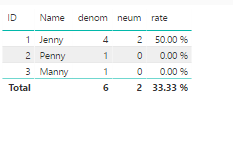
You can try to create 3 measures as below
denom =
CALCULATE (
    COUNTROWS ( 'Summarize' ),
    ALLEXCEPT ( 'Summarize', 'Summarize'[ID], 'Summarize'[Name] )
)

neum =
IF (
    ISBLANK (
        COUNTROWS ( FILTER ( 'Summarize', 'Summarize'[Days_to _come_back] > 0 ) )
    ),
    0,
    COUNTROWS ( FILTER ( 'Summarize', 'Summarize'[Days_to _come_back] > 0 ) )
)
rate = [neum1]/[denom]


- Mark as New
- Bookmark
- Subscribe
- Mute
- Subscribe to RSS Feed
- Permalink
- Report Inappropriate Content
Denom = COUNTROWS('Summarize')

Neum = VAR mycount = COUNT('Summarize'[Days_to_come_back])
RETURN (IF(ISBLANK(mycount),0,mycount))

Rate = DIVIDE([Neum],[Denom])
Create a table visualization with ID, NAME, Denom, Neum and Rate.
Follow on LinkedIn
@ me in replies or I'll lose your thread!!!
Instead of a Kudo, please vote for this idea
Become an expert!: Enterprise DNA
External Tools: MSHGQM
YouTube Channel!: Microsoft Hates Greg
Latest book!: DAX For Humans
DAX is easy, CALCULATE makes DAX hard...
- Mark as New
- Bookmark
- Subscribe
- Mute
- Subscribe to RSS Feed
- Permalink
- Report Inappropriate Content
Helo smoupre,
I tried to do the denominator and all the rows gettign a value of 6
For Jenny denom should be 4 since there is 4 records
For Penny denom should be 1 since there is a single record
For Manny denom should be 1 since there is a single record
For Jenny neum should be 2 since there is 2 records for Jenny which had a value for Days_to_come_back
For Penny and Manny, Neum should be 0 since they both dont have a value under Days_to_come_back
Generally the value under Days_to_come_back if exists has a value from 1-30
- Mark as New
- Bookmark
- Subscribe
- Mute
- Subscribe to RSS Feed
- Permalink
- Report Inappropriate Content
@karkar wrote:
Helo smoupre,
I tried to do the denominator and all the rows gettign a value of 6
For Jenny denom should be 4 since there is 4 records
For Penny denom should be 1 since there is a single record
For Manny denom should be 1 since there is a single record
For Jenny neum should be 2 since there is 2 records for Jenny which had a value for Days_to_come_back
For Penny and Manny, Neum should be 0 since they both dont have a value under Days_to_come_back
Generally the value under Days_to_come_back if exists has a value from 1-30
You can try to create 3 measures as below
denom =
CALCULATE (
    COUNTROWS ( 'Summarize' ),
    ALLEXCEPT ( 'Summarize', 'Summarize'[ID], 'Summarize'[Name] )
)

neum =
IF (
    ISBLANK (
        COUNTROWS ( FILTER ( 'Summarize', 'Summarize'[Days_to _come_back] > 0 ) )
    ),
    0,
    COUNTROWS ( FILTER ( 'Summarize', 'Summarize'[Days_to _come_back] > 0 ) )
)
rate = [neum1]/[denom]
- Mark as New
- Bookmark
- Subscribe
- Mute
- Subscribe to RSS Feed
- Permalink
- Report Inappropriate Content
Hello Eric,
Thank you for providing the DAX. I notice that with Measures we get correct output.
I am very curious to learn as to why we are getting the following results with creating columns like shown below:
col1 = countrows(Sheet1) gives
ID NAME COL1
101 Jenny 24
102 Penny 6
103 Manny 6
col2 = CALCULATE( COUNTROWS('Sheet1'), ALLEXCEPT(Sheet1,Sheet1[ID])) gives:
ID NAME COL2
101 Jenny 16
102 Penny 1
103 Manny 1
col3 = CALCULATE( COUNTROWS('Sheet1'),
ALLEXCEPT(Sheet1,Sheet1[ID],Sheet1[NAME]))
ID NAME COL3
101 Jenny 16
102 Penny 1
103 Manny 1
- Mark as New
- Bookmark
- Subscribe
- Mute
- Subscribe to RSS Feed
- Permalink
- Report Inappropriate Content
@karkar wrote:
Helo smoupre,
I tried to do the denominator and all the rows gettign a value of 6
For Jenny denom should be 4 since there is 4 records
For Penny denom should be 1 since there is a single record
For Manny denom should be 1 since there is a single record
For Jenny neum should be 2 since there is 2 records for Jenny which had a value for Days_to_come_back
For Penny and Manny, Neum should be 0 since they both dont have a value under Days_to_come_back
Generally the value under Days_to_come_back if exists has a value from 1-30
You can try to create 3 measures as below
denom =
CALCULATE (
    COUNTROWS ( 'Summarize' ),
    ALLEXCEPT ( 'Summarize', 'Summarize'[ID], 'Summarize'[Name] )
)

neum =
IF (
    ISBLANK (
        COUNTROWS ( FILTER ( 'Summarize', 'Summarize'[Days_to _come_back] > 0 ) )
    ),
    0,
    COUNTROWS ( FILTER ( 'Summarize', 'Summarize'[Days_to _come_back] > 0 ) )
)
rate = [neum1]/[denom]


- Mark as New
- Bookmark
- Subscribe
- Mute
- Subscribe to RSS Feed
- Permalink
- Report Inappropriate Content
from your example second table is not clear. What are "Denom" and "Neum" columns and what data do you resresent there?
- Mark as New
- Bookmark
- Subscribe
- Mute
- Subscribe to RSS Feed
- Permalink
- Report Inappropriate Content
Hello ,
Denominator is Count of unique ID/NAME
Numerator is the count of rows within each ID/NAME combinations which had a value.

Helpful resources

FabCon & SQLCon – Barcelona 2026
Join us in Barcelona for FabCon and SQLCon, the Fabric, Power BI, SQL, and AI community event. Save €200 with code FABCMTY200.

Fabric Community Sticker Challenge - Barcelona 2026
If you love stickers, then you will definitely want to check out our community sticker challenge, Barcelona edition!

Power BI Monthly Update - July 2026
Check out the July 2026 Power BI update to learn about new features.

Power BI DataViz World Championships - June 2026
A new Power BI DataViz World Championship is coming this June! Don't miss out on submitting your entry.

| User | Count |
|---|---|
| 25 | |
| 23 | |
| 19 | |
| 17 | |
| 14 |


| User | Count |
|---|---|
| 24 | |
| 23 | |
| 20 | |
| 20 | |
| 19 |


