cancel
Showing results for 
Search instead for 
Did you mean: 

Next up in the FabCon + SQLCon recap series: The roadmap for Microsoft SQL and Maximizing Developer experiences in Fabric. All sessions are available on-demand after the live show. Register now

Reply
Anonymous
Not applicable

Summarize

Hello, 

Im new to DAX and currently stucked trying to get following result, i have a Rawdata table and below i show a ResultTable that i would like to have as a result, it should aggregates the data as it is described in the column Total in the ResultTable:


RawdataTable

DateFactoryShiftQty
01/08/2021AMorning5
01/08/2021AAfternoon11
01/08/2021ANight4
02/08/2021AMorning7
02/08/2021AAfternoon8
02/08/2021ANight6


ResultTable:

DateFactoryTotal
02/08/2021A= (01/08/2021|Night|Qty*0.75) + (02/08/2021|Morning|Qty*1.0) + (02/08/2021|Afternoon|Qty*1.0) + (02/08/2021|Night|Qty*0.25) = 19.5


If i simply use summarize group by date and factory i would get a wrong 21 in that example. Any idea or hint on how i can achieve this is very appreciated?

Thanks a lot


Edit: changed picture for actual tables in order to make it easier to copy paste

1 ACCEPTED SOLUTION
Anonymous
Not applicable

Hi @Anonymous ,


Please use the following formula to create a measure:

Measure =
VAR _pre =
    CALCULATE (
        SUM ( 'Table'[Qty] ),
        FILTER (
            ALLSELECTED ( 'Table' ),
            [Date]
                = MAX ( 'Table'[Date] ) - 1
                && [Factory] = MAX ( 'Table'[Factory] )
                && [Shift] = "Night"
        )
    ) * 0.75
VAR _mornAndAfter =
    CALCULATE (
        SUM ( 'Table'[Qty] ),
        FILTER (
            ALLSELECTED ( 'Table' ),
            [Date] = MAX ( 'Table'[Date] )
                && [Factory] = MAX ( 'Table'[Factory] )
                && [Shift] IN { "Morning", "Afternoon" }
        )
    )
VAR _night =
    CALCULATE (
        SUM ( 'Table'[Qty] ),
        FILTER (
            ALLSELECTED ( 'Table' ),
            [Date] = MAX ( 'Table'[Date] )
                && [Factory] = MAX ( 'Table'[Factory] )
                && [Shift] = "Night"
        )
    ) * 0.25
RETURN
    _pre + _mornAndAfter + _night

Here is the final output:

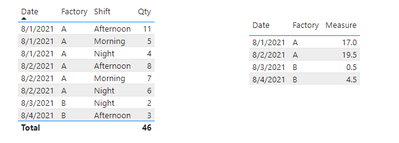
Eyelyn9_0-1631519053541.png


Best Regards,
Eyelyn Qin
If this post helps, then please consider Accept it as the solution to help the other members find it more quickly.

View solution in original post

4 REPLIES 4
Anonymous
Not applicable

Hi @Anonymous ,


Please use the following formula to create a measure:

Measure =
VAR _pre =
    CALCULATE (
        SUM ( 'Table'[Qty] ),
        FILTER (
            ALLSELECTED ( 'Table' ),
            [Date]
                = MAX ( 'Table'[Date] ) - 1
                && [Factory] = MAX ( 'Table'[Factory] )
                && [Shift] = "Night"
        )
    ) * 0.75
VAR _mornAndAfter =
    CALCULATE (
        SUM ( 'Table'[Qty] ),
        FILTER (
            ALLSELECTED ( 'Table' ),
            [Date] = MAX ( 'Table'[Date] )
                && [Factory] = MAX ( 'Table'[Factory] )
                && [Shift] IN { "Morning", "Afternoon" }
        )
    )
VAR _night =
    CALCULATE (
        SUM ( 'Table'[Qty] ),
        FILTER (
            ALLSELECTED ( 'Table' ),
            [Date] = MAX ( 'Table'[Date] )
                && [Factory] = MAX ( 'Table'[Factory] )
                && [Shift] = "Night"
        )
    ) * 0.25
RETURN
    _pre + _mornAndAfter + _night

Here is the final output:

Eyelyn9_0-1631519053541.png


Best Regards,
Eyelyn Qin
If this post helps, then please consider Accept it as the solution to help the other members find it more quickly.

Ashish_Mathur
Super User
Super User

Hi,

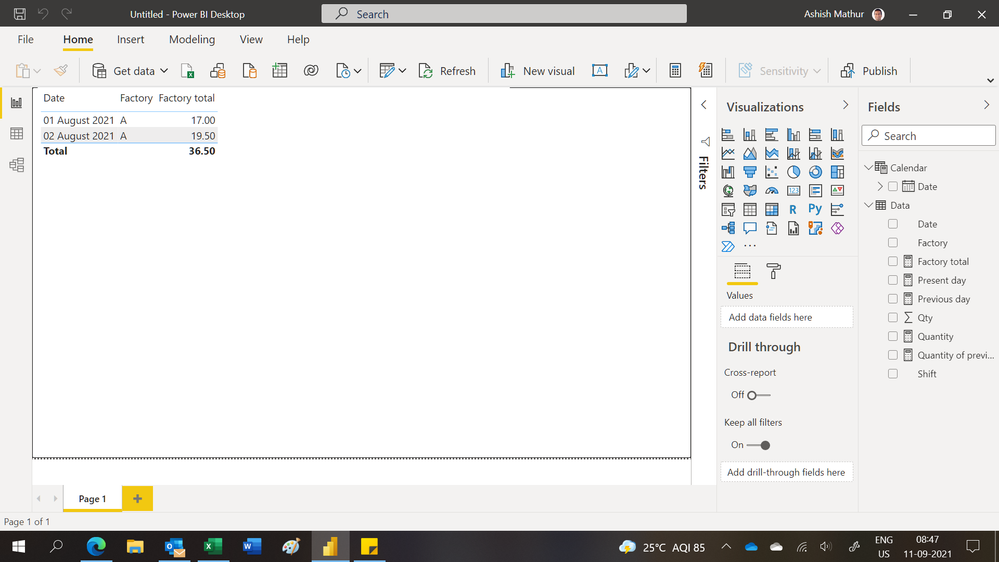
You may download my PBI file from here.

Hope this helps.

Untitled.png


Regards,
Ashish Mathur
http://www.ashishmathur.com
https://www.linkedin.com/in/excelenthusiasts/
Ashish_Mathur
Super User
Super User

Hi,

You may download my PBI file from here.

Hope this helps.

Untitled.png


Regards,
Ashish Mathur
http://www.ashishmathur.com
https://www.linkedin.com/in/excelenthusiasts/
lbendlin
Super User
Super User

if you are new to DAX then this is a pretty tall ask.


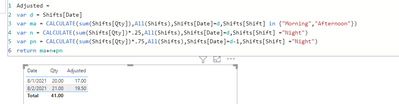
You didn't say if you wanted this as a measure or calculated column. Here's a calculated column version


lbendlin_0-1631325923685.png


Helpful resources

Announcements
New to Fabric survey Carousel

New to Fabric Survey

If you have recently started exploring Fabric, we'd love to hear how it's going. Your feedback can help with product improvements.

Power BI DataViz World Championships carousel

Power BI DataViz World Championships - June 2026

A new Power BI DataViz World Championship is coming this June! Don't miss out on submitting your entry.

Join our Fabric User Panel

Join our Fabric User Panel

Share feedback directly with Fabric product managers, participate in targeted research studies and influence the Fabric roadmap.

March Power BI Update Carousel

Power BI Community Update - March 2026

Check out the March 2026 Power BI update to learn about new features.