cancel
Showing results for 
Search instead for 
Did you mean: 

We've captured the moments from FabCon & SQLCon that everyone is talking about, and we are bringing them to the community, live and on-demand. Starts on April 14th. Register now

Reply
fingalbrad
Helper I
Helper I

Summarize table based on column values

Hi I have a spreadsheet which is set up as below. Its a list of notifications and the individual tasks associated with the notification and the individual completion dates. The tasks may be the same for the notifications, but they have different completion dates. 


Notification     Priority        Tasks       Task Compled Date

1                       2                   A            Completed  Date 

1                       2                   B             Completed Date 

2                       3                   A             Completed Date 

3                       3                   A             Completed Date

3                       3                   B             Completed Date

3                       3                   C             Completed Date


I want to Summarise this table to the following


Notification    Priority    Task A                         Task B                         Task C   

1                      2             Completed Date        Completed Date        Completed Date

2                      3             Completed Date        Completed Date        Completed Date

3                      3             Completed Date        Completed Date        Completed Date

7 REPLIES 7
Ashish_Mathur
Super User
Super User

Hi,

Create a matrix visual.  Drag the first 2 fields to the row labels and the third one to the column labels.  Write this measure

=MIN(Data[Task Completed Date])

Hope this helps.


Regards,
Ashish Mathur
http://www.ashishmathur.com
https://www.linkedin.com/in/excelenthusiasts/

I want to do all this in the data part of powerbi. I want to create a new table before I do the visual

Hi,

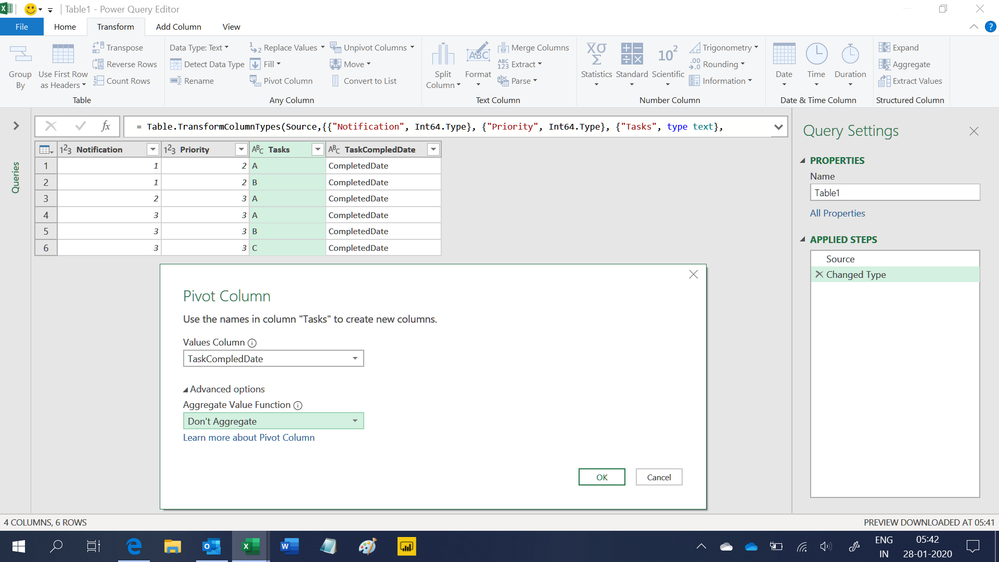
Go to the Query Editor click on any cell in the Tasks column.  Under Transform, click on Pivot column.

Untitled.png


Regards,
Ashish Mathur
http://www.ashishmathur.com
https://www.linkedin.com/in/excelenthusiasts/

THanks for that. The only issue now is that I have the notification listed multiple time. I only wanted it listed once and have the dates shown

Share a proper example and show the expected result.


Regards,
Ashish Mathur
http://www.ashishmathur.com
https://www.linkedin.com/in/excelenthusiasts/
danextian
Super User
Super User

Hellow @fingalbrad ,


Have you tried using the matrix visual.  You can drag Notification and Priority columns to Rows, Tasks to Columns and Completed date to Value. If you want a layout very similar to yours, may disable the stepped layout and the subtotals. Once plotted, your data should looke like below:

matrix visual.png
More on the matrix visual: Create matrix visualizations in Power BI


Dane Belarmino | Microsoft MVP | Proud to be a Super User!

Did I answer your question? Mark my post as a solution!


"Tell me and I’ll forget; show me and I may remember; involve me and I’ll understand."
Need Power BI consultation, get in touch with me on LinkedIn or hire me on UpWork.
Learn with me on YouTube @DAXJutsu or follow my page on Facebook @DAXJutsuPBI.

Hi 


I want to be able to do some analysis tho and compare the dates between the tasks. I dont think I can do this with a visual??

Helpful resources

Announcements
New to Fabric survey Carousel

New to Fabric Survey

If you have recently started exploring Fabric, we'd love to hear how it's going. Your feedback can help with product improvements.

Power BI DataViz World Championships carousel

Power BI DataViz World Championships - June 2026

A new Power BI DataViz World Championship is coming this June! Don't miss out on submitting your entry.

Join our Fabric User Panel

Join our Fabric User Panel

Share feedback directly with Fabric product managers, participate in targeted research studies and influence the Fabric roadmap.