cancel
Showing results for 
Search instead for 
Did you mean: 

The Power BI Data Visualization World Championships is back! Get ahead of the game and start preparing now! Learn more

Reply
moezsajwani
Frequent Visitor

Summarize for Price Change HELP NEEDED

Hi All,


I have data in below table:

Item  Price  Date

-----  ----- -------
A       1        2018/10/01

A       1        2018/10/02

A       2        2018/10/03
A       2        2018/10/04

What I am trying to do is create a measure to return me two scalar value:


1. Date on which price was changed, in this case 2018/10/03 as price moved from $1 to $2
2. % of price changed i.e. divide(2,1)


Please keep in mind I have multiple Items in the table with sale price on multiple dates. The record size is about 2 million.


Thanks for your help in advance.


Moez


5 REPLIES 5
nickchobotar
Skilled Sharer
Skilled Sharer

 Hello @moezsajwani


 Here is a version in M. This will perform better on very large data sets

 
(data source is binary, so you can just copy/ paste the script in PQ )

let
    Source = Table.FromRows(Json.Document(Binary.Decompress(Binary.FromText("i45WclTSUTIEYiMDQwt9QwN9A0OlWB0swkZwYSNkYWPswiZgYSfsZmMIG8GFsZiNoRpodiwA", BinaryEncoding.Base64), Compression.Deflate)), let _t = ((type text) meta [Serialized.Text = true]) in type table [Item = _t, Price = _t, Date = _t]),
    ChangedType = Table.TransformColumnTypes(Source,{{"Item", type text}, {"Price", Int64.Type}, {"Date", type date}}),
    

    #"Grouped Rows" = 
    Table.Group(
        ChangedType, 
        {"Item"}, 
        { {"index", each Table.AddIndexColumn(_, "Index",0,1), type table} }
    ),
   
    #"Expanded index" = Table.ExpandTableColumn(#"Grouped Rows", "index", {"Price", "Date", "Index"}, {"Price", "Date", "Index.1"}),
  
    #"Added Custom" = 
        Table.AddColumn(#"Expanded index", "PrevPrice", 
            each try #"Expanded index"{[Index.1]-1}[Price] otherwise "", Currency.Type
        ),
    
    
    #"Added Custom1" = 
        Table.AddColumn(#"Added Custom", "Diff Ddate",
             each if [PrevPrice] <> "" and [PrevPrice]  <> [Price] then [Date] else ""),
    #"Added Custom2" = Table.AddColumn(#"Added Custom1", "%Diff", each if [PrevPrice] <> "" and [PrevPrice]  <> [Price] then ([PrevPrice] / [Price]) -1  else  "")
in
    #"Added Custom2"


Anonymous
Not applicable

Hi,


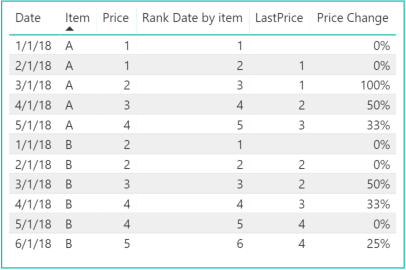
If I am correct, you are trying to pull all dates that price of item change as well as % change. I suggest to create following calculated columns:


Rank Date by item = RANKX(Q5,Q5[Date],,ASC,Dense)
LastPrice = IF(Q5[Rank Date by item] > 1, 
               CALCULATE(MAX(Q5[Price]),
                       FILTER(Q5,
                                Q5[Rank Date by item] = (EARLIER(Q5[Rank Date by item])-1) && 
                                Q5[Item] = EARLIER(Q5[Item]))),BLANK())
Price Change = 
IF(Q5[Rank Date by item] = 1, 0,DIVIDE(Q5[Price],Q5[LastPrice],0) - 1)

Now you will get following table: 


Capture.PNG


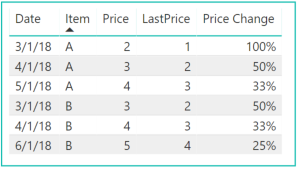
Or filter to only see Days Price changes and % changes:


Capture.PNG


Let me know if this help. Thanks.


Ashish_Mathur
Super User
Super User

Hi,


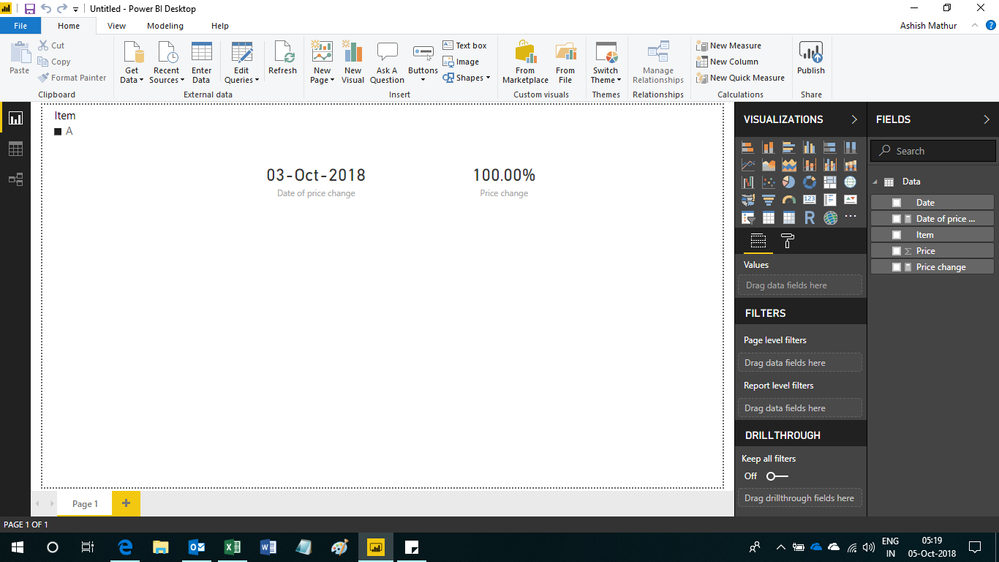
You may download my PBI file from here.


Hope this helps.


Untitled.png


Regards,
Ashish Mathur
http://www.ashishmathur.com
https://www.linkedin.com/in/excelenthusiasts/

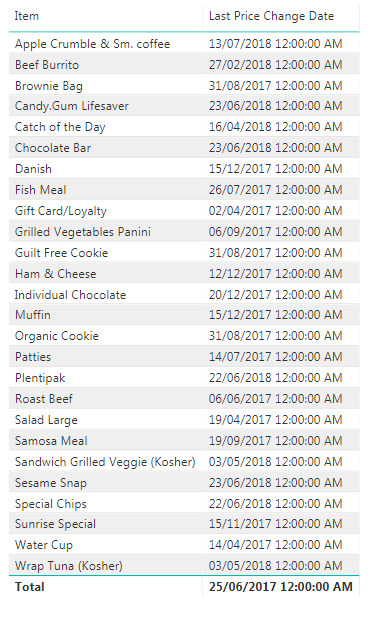
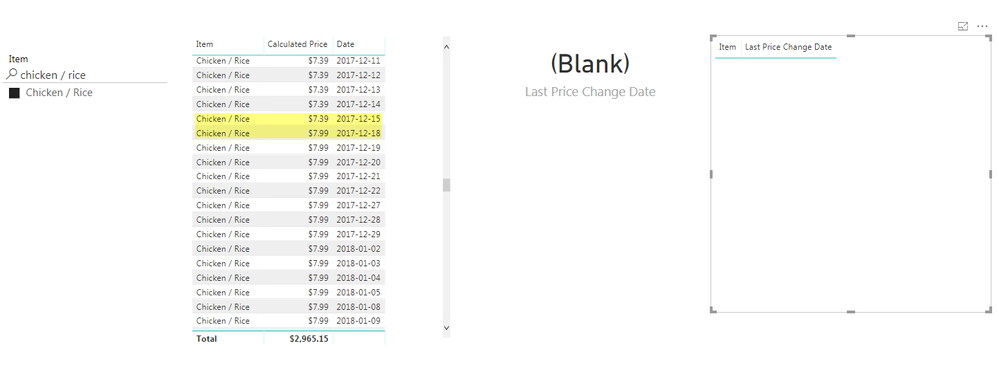
Hi Ashish, thanks a lot for your help. I think I am really close to what needs to be achieved. I am super impressed the way you have written the code. However for some reasons it is picking up certains items accurately. Below are the snap shots of two tables. The first one is all the items with last price change date and second picture is chicken / rice filter only to show that chicken / rice wasn't picked up by the measure. can you help me troubleshoot? I have also posted the measure at the end, I have changed a little bit to return some text when no change is found because I am using it in tooltip. can you please help me troubleshoot this?


All ItemsAll ItemsChicken / Rice FilterChicken / Rice Filter


Last Price Change Date =

var
pricechange =
MINX (
FILTER (
SUMMARIZE (
VALUES ( 'Price Change'[Date] ),
'Price Change'[Date],
"ABCD", MIN ( 'Price Change'[Calculated Price] ),
"EFGH", CALCULATE (
MIN ( 'Price Change'[Calculated Price] ),
PREVIOUSDAY ( 'Price Change'[Date] )
),
"IJKL", MIN ( 'Price Change'[Date] )
),
[ABCD] / [EFGH]
- 1
> 0
&& [EFGH] > 0
),
[IJKL]
)
return

IF(pricechange=BLANK(),"No Change Found",FORMAT(pricechange,"Short Date"))

You are welcome.  I will need to see your PBI file.  Share the link from where i can download your PBI file.


Regards,
Ashish Mathur
http://www.ashishmathur.com
https://www.linkedin.com/in/excelenthusiasts/

Helpful resources

Announcements
Power BI DataViz World Championships

Power BI Dataviz World Championships

The Power BI Data Visualization World Championships is back! Get ahead of the game and start preparing now!

December 2025 Power BI Update Carousel

Power BI Monthly Update - December 2025

Check out the December 2025 Power BI Holiday Recap!

FabCon Atlanta 2026 carousel

FabCon Atlanta 2026

Join us at FabCon Atlanta, March 16-20, for the ultimate Fabric, Power BI, AI and SQL community-led event. Save $200 with code FABCOMM.