cancel
Showing results for 
Search instead for 
Did you mean: 

The Power BI Data Visualization World Championships is back! Get ahead of the game and start preparing now! Learn more

Reply
ThomasM
Frequent Visitor

Summarize Table

Hi All


I am trying to summarize a table that contains payment of customers.


I want the first transaction date and first amount, also the last transaction date and last amount.


As soon as i have this information, i will be able to calculate what the customer should have paid me from when they started paying to now. 


In addition, i will know those who are behind.


PS: I am unable to get the FirstPaymentAmount and LastPaymentAmount. Any solution?


DAX Code:

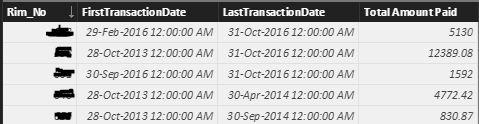
BI_ARREARS = SUMMARIZE(BI_TRANSACTIONS, BI_TRANSACTIONS[Rim_No], "FirstTransactionDate", MIN(BI_TRANSACTIONS[Payment_Date].[Date]),"Total Amount Paid",SUM(BI_TRANSACTIONS[Payment_Amount]), "LastTransactionDate", MAX(BI_TRANSACTIONS[Payment_Date]))

 ResultsCapture.PNG

1 ACCEPTED SOLUTION

Hi @ThomasM,


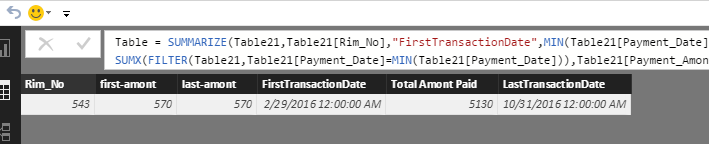
Please add another two <groupBy_columnName> arguments in summarize function. Please try the following formula. I test it using your given sample data and get expected result.


Table = SUMMARIZE(Table21,Table21[Rim_No],"FirstTransactionDate",MIN(Table21[Payment_Date]),"Total Amont Paid",SUM(Table21[Payment_Amont]),"LastTransactionDate",MAX(Table21[Payment_Date]),"first-amont",SUMX(FILTER(Table21,Table21[Payment_Date]=MIN(Table21[Payment_Date])),Table21[Payment_Amont]),"last-amont",SUMX(FILTER(Table21,Table21[Payment_Date]=MAX(Table21[Payment_Date])),Table21[Payment_Amont]))


11.png

If you have any question, please feel free to ask.

Best Regards,
Angelia

View solution in original post

4 REPLIES 4
Greg_Deckler
Community Champion
Community Champion

I do not have your original data or a sample of your data, but why are you using SUMMARIZE? I would think that if you had a customer table and it was related to your transaction table that you could just create 4 columns in this table:


First Date = MIN(Table[Date])

Last Date = MAX(Table[Date])

First Amount = CALCULATE(SUM(Table[Amount]),FILTER(Table,Table[Date]=MIN(Table[Date])))

Last Amount = CALCULATE(SUM(Table[Amount]),FILTER(Table,Table[Date]=MAX(Table[Date])))


I may not have the DAX 100% correct, you may need to use RELATEDTABLE or RELATED, but that's the general gist of it. 


Follow on LinkedIn
@ me in replies or I'll lose your thread!!!
Instead of a Kudo, please vote for this idea
Become an expert!: Enterprise DNA
External Tools: MSHGQM
YouTube Channel!: Microsoft Hates Greg
Latest book!:
DAX For Humans

DAX is easy, CALCULATE makes DAX hard...

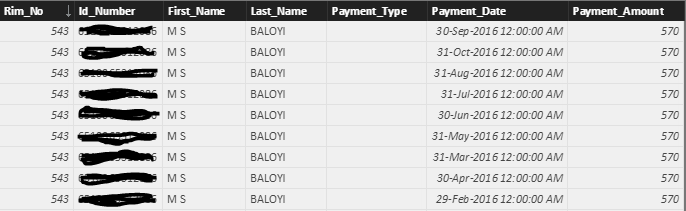
Please see below table sample.


The reason i created a summary table is because the original table contains multiple payments for each customer and therefore i only require a single line that contains id, first date, first amount and last date, last amount. Once i have this, i can figure out whether the customer is behind with payments or not, that means i am create more columns on the summary table.


Capture.PNG

Hi @ThomasM,


Please add another two <groupBy_columnName> arguments in summarize function. Please try the following formula. I test it using your given sample data and get expected result.


Table = SUMMARIZE(Table21,Table21[Rim_No],"FirstTransactionDate",MIN(Table21[Payment_Date]),"Total Amont Paid",SUM(Table21[Payment_Amont]),"LastTransactionDate",MAX(Table21[Payment_Date]),"first-amont",SUMX(FILTER(Table21,Table21[Payment_Date]=MIN(Table21[Payment_Date])),Table21[Payment_Amont]),"last-amont",SUMX(FILTER(Table21,Table21[Payment_Date]=MAX(Table21[Payment_Date])),Table21[Payment_Amont]))


11.png

If you have any question, please feel free to ask.

Best Regards,
Angelia

Works perfectly. Thank you!!!

Helpful resources

Announcements
Power BI DataViz World Championships

Power BI Dataviz World Championships

The Power BI Data Visualization World Championships is back! Get ahead of the game and start preparing now!

November Power BI Update Carousel

Power BI Monthly Update - November 2025

Check out the November 2025 Power BI update to learn about new features.

FabCon Atlanta 2026 carousel

FabCon Atlanta 2026

Join us at FabCon Atlanta, March 16-20, for the ultimate Fabric, Power BI, AI and SQL community-led event. Save $200 with code FABCOMM.