Join us at FabCon Atlanta from March 16 - 20, 2026, for the ultimate Fabric, Power BI, AI and SQL community-led event. Save $200 with code FABCOMM.
Register now!Learn from the best! Meet the four finalists headed to the FINALS of the Power BI Dataviz World Championships! Register now
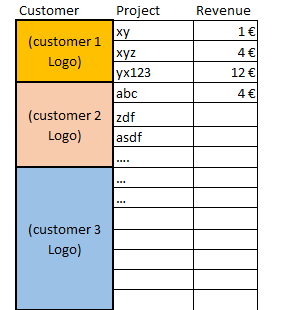
Hello there, I wonder if someone could help me with following issue. I want do make a Table as you see below. In the first column there should be the customer logo, in the second column should be the project name and in the last column should be the revenue. So far, so good. The measures are all prepared and the data is available. The problem is: How can i summarize the customer values to one row per customer, so that there is only the "big" customer logo and also a list of all projects per customer including the revenue per customer.
Solved! Go to Solution.
Hi Zoe,
You can use a matrix visual for this. with the logo and Project on rows, then revenue on Values.
In the format pane (paintbrush), go to row headers and turn Stepped layout off, and you'll get a result like this:
Hope that helps!
Hi Zoe,
You can use a matrix visual for this. with the logo and Project on rows, then revenue on Values.
In the format pane (paintbrush), go to row headers and turn Stepped layout off, and you'll get a result like this:
Hope that helps!
Share feedback directly with Fabric product managers, participate in targeted research studies and influence the Fabric roadmap.
Check out the February 2026 Power BI update to learn about new features.
| User | Count |
|---|---|
| 66 | |
| 58 | |
| 45 | |
| 19 | |
| 15 |