Join us at FabCon Atlanta from March 16 - 20, 2026, for the ultimate Fabric, Power BI, AI and SQL community-led event. Save $200 with code FABCOMM.
Register now!The Power BI Data Visualization World Championships is back! Get ahead of the game and start preparing now! Learn more
https://1drv.ms/u/s!AjqH7k_M5ZVEgybq24LU4mghbdSP?e=49IILa
Hi Team,
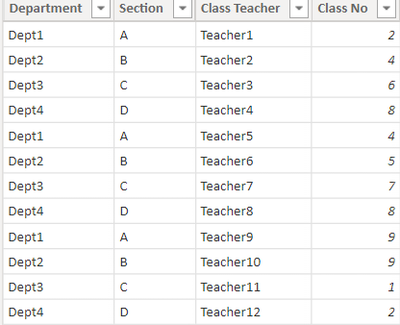
I have a input as below :
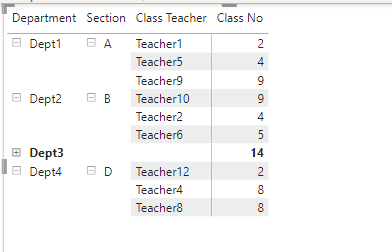
I am grouping thr columns based on Department and Section as below:
I am able to achiev in Matrix with the Stepped Layout off,But when i am trying to export the same the Departments and Section gets repeated:
| Department | Section | Class Teacher | Class No |
| Dept1 | A | Teacher1 | 2 |
| Dept1 | A | Teacher5 | 4 |
| Dept1 | A | Teacher9 | 9 |
| Dept2 | B | Teacher10 | 9 |
| Dept2 | B | Teacher2 | 4 |
| Dept2 | B | Teacher6 | 5 |
| Dept3 | C | Teacher11 | 1 |
| Dept3 | C | Teacher3 | 6 |
| Dept3 | C | Teacher7 | 7 |
| Dept4 | D | Teacher12 | 2 |
| Dept4 | D | Teacher4 | 8 |
| Dept4 | D | Teacher8 | 8 |
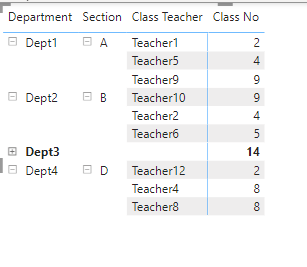
How can i get the same output as shown in metrix?Can anyone suggest any DAX fucntion from where i can achieve the output as below:
Thanks in Advance
Shivayogi
@Shivayogi123 , this was a workaround for grand total, you need same for subtotal too
Show Grand total row or Avg Grand total row in Visual: https://youtu.be/OSwRZ4GUhxc
Hi,
Thanks for the reply as if now i am not bothered of the Total .
I am looking the Group and show teh first and second column as one as below when i export that to excel as below:
Thanks
Shivayogi
The Power BI Data Visualization World Championships is back! Get ahead of the game and start preparing now!
| User | Count |
|---|---|
| 38 | |
| 36 | |
| 33 | |
| 32 | |
| 29 |
| User | Count |
|---|---|
| 129 | |
| 88 | |
| 79 | |
| 68 | |
| 63 |