Join us at FabCon Atlanta from March 16 - 20, 2026, for the ultimate Fabric, Power BI, AI and SQL community-led event. Save $200 with code FABCOMM.
Register now!The Power BI Data Visualization World Championships is back! It's time to submit your entry. Live now!
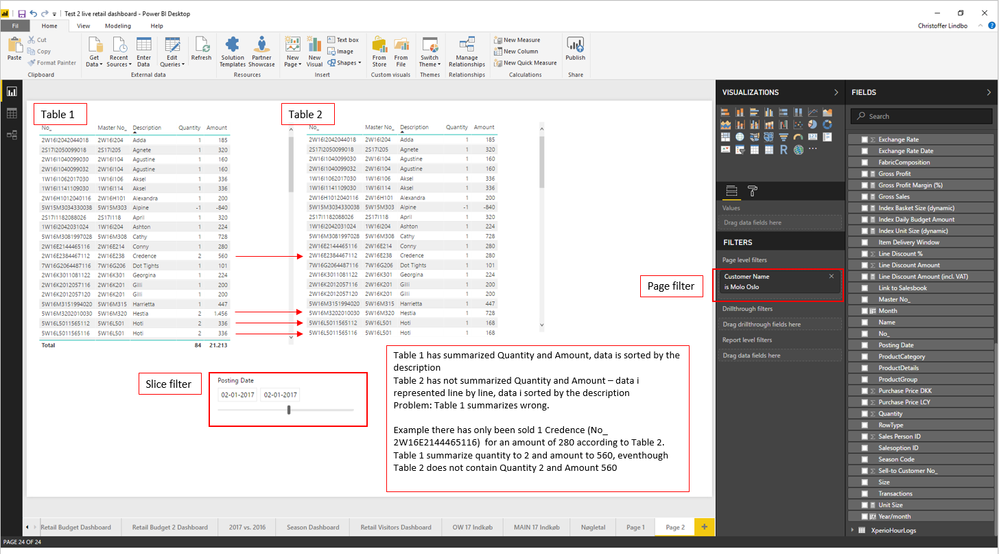
I have experienced attached issue summarizing my data. I KNOW my numbers have been correct ealier on, so I wonder if it is some update that courses the problem or if I have overlooked something important.
Solved! Go to Solution.
I would do the following testing :
How did you create your summarized Table 1 ?
Are you sure your date slicer is set on both tables ?
How many rows you get if you run this measure on your transactional table ?
= CALCULATE (
COUNTROWS(Table2),
Table2[No] = "<Credence ID>"
)
Fyi: that Credence ID ends with 112 in your dataset rather than 116 as shown in your example.
I would do the following testing :
How did you create your summarized Table 1 ?
Are you sure your date slicer is set on both tables ?
How many rows you get if you run this measure on your transactional table ?
= CALCULATE (
COUNTROWS(Table2),
Table2[No] = "<Credence ID>"
)
Fyi: that Credence ID ends with 112 in your dataset rather than 116 as shown in your example.
Hey,
can you post an image of your datamodel?
Greetings,
Wolf
The Power BI Data Visualization World Championships is back! It's time to submit your entry.
Check out the January 2026 Power BI update to learn about new features.
| User | Count |
|---|---|
| 60 | |
| 41 | |
| 27 | |
| 26 | |
| 23 |
| User | Count |
|---|---|
| 127 | |
| 109 | |
| 55 | |
| 39 | |
| 33 |