Get certified for free when you join Fabric Data Days 2026 and dive into Fabric, Power BI, SQL, AI, and other essential data skills.
Join nowData Days is here! Join us now for 60+ days of learning, challenges, and connection. Learn more
Hello everyone,
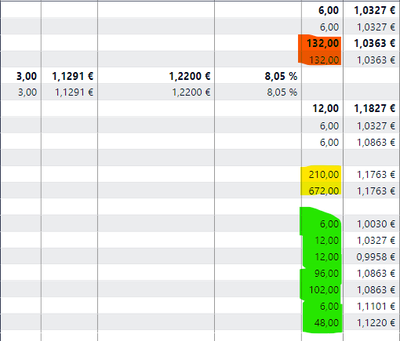
I am using the simple summarization of one column, but for some of the rows I have sum and for some they are missing. I have attached a screenshot of the example. The one that is marked with red is summed, but the yellow and green are not.
Does someone knows why is this happening?
Thanks a lot.
Kind regards,
Stefani
Solved! Go to Solution.
You can review the following:
* Try using the dax SUMX function and not the SUM function
* Check that relationships have and follow a coherence, even a tilde can be taken as different in relationships.
* Check the format of the numbers, these usually bring spaces or have some ,. different.
* Is some summary from excel loaded in Power BI a table with sparse data that does not follow a relationship or order of data? If so, you should check the Query that meets the information quality parameters.
*No need to show the data! just make an example and change the names so you can understand your problem in depth
You can review the following:
* Try using the dax SUMX function and not the SUM function
* Check that relationships have and follow a coherence, even a tilde can be taken as different in relationships.
* Check the format of the numbers, these usually bring spaces or have some ,. different.
* Is some summary from excel loaded in Power BI a table with sparse data that does not follow a relationship or order of data? If so, you should check the Query that meets the information quality parameters.
*No need to show the data! just make an example and change the names so you can understand your problem in depth
Could you show us the columns and row names as well...?
It is not clear what are the hierarchy levels since you are only showing the matrix values
The bold ones are the rows, and from the selected one the upper rows are missing. Sorry but I am not able to share the names of the rows and columns..
Don't miss out on Data Days, June 15 through August 7. Learn Fabric, Power BI, SQL, AI and more.
Check out the May 2026 Power BI update to learn about new features.
| User | Count |
|---|---|
| 23 | |
| 23 | |
| 21 | |
| 17 | |
| 13 |
| User | Count |
|---|---|
| 58 | |
| 50 | |
| 37 | |
| 29 | |
| 24 |