Join us at FabCon Atlanta from March 16 - 20, 2026, for the ultimate Fabric, Power BI, AI and SQL community-led event. Save $200 with code FABCOMM.
Register now!The Power BI Data Visualization World Championships is back! Get ahead of the game and start preparing now! Learn more
Hello guys, need some help
I need to creat a columm in someway that in excel works with a SUMIF.
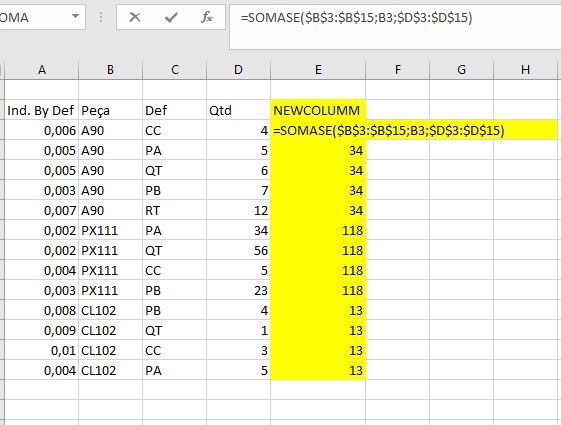
I have a table (image bellow), with a columm of products (Columm "Peça"), another with defects (Collum "Def"), and another with quantities (Collum "Qtd"). I need to create a extra columm that sum the quantities by PRODUCTS. Them after this i will use this columm to multiples another table (that have a indicator by products by defects. Someone know how to do this?
Solved! Go to Solution.
Hi @HENRIQSI
New Column = CALCULATE ( SUM ( TableName[Qtd] ), ALLEXCEPT ( TableName, TableName[Peca] ) )
Hey,
for me it is not clear want you exactly want to reach. Are you sure you want a column?
Maybe post a screenshot in Excel to make it clear.
Greeetings.
Hello, thks for reply @WolfBiber.
Ok, look for my screenshot 1 at excel. I have this new columm ("NEWCOLUMM") that sum the quantities by product, using the function SUMIF (ps: my excel u can see as "SOMASE", portuguese version of excel).
I need this columm to multiplies with the values of columm "Ind. By Def" (Screenshot 2). That way, for each "Def" by "Peça" I will have my Indicator.
Hi @HENRIQSI
New Column = CALCULATE ( SUM ( TableName[Qtd] ), ALLEXCEPT ( TableName, TableName[Peca] ) )
This solved my problem tooo. thank you sir!
The Power BI Data Visualization World Championships is back! Get ahead of the game and start preparing now!
| User | Count |
|---|---|
| 38 | |
| 36 | |
| 33 | |
| 30 | |
| 28 |
| User | Count |
|---|---|
| 128 | |
| 88 | |
| 79 | |
| 67 | |
| 62 |