cancel
Showing results for 
Search instead for 
Did you mean: 

Learn from the best! Meet the four finalists headed to the FINALS of the Power BI Dataviz World Championships! Register now

Reply
jsjames2285
New Member

Sum up data from multiple columns

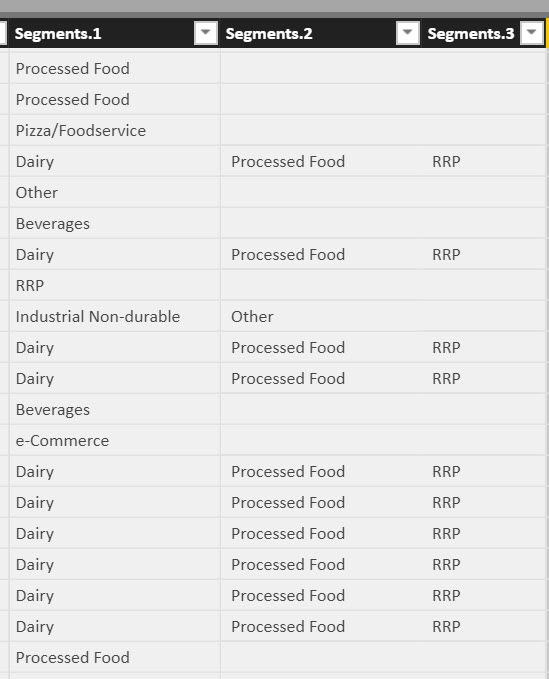
I'm trying to create a pie chart of Segments.  The issue is that one "project" can contain multiple segments.  But I want to have a chart that sums up all of each type of segment.

The Segment cell was originally listed with a "Pipe" separating them, but I did the split column to give me multiple columns.

But as you see RRP can be in Segment 1 and Segment 3.  I'd like my chart to sum up all instances of RRP.


RRP occurs 28 times in Segment1 and 11 times in Segment3, but I can't get the pie chart to add all the occurances together.

It just shows 28 in the chart.

2018-09-24_15-35-20.jpg

1 ACCEPTED SOLUTION
v-jiascu-msft
Microsoft Employee
Microsoft Employee

Hi @jsjames2285,


There could be two solutions. Please refer to the demo in the attachment.

1. Unpivot the three columns into one column.

2. Create a new table and a measure.

Sum_up_data_from_multiple_columns


Best Regards,
Dale

Community Support Team _ Dale
If this post helps, then please consider Accept it as the solution to help the other members find it more quickly.

View solution in original post

2 REPLIES 2
Ashish_Mathur
Super User
Super User

Hi,


In the Split column window, click on Advanced and select rows.  Click on OK


Does this help?


Regards,
Ashish Mathur
http://www.ashishmathur.com
https://www.linkedin.com/in/excelenthusiasts/
v-jiascu-msft
Microsoft Employee
Microsoft Employee

Hi @jsjames2285,


There could be two solutions. Please refer to the demo in the attachment.

1. Unpivot the three columns into one column.

2. Create a new table and a measure.

Sum_up_data_from_multiple_columns


Best Regards,
Dale

Community Support Team _ Dale
If this post helps, then please consider Accept it as the solution to help the other members find it more quickly.

Helpful resources

Announcements
Power BI DataViz World Championships carousel

Power BI DataViz World Championships - June 2026

A new Power BI DataViz World Championship is coming this June! Don't miss out on submitting your entry.

Join our Fabric User Panel

Join our Fabric User Panel

Share feedback directly with Fabric product managers, participate in targeted research studies and influence the Fabric roadmap.

March Power BI Update Carousel

Power BI Community Update - March 2026

Check out the March 2026 Power BI update to learn about new features.