Get certified for free when you join Fabric Data Days 2026 and dive into Fabric, Power BI, SQL, AI, and other essential data skills.
Join nowTry your skills in the Power BI Dataviz World Championship! Round one ends June 26. Join now
Hey All,
I deadly need your helps guys.
Let's say I have the following table:
I want firstly to distinct count the values in Col1 based on Col2 to get:
A1>>>2
B1>>>1
C1>>>1
afterthat I want to count the resultant values based on Col3:
DD>>>2
BB>>>2
if I will use directly distinct count based on Col3 the result for "BB" will be 1 which is not what I want to get at the end.
Thank you all in advance.
Regards,
Solved! Go to Solution.
Hi @AZL
How about a DISTINCTCOUNT on the concatenation of the columns you are interested in? For instance, in your first example with Col1 and Col2, you create an additional calculated column
Table1[NewColum]=Table1[Col] & Table1[Col2]
and then
DISTINCTCOUNT(Table1[NewColum])
Hi @AZL
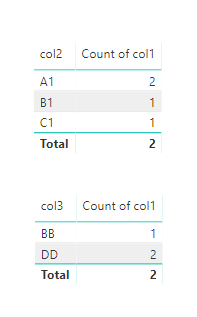
Assume you have the result as below
Per your requirement, you could create a measure
Measure = CALCULATE(DISTINCTCOUNT(Sheet3[col1]),ALLEXCEPT(Sheet3,Sheet3[col2]))
Best Regards
Maggie
Hi @AZL
How about a DISTINCTCOUNT on the concatenation of the columns you are interested in? For instance, in your first example with Col1 and Col2, you create an additional calculated column
Table1[NewColum]=Table1[Col] & Table1[Col2]
and then
DISTINCTCOUNT(Table1[NewColum])
you're very welcome. glad it helped.
Please mark it as solution then, so that it's available for others too.
Cheers
Don't miss out on Data Days, June 15 through August 7. Learn Fabric, Power BI, SQL, AI and more.
Check out the May 2026 Power BI update to learn about new features.
| User | Count |
|---|---|
| 24 | |
| 22 | |
| 22 | |
| 20 | |
| 12 |
| User | Count |
|---|---|
| 69 | |
| 57 | |
| 42 | |
| 40 | |
| 30 |