This time we’re going bigger than ever. Fabric, Power BI, SQL, AI and more. We're covering it all. You won't want to miss it.
Learn moreLevel up your Power BI skills this month - build one visual each week and tell better stories with data! Get started
Hi
I need some help with something that I guess must be very simple but can't figure out.
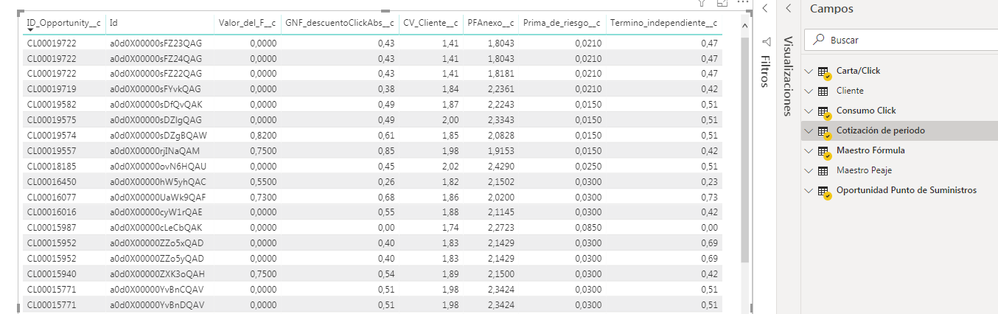
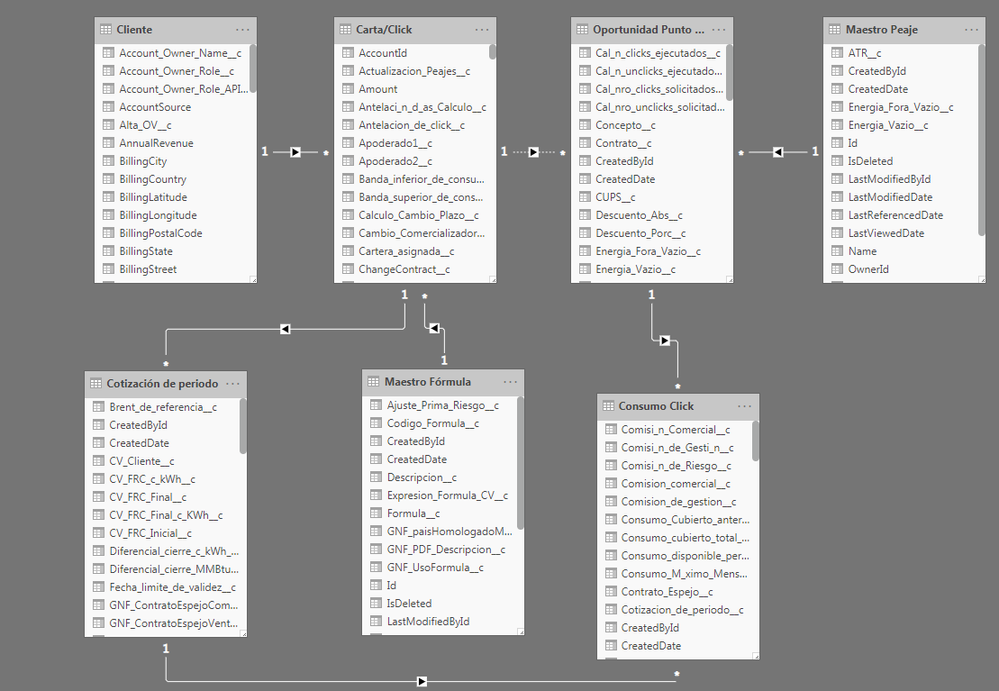
I have this visual object (table) with columns from different tables with quite a complex structure between them. I'd like to sum several of the columns from this table in a new column:
relationships
I tried with this calculations but both seem to be wrong:
Not exactly a measure totals problem but the same technique should work. You would need to essentially replicate your table visualization in a table variable in DAX. This Quick Measure, Measure Totals, The Final Word should get you what you need:
https://community.powerbi.com/t5/Quick-Measures-Gallery/Measure-Totals-The-Final-Word/m-p/547907
My problem is when trying to create a measure at the row level. If I sumx a variable from another table I get an out of memory error.
In the table 'consumo click' this works fine:
F_Calculada = sumx('Consumo Click';'Consumo Click'[PFAnexo__c])But this doesn't:
F_Calculada = sumx('Consumo Click';'Consumo Click'[PFAnexo__c]) - sumx('Cotización de periodo';'Cotización de periodo'[GNF_CVClientePrima_Click__c])"The report ran out of memory, and the application must close"
I just need to add 3 values I'm already seeing in my visual table for each row!
It's a good practice if you avoid the measures that are designed keeping specific visualization in mind.
Let us consider an example based on the data provided above.
1. The years are identifiers for the rows in the table
2. If any other column or row is added like month then the behavior of the measure will be different
The part of your formula for the calculation the total measure would work well on the detail rows when iterating over VALUES(Table[Year] instead of Table itself:
MyMeasure3 = SUMX(FILTER(VALUES(Table[Year]),[Amount]>1000),[Amount]-1000)
However, VALUES(Table[Year]) would contain only one row while the filtered table is empty when [Amount]<=1000.
This means that rows for years with [Amount] lower than 1000 should have a blank value. In case you want to have 0 instead of blank, you can just add 0 to the result:
MyMeasure3 = SUMX(FILTER(VALUES(Table[Year]),[Amount]>1000),[Amount]-1000) + 0
Hope this helps!!
Admin
I think the formula is correct. I doubt so the relation is not working. The other thing is that you can group is a level using summarize. example
Check out the April 2026 Power BI update to learn about new features.
Sign up to receive a private message when registration opens and key events begin.
If you have recently started exploring Fabric, we'd love to hear how it's going. Your feedback can help with product improvements.
| User | Count |
|---|---|
| 35 | |
| 32 | |
| 25 | |
| 22 | |
| 18 |
| User | Count |
|---|---|
| 66 | |
| 36 | |
| 32 | |
| 25 | |
| 23 |