Get Fabric or SQL Certified for Free.
Get certified for free when you join Fabric Data Days 2026 and dive into Fabric, Power BI, SQL, AI, and other essential data skills.
Join now- Power BI forums
- Get Help with Power BI
- Desktop
- Service
- Report Server
- Power Query
- Mobile Apps
- Developer
- DAX Commands and Tips
- Custom Visuals Development Discussion
- Health and Life Sciences
- Power BI Spanish forums
- Translated Spanish Desktop
- Training and Consulting
- Instructor Led Training
- Dashboard in a Day for Women, by Women
- Galleries
- Data Stories Gallery
- Themes Gallery
- Contests Gallery
- QuickViz Gallery
- Quick Measures Gallery
- Visual Calculations Gallery
- Notebook Gallery
- Translytical Task Flow Gallery
- TMDL Gallery
- R Script Showcase
- Webinars and Video Gallery
- Ideas
- Custom Visuals Ideas (read-only)
- Issues
- Issues
- Events
- Upcoming Events
July 7 - July 17 | Round 2 of the Power BI Dataviz World Championships. Don't miss your chance! Learn more
- Power BI forums
- Forums
- Get Help with Power BI
- Desktop
- Re: Sum only first entry
- Subscribe to RSS Feed
- Mark Topic as New
- Mark Topic as Read
- Float this Topic for Current User
- Bookmark
- Subscribe
- Printer Friendly Page

- Mark as New
- Bookmark
- Subscribe
- Mute
- Subscribe to RSS Feed
- Permalink
- Report Inappropriate Content
Sum only first entry
Hi
I have been trying to figure this out for a few days now. I am very new to DAX language, but pretty good at googeling, and figuring out how to change what ever functions i might find, but this time i haven't succeeded.
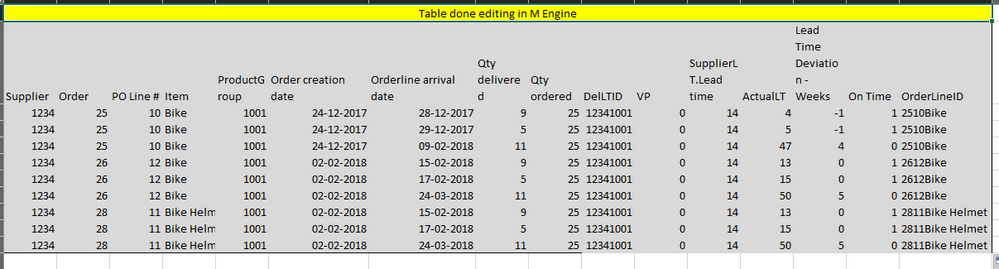
I have a bunch of columns and rows that contains arrival of items from suppliers. in a new colum i have created a formula that returns the value 1 if the line was delivered timely, and 0 if it wasn't, column named [On time]. However as it often occurs, a supplier might deliver a line partially. What i want is to sum only the values, for the first entries.
Each row has an orderline ID which is a concatanation of order No, Orderline no, Item.
So i need a Dax formula that checks whether the [Orderline ID] exists more than once, and if it does, only return the value from [On Time], from the first time this orderline was delivered. [Orderline Arrival Date].
Hope it makes sense 🙂
Solved! Go to Solution.
- Mark as New
- Bookmark
- Subscribe
- Mute
- Subscribe to RSS Feed
- Permalink
- Report Inappropriate Content
Sorry for all my posts, i promise this is the last 🙂 Just wanted to show, what it ended up being. The solution provided by @v-ljerr-msft kept on making issues for me, so i reverted back to the firstnonblank solution. And this was the final, which does excactly what i want everywhere.
OTP = CALCULATE(SUMX(DISTINCT(DelOrder[OrderLineID]);FIRSTNONBLANK(DelOrder[On Time];0))/DISTINCTCOUNT(DelOrder[OrderLineID]);DISTINCT(DelOrder[OrderLineID]);ALL(DelOrder[Orderline arrival date]))
Never the less, thanks for the help. @v-ljerr-msft now i know how to use VAR, and i kickstarted som though processes, that eventually lead to my final solution.


- Mark as New
- Bookmark
- Subscribe
- Mute
- Subscribe to RSS Feed
- Permalink
- Report Inappropriate Content
Hi @Anonymous,
Could you post your table structures with some sample/mock data and the expected result, so that we can better assist on this issue? It's better to share a dummy pbix file which can reproduce the issue. You can upload it to OneDrive or Dropbox and post the link here. Do mask sensitive data before uploading. 
Regards
- Mark as New
- Bookmark
- Subscribe
- Mute
- Subscribe to RSS Feed
- Permalink
- Report Inappropriate Content
Sure thing, here is an example.
https://www.dropbox.com/s/orvdzha2wi36htq/Supplier%20Performance%20Example.pbix?dl=0
I actually managed to solve it my self, in a way. In the Query editor I sort the arrival date by so the earliest is in the beginning. And then i use this formula:
OTP = SUMX(DISTINCT(DelOrder[OrderLineID]);FIRSTNONBLANK(DelOrder[On Time];0))/DISTINCTCOUNT(DelOrder[OrderLineID])
Now it only sums the earliest On Time value, of a delivered orderline. , this works, but maybe there is a different solution, in case i hadn't sorted the data?
- Mark as New
- Bookmark
- Subscribe
- Mute
- Subscribe to RSS Feed
- Permalink
- Report Inappropriate Content
Hi @Anonymous,
Now it only sums the earliest On Time value, of a delivered orderline. , this works, but maybe there is a different solution, in case i hadn't sorted the data?
Could you try using the formula below to see if it works in this scenario?
OTP2 =
SUMX (
    DISTINCT ( DelOrder[OrderLineID] );
    VAR firstArrivalDate =
        CALCULATE ( MIN ( DelOrder[Orderline Arrival Date] ) )
    RETURN
        CALCULATE (
            SUM ( DelOrder[On Time] );
            FILTER ( DelOrder; DelOrder[Orderline Arrival Date] = firstArrivalDate )
        )
)
    / DISTINCTCOUNT ( DelOrder[OrderLineID] )
Regards
- Mark as New
- Bookmark
- Subscribe
- Mute
- Subscribe to RSS Feed
- Permalink
- Report Inappropriate Content
It works perfectly, thanks!
One last request, while playing around with it, I noticed that if i only mark 2018, as the year i am interessted in looking at, the OTP is 0.5. As orderline 2510Bike was partially delivered first time in 2017 and 2018. I need it to clear the arrival date filter, forgot to say that. I assume i need to use the All () function on [OrderLine Arrival Date], but i am not sure where to apply it, in your function.
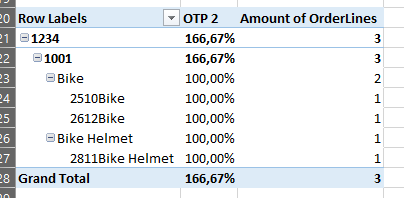
And secondly there is an issue with a wrong grand total. If i have this table for instance.
The grand total should be 300%/3 unique orderlineID = 100%, but it returns 166,67%
- Mark as New
- Bookmark
- Subscribe
- Mute
- Subscribe to RSS Feed
- Permalink
- Report Inappropriate Content
Nevermind mind second part. Solved it with
SUMX(DelOrder;[OTP]/DISTINCTCOUNT(DelOrder[OrderLineID]))
- Mark as New
- Bookmark
- Subscribe
- Mute
- Subscribe to RSS Feed
- Permalink
- Report Inappropriate Content
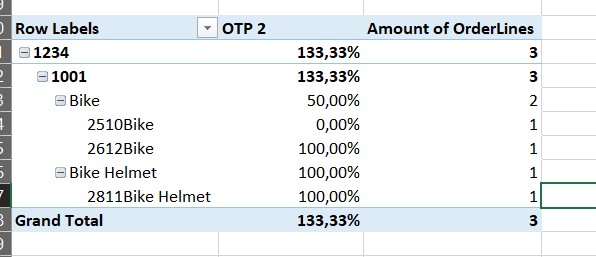
Hmm I was a bit too fast. My total is still incorrect.
As you can se here, the OTP result is 133,33%, it should be 66,67%.
(100+100+0)/3=66,67%
- Mark as New
- Bookmark
- Subscribe
- Mute
- Subscribe to RSS Feed
- Permalink
- Report Inappropriate Content
Sorry for all my posts, i promise this is the last 🙂 Just wanted to show, what it ended up being. The solution provided by @v-ljerr-msft kept on making issues for me, so i reverted back to the firstnonblank solution. And this was the final, which does excactly what i want everywhere.
OTP = CALCULATE(SUMX(DISTINCT(DelOrder[OrderLineID]);FIRSTNONBLANK(DelOrder[On Time];0))/DISTINCTCOUNT(DelOrder[OrderLineID]);DISTINCT(DelOrder[OrderLineID]);ALL(DelOrder[Orderline arrival date]))
Never the less, thanks for the help. @v-ljerr-msft now i know how to use VAR, and i kickstarted som though processes, that eventually lead to my final solution.
- Mark as New
- Bookmark
- Subscribe
- Mute
- Subscribe to RSS Feed
- Permalink
- Report Inappropriate Content
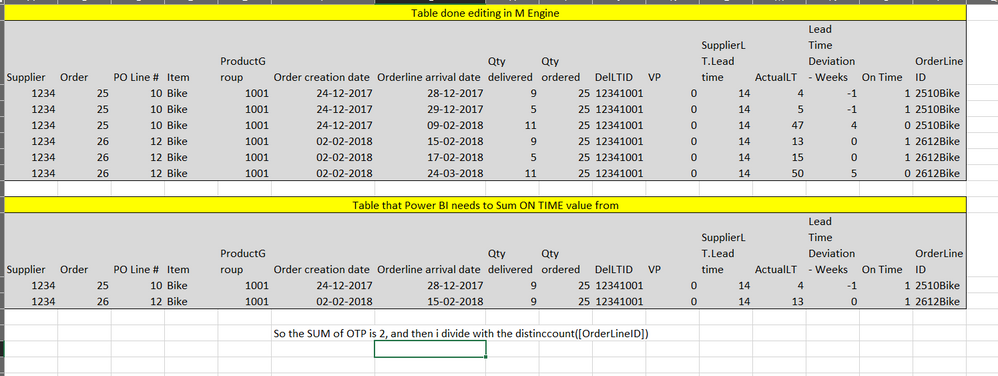
I think showing with this table might make more sense.
I need to Power BI, to basically exclude all rows, that are not the first time arrival and then sum the On Time Value.
So in this case, there are 2 orderlines, each line has been partially delivered 3 times. Some of them was on time, some where not. But i only want it to sum the On Time values from the first delivery of an order line.


- Mark as New
- Bookmark
- Subscribe
- Mute
- Subscribe to RSS Feed
- Permalink
- Report Inappropriate Content
Hi @Anonymous,
Can you provide a dataset as sample ?
Ricardo
Helpful resources

FabCon & SQLCon – Barcelona 2026
Join us in Barcelona for FabCon and SQLCon, the Fabric, Power BI, SQL, and AI community event. Save €200 with code FABCMTY200.

Data Days 2026
Join Fabric Data Days 2026: 60 days of free live/on-demand sessions, challenges, study groups, and certification opportunities.

Power BI DataViz World Championships - June 2026
A new Power BI DataViz World Championship is coming this June! Don't miss out on submitting your entry.

| User | Count |
|---|---|
| 22 | |
| 20 | |
| 17 | |
| 13 | |
| 13 |


| User | Count |
|---|---|
| 62 | |
| 41 | |
| 39 | |
| 38 | |
| 38 |


