cancel
Showing results for 
Search instead for 
Did you mean: 

Get Fabric Certified for FREE during Fabric Data Days. Don't miss your chance! Request now

Reply
Nazeem81
Helper I
Helper I

Sum of duration

I have time values in format HH:MM:SS and I would like to be able to summarize values in that format. I found code below which is working, but the format is DD:HH:MM:SS, for example 34days02:59:27.

But I dont want to show the summary in days, I want to show total hours, minutes and seconds. Instead of  34days02:59:27 it should show 818:59:27


Anyone who can help me solve this?


newDuration =

VAR TotalSeconds=SUMX('Tiddata';HOUR('Tiddata'[CopyDuration])*3600+MINUTE('Tiddata'[CopyDuration])*60+SECOND('Tiddata'[CopyDuration]))

VAR Days =TRUNC(TotalSeconds/3600/24)

VAR Hors = TRUNC((TotalSeconds-Days*3600*24)/3600)

VAR Mins =TRUNC(MOD(TotalSeconds;3600)/60)

VAR Secs = MOD(TotalSeconds;60)

return IF(DAYS=0;"";IF(DAYS>1;DAYS&"days";Days&"day"))&IF(Hors<10;"0"&Hors;Hors)&":"&IF(Mins<10;"0"&Mins;Mins)&":"&IF(Secs<10;"0"&Secs;Secs)

1 ACCEPTED SOLUTION
Anonymous
Not applicable

Try this:

newDuration =
VAR TotalSeconds =
    SUMX (
        'Tiddata';
        HOUR ( 'Tiddata'[CopyDuration] ) * 3600
            + MINUTE ( 'Tiddata'[CopyDuration] ) * 60
            + SECOND ( 'Tiddata'[CopyDuration] )
    )
VAR Hors =
    TRUNC ( TotalSeconds / 3600 )
VAR Mins =
    TRUNC ( MOD ( TotalSeconds; 3600 ) / 60 )
VAR Secs =
    MOD ( TotalSeconds; 60 )
RETURN
    IF ( Hors < 10; "0" & Hors; Hors )
        & ":"
        & IF ( Mins < 10; "0" & Mins; Mins )
        & ":"
        & IF ( Secs < 10; "0" & Secs; Secs )


I changed the Hors variable to 

VAR Hors =
TRUNC ( TotalSeconds / 3600 )

and then removed any code having to do with the Days variable.

View solution in original post

3 REPLIES 3
Nazeem81
Helper I
Helper I

Hi again,


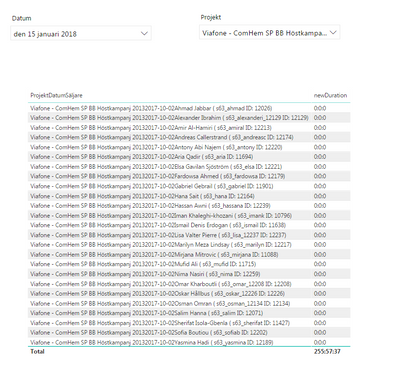
The problem I have now is that the new measure is not working with the date table I have. The total value for a specific date is correct, but in the table I can see all the all values for all dates and not only the one I selected in a filter. This is the case only for the created measu newDuration, for other measures in table Tiddata the date table is working fine. See issue in table below:


Skärmklipp.PNG


Anonymous
Not applicable

Try this:

newDuration =
VAR TotalSeconds =
    SUMX (
        'Tiddata';
        HOUR ( 'Tiddata'[CopyDuration] ) * 3600
            + MINUTE ( 'Tiddata'[CopyDuration] ) * 60
            + SECOND ( 'Tiddata'[CopyDuration] )
    )
VAR Hors =
    TRUNC ( TotalSeconds / 3600 )
VAR Mins =
    TRUNC ( MOD ( TotalSeconds; 3600 ) / 60 )
VAR Secs =
    MOD ( TotalSeconds; 60 )
RETURN
    IF ( Hors < 10; "0" & Hors; Hors )
        & ":"
        & IF ( Mins < 10; "0" & Mins; Mins )
        & ":"
        & IF ( Secs < 10; "0" & Secs; Secs )


I changed the Hors variable to 

VAR Hors =
TRUNC ( TotalSeconds / 3600 )

and then removed any code having to do with the Days variable.

Hi ChrisHaas,


It's working 🙂


This really made my day, I really needed this to start off the week right 😄


BR

Nazeem

Helpful resources

Announcements
November Power BI Update Carousel

Power BI Monthly Update - November 2025

Check out the November 2025 Power BI update to learn about new features.

Fabric Data Days Carousel

Fabric Data Days

Advance your Data & AI career with 50 days of live learning, contests, hands-on challenges, study groups & certifications and more!

FabCon Atlanta 2026 carousel

FabCon Atlanta 2026

Join us at FabCon Atlanta, March 16-20, for the ultimate Fabric, Power BI, AI and SQL community-led event. Save $200 with code FABCOMM.

Top Solution Authors
Top Kudoed Authors