Join us at FabCon Vienna from September 15-18, 2025
The ultimate Fabric, Power BI, SQL, and AI community-led learning event. Save €200 with code FABCOMM.
Get registered- Power BI forums
- Get Help with Power BI
- Desktop
- Service
- Report Server
- Power Query
- Mobile Apps
- Developer
- DAX Commands and Tips
- Custom Visuals Development Discussion
- Health and Life Sciences
- Power BI Spanish forums
- Translated Spanish Desktop
- Training and Consulting
- Instructor Led Training
- Dashboard in a Day for Women, by Women
- Galleries
- Data Stories Gallery
- Themes Gallery
- Contests Gallery
- Quick Measures Gallery
- Notebook Gallery
- Translytical Task Flow Gallery
- TMDL Gallery
- R Script Showcase
- Webinars and Video Gallery
- Ideas
- Custom Visuals Ideas (read-only)
- Issues
- Issues
- Events
- Upcoming Events
Enhance your career with this limited time 50% discount on Fabric and Power BI exams. Ends August 31st. Request your voucher.
- Power BI forums
- Forums
- Get Help with Power BI
- Desktop
- Re: Sum of a calculated column which excludes the ...
- Subscribe to RSS Feed
- Mark Topic as New
- Mark Topic as Read
- Float this Topic for Current User
- Bookmark
- Subscribe
- Printer Friendly Page


- Mark as New
- Bookmark
- Subscribe
- Mute
- Subscribe to RSS Feed
- Permalink
- Report Inappropriate Content
Sum of a calculated column which excludes the lines for which a criteria is met
Hi all,
I want to create a calculated column which will return a sum of values, excluding the lines for which a criteria is met, see below example. So if the status is "Idle" I want to have the sum of all the others statuses for the particular person on each day, if not, to return the same hours.
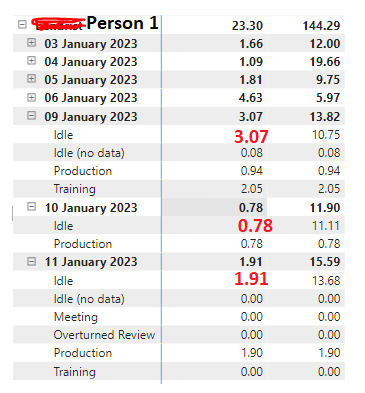
I highlighted with red the expected behaviour, I tried this formula but I get a blank:
Column1 = IF(Status[L1 Status]="Idle",CALCULATE(SUM(Status[Status Hours]),Status[L1 Status]<>"Idle"),Status[Status Hours])
Any idea on how can I fix this please ?
Thank you!
Solved! Go to Solution.


- Mark as New
- Bookmark
- Subscribe
- Mute
- Subscribe to RSS Feed
- Permalink
- Report Inappropriate Content
Hi,
Revise the "Test_Idle_Hours" calculated column formula to
Test_Idle_Hours =
IF ( [L1 Status] = "Idle",
    CALCULATE ( SUM ( 'AHP_Utilization'[Status Hours] ),
        FILTER ('AHP_Utilization',
                [L1 Status] <> "Idle"
                    && [Select Data Part] = EARLIER ('AHP_Utilization'[Select Data Part] )
        &&AHP_Utilization[Login Name]=EARLIER(AHP_Utilization[Login Name]))
    ),
    AHP_Utilization[Status Hours]
)
This is the result you will get

Regards,
Ashish Mathur
http://www.ashishmathur.com
https://www.linkedin.com/in/excelenthusiasts/
- Mark as New
- Bookmark
- Subscribe
- Mute
- Subscribe to RSS Feed
- Permalink
- Report Inappropriate Content
I am looking for a calculated column and yes the total for 9th of Jan should be 6.14
That's exactly what I am looking for and even though I used the same formula, for me it's not working:

Test_Status_Hours = IF(AHP_Utilization[L1 Status]="Idle",
    CALCULATE(SUM(AHP_Utilization[Status Hours]),
        FILTER(AHP_Utilization,
                [L1 Status]<>"Idle"
                    && [Select Data Part] = EARLIER([Select Data Part])
        )
    ),
    AHP_Utilization[Status Hours]
)
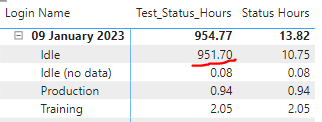
Any idea why ?
- Mark as New
- Bookmark
- Subscribe
- Mute
- Subscribe to RSS Feed
- Permalink
- Report Inappropriate Content
The formula suggested by @v-zhangti should be written as a calculated column formula (not as a measure). Make that correction and you will get your desired result.
Regards,
Ashish Mathur
http://www.ashishmathur.com
https://www.linkedin.com/in/excelenthusiasts/
- Mark as New
- Bookmark
- Subscribe
- Mute
- Subscribe to RSS Feed
- Permalink
- Report Inappropriate Content
- Mark as New
- Bookmark
- Subscribe
- Mute
- Subscribe to RSS Feed
- Permalink
- Report Inappropriate Content
Share the download link of the PBI file with the calculated column formula already written there.
Regards,
Ashish Mathur
http://www.ashishmathur.com
https://www.linkedin.com/in/excelenthusiasts/
- Mark as New
- Bookmark
- Subscribe
- Mute
- Subscribe to RSS Feed
- Permalink
- Report Inappropriate Content
- Mark as New
- Bookmark
- Subscribe
- Mute
- Subscribe to RSS Feed
- Permalink
- Report Inappropriate Content
Hi,
Revise the "Test_Idle_Hours" calculated column formula to
Test_Idle_Hours =
IF ( [L1 Status] = "Idle",
    CALCULATE ( SUM ( 'AHP_Utilization'[Status Hours] ),
        FILTER ('AHP_Utilization',
                [L1 Status] <> "Idle"
                    && [Select Data Part] = EARLIER ('AHP_Utilization'[Select Data Part] )
        &&AHP_Utilization[Login Name]=EARLIER(AHP_Utilization[Login Name]))
    ),
    AHP_Utilization[Status Hours]
)
This is the result you will get
Regards,
Ashish Mathur
http://www.ashishmathur.com
https://www.linkedin.com/in/excelenthusiasts/
- Mark as New
- Bookmark
- Subscribe
- Mute
- Subscribe to RSS Feed
- Permalink
- Report Inappropriate Content
Thank you very much, appreciate your help !
- Mark as New
- Bookmark
- Subscribe
- Mute
- Subscribe to RSS Feed
- Permalink
- Report Inappropriate Content
You are welcome.
Regards,
Ashish Mathur
http://www.ashishmathur.com
https://www.linkedin.com/in/excelenthusiasts/
- Mark as New
- Bookmark
- Subscribe
- Mute
- Subscribe to RSS Feed
- Permalink
- Report Inappropriate Content
Hi,
Are you looking at a calculated column formula solution or a measure solution? Also, what should the total at the day level be? So for Jan 9, 2023, should the answer be 6.14?
Regards,
Ashish Mathur
http://www.ashishmathur.com
https://www.linkedin.com/in/excelenthusiasts/


- Mark as New
- Bookmark
- Subscribe
- Mute
- Subscribe to RSS Feed
- Permalink
- Report Inappropriate Content
Hi, @Bratone
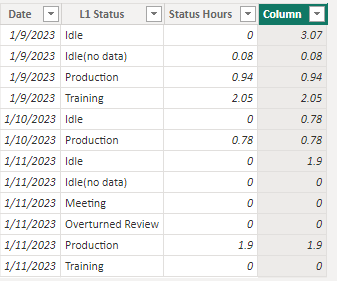
You can try the following methods.
Column =
IF ( [L1 Status] = "Idle",
     CALCULATE ( SUM ( 'Status'[Status Hours] ),
        FILTER ('Status',
            [L1 Status] <> "Idle"
                && [Date] = EARLIER ( 'Status'[Date] )
        )
    ),
    [Status Hours]
)
Result:
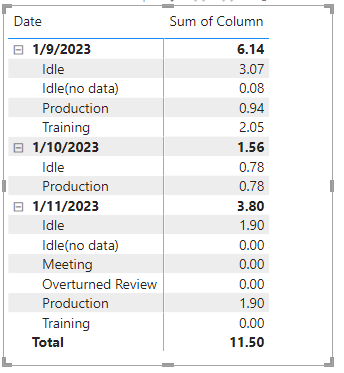
Is this the result you expect?
Best Regards,
Community Support Team _Charlotte
If this post helps, then please consider Accept it as the solution to help the other members find it more quickly.

Helpful resources

Fabric Community Update - July 2025
Find out what's new and trending in the Fabric community.

Power BI Monthly Update - July 2025
Check out the July 2025 Power BI update to learn about new features.

| User | Count |
|---|---|
| 78 | |
| 74 | |
| 42 | |
| 32 | |
| 28 |


| User | Count |
|---|---|
| 104 | |
| 93 | |
| 52 | |
| 50 | |
| 46 |


