New Offer! Become a Certified Fabric Data Engineer
Check your eligibility for this 50% exam voucher offer and join us for free live learning sessions to get prepared for Exam DP-700.
Get Started- Power BI forums
- Get Help with Power BI
- Desktop
- Service
- Report Server
- Power Query
- Mobile Apps
- Developer
- DAX Commands and Tips
- Custom Visuals Development Discussion
- Health and Life Sciences
- Power BI Spanish forums
- Translated Spanish Desktop
- Training and Consulting
- Instructor Led Training
- Dashboard in a Day for Women, by Women
- Galleries
- Community Connections & How-To Videos
- COVID-19 Data Stories Gallery
- Themes Gallery
- Data Stories Gallery
- R Script Showcase
- Webinars and Video Gallery
- Quick Measures Gallery
- 2021 MSBizAppsSummit Gallery
- 2020 MSBizAppsSummit Gallery
- 2019 MSBizAppsSummit Gallery
- Events
- Ideas
- Custom Visuals Ideas
- Issues
- Issues
- Events
- Upcoming Events
Don't miss out! 2025 Microsoft Fabric Community Conference, March 31 - April 2, Las Vegas, Nevada. Use code MSCUST for a $150 discount. Prices go up February 11th. Register now.
- Power BI forums
- Forums
- Get Help with Power BI
- Desktop
- Re: Sum of X Days - X days should be a variable
- Subscribe to RSS Feed
- Mark Topic as New
- Mark Topic as Read
- Float this Topic for Current User
- Bookmark
- Subscribe
- Printer Friendly Page

- Mark as New
- Bookmark
- Subscribe
- Mute
- Subscribe to RSS Feed
- Permalink
- Report Inappropriate Content
Sum of X Days - X days should be a variable
Hello,
i have the following problem.
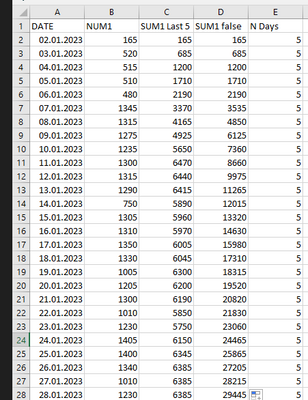
I want to have to SUM of the last 5 days from "Num1". Including the current day
"SUM1 LAST 5" ist the result, which i calculated in excel...but i need this one in power bi...
I used the following code for "SUM1 false", but it only sums up everything:
Solved! Go to Solution.
- Mark as New
- Bookmark
- Subscribe
- Mute
- Subscribe to RSS Feed
- Permalink
- Report Inappropriate Content
I've tried it and i'm getting the following error:
"A ring dependency was detected: Table1[Previous5DaySum], Table1[Sum Running Total], Table1[Previous5DaySum]."
This is the code:


- Mark as New
- Bookmark
- Subscribe
- Mute
- Subscribe to RSS Feed
- Permalink
- Report Inappropriate Content
- Mark as New
- Bookmark
- Subscribe
- Mute
- Subscribe to RSS Feed
- Permalink
- Report Inappropriate Content
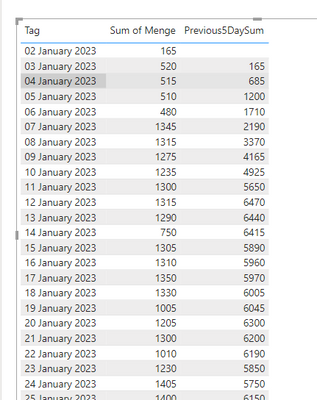
Pardon Sir - i've added you the table. Is this ok?
| Tag | Menge | Circulation | Circulation false | N Days |
| 02.01.2023 | 165 | 165 | 165 | 5 |
| 03.01.2023 | 520 | 685 | 685 | 5 |
| 04.01.2023 | 515 | 1200 | 1200 | 5 |
| 05.01.2023 | 510 | 1710 | 1710 | 5 |
| 06.01.2023 | 480 | 2190 | 2190 | 5 |
| 07.01.2023 | 1345 | 3370 | 3535 | 5 |
| 08.01.2023 | 1315 | 4165 | 4850 | 5 |
| 09.01.2023 | 1275 | 4925 | 6125 | 5 |
| 10.01.2023 | 1235 | 5650 | 7360 | 5 |
| 11.01.2023 | 1300 | 6470 | 8660 | 5 |
| 12.01.2023 | 1315 | 6440 | 9975 | 5 |
| 13.01.2023 | 1290 | 6415 | 11265 | 5 |
| 14.01.2023 | 750 | 5890 | 12015 | 5 |
| 15.01.2023 | 1305 | 5960 | 13320 | 5 |
| 16.01.2023 | 1310 | 5970 | 14630 | 5 |
| 17.01.2023 | 1350 | 6005 | 15980 | 5 |
| 18.01.2023 | 1330 | 6045 | 17310 | 5 |
| 19.01.2023 | 1005 | 6300 | 18315 | 5 |
| 20.01.2023 | 1205 | 6200 | 19520 | 5 |
| 21.01.2023 | 1300 | 6190 | 20820 | 5 |
| 22.01.2023 | 1010 | 5850 | 21830 | 5 |
| 23.01.2023 | 1230 | 5750 | 23060 | 5 |
| 24.01.2023 | 1405 | 6150 | 24465 | 5 |
| 25.01.2023 | 1400 | 6345 | 25865 | 5 |
| 26.01.2023 | 1340 | 6385 | 27205 | 5 |
| 27.01.2023 | 1010 | 6385 | 28215 | 5 |
| 28.01.2023 | 1230 | 6385 | 29445 | 5 |
| 29.01.2023 | 1405 | 6385 | 30850 | 5 |
| 30.01.2023 | 1400 | 6385 | 32250 | 5 |
| 31.01.2023 | 1340 | 6385 | 33590 | 5 |
| 01.02.2023 | 1405 | 6780 | 34995 | 5 |
| 02.02.2023 | 1400 | 6950 | 36395 | 5 |
| 03.02.2023 | 1340 | 6885 | 37735 | 5 |
- Mark as New
- Bookmark
- Subscribe
- Mute
- Subscribe to RSS Feed
- Permalink
- Report Inappropriate Content
@SHenryy
You can create What-If parameters for the dynamic value of Days (i.e. X).
Please see this link.
Then you can create the following DAX measure:
Previous5DaySum =
VAR CurrentDate = LASTDATE(table[DATE])
RETURN
CALCULATE(
    SUM(table[NUM1]),
    DATESBETWEEN(table[date], CurrentDate - [Parameter that you created], CurrentDate - 1)
)
Please let me know if this didn't work.
- Mark as New
- Bookmark
- Subscribe
- Mute
- Subscribe to RSS Feed
- Permalink
- Report Inappropriate Content
I've tried it and i'm getting the following error:
"A ring dependency was detected: Table1[Previous5DaySum], Table1[Sum Running Total], Table1[Previous5DaySum]."
This is the code:
- Mark as New
- Bookmark
- Subscribe
- Mute
- Subscribe to RSS Feed
- Permalink
- Report Inappropriate Content
- Mark as New
- Bookmark
- Subscribe
- Mute
- Subscribe to RSS Feed
- Permalink
- Report Inappropriate Content
This is an old collumn...which i dont use anymore? should i delete it?
- Mark as New
- Bookmark
- Subscribe
- Mute
- Subscribe to RSS Feed
- Permalink
- Report Inappropriate Content
i deleted all unnessary collumns.
But as a result my "Previous5DaySum" is now empty
- Mark as New
- Bookmark
- Subscribe
- Mute
- Subscribe to RSS Feed
- Permalink
- Report Inappropriate Content
- Mark as New
- Bookmark
- Subscribe
- Mute
- Subscribe to RSS Feed
- Permalink
- Report Inappropriate Content
True - but which kind of code did you use?
- Mark as New
- Bookmark
- Subscribe
- Mute
- Subscribe to RSS Feed
- Permalink
- Report Inappropriate Content
Yes, but it should already start in 2.Jan
- Mark as New
- Bookmark
- Subscribe
- Mute
- Subscribe to RSS Feed
- Permalink
- Report Inappropriate Content
@SHenryy , but it doesn't have any data before that, so how would it give any value?
- Mark as New
- Bookmark
- Subscribe
- Mute
- Subscribe to RSS Feed
- Permalink
- Report Inappropriate Content
@SHenryy
I created the following DAX measure:
Previous5DaySum =
VAR CurrentDate = LASTDATE('Tabelle1'[Tag])
RETURN
CALCULATE(
    SUM('Tabelle1'[Menge]),
    DATESBETWEEN('Tabelle1'[Tag], CurrentDate - 5, CurrentDate - 1)
)- Mark as New
- Bookmark
- Subscribe
- Mute
- Subscribe to RSS Feed
- Permalink
- Report Inappropriate Content
pardon sir, how did you created this table?
- Mark as New
- Bookmark
- Subscribe
- Mute
- Subscribe to RSS Feed
- Permalink
- Report Inappropriate Content


- Mark as New
- Bookmark
- Subscribe
- Mute
- Subscribe to RSS Feed
- Permalink
- Report Inappropriate Content
Hi @SHenryy ,
Please post a sample data that one can easily copy-paste (not an image) and your expected result. Also I don't see Menge and Tag columns in your screenshot.
Did I answer your question? Mark my post as a solution!
Proud to be a Super User!
"Tell me and I’ll forget; show me and I may remember; involve me and I’ll understand."
Need Power BI consultation, get in touch with me on LinkedIn or hire me on UpWork.
Learn with me on YouTube @DAXJutsu or follow my page on Facebook @DAXJutsuPBI.

Helpful resources

Join us at the Microsoft Fabric Community Conference
March 31 - April 2, 2025, in Las Vegas, Nevada. Use code MSCUST for a $150 discount! Prices go up Feb. 11th.

Power BI Monthly Update - January 2025
Check out the January 2025 Power BI update to learn about new features in Reporting, Modeling, and Data Connectivity.

Fabric Community Update - January 2025
Find out what's new and trending in the Fabric community.

| User | Count |
|---|---|
| 147 | |
| 85 | |
| 66 | |
| 52 | |
| 46 |


| User | Count |
|---|---|
| 215 | |
| 90 | |
| 83 | |
| 66 | |
| 58 |


