cancel
Showing results for 
Search instead for 
Did you mean: 

The Power BI Data Visualization World Championships is back! Get ahead of the game and start preparing now! Learn more

Reply
Ash_za
New Member

Sum of Units by DAY

Hi everyone, 

New to the community and hoping to get some assistance on a problem I am facing.

I have a Table which consists of outbound information, various columns, but the below headings are most important for the problem I have:


Delivery Number
Material Number
Document Date
Document Time
Movement Date

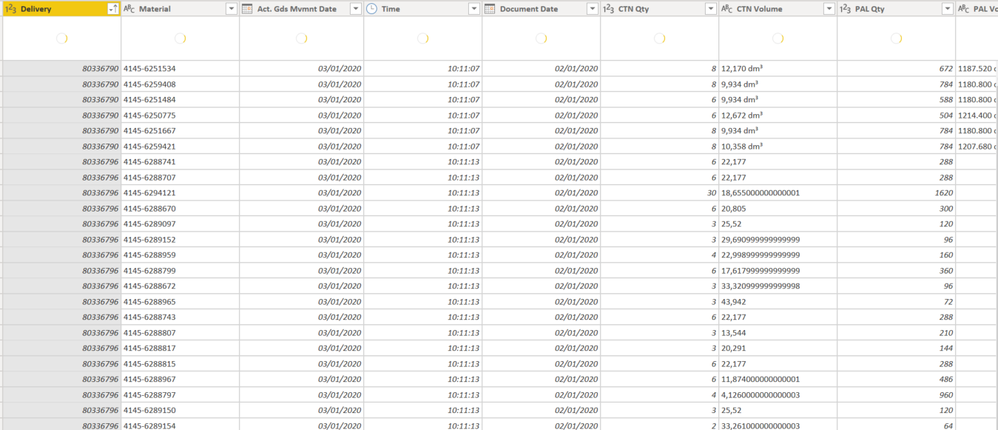
It looks like this:
Ash_za_1-1601412049409.png


As you can see, the delivery number expands per part number. I created a Merge between Material database and Outbound report to bring in the number of pieces within a carton. This was fine.

However, my problem is trying to isolate the number of cartons per DAY. Reason being is we have different measures of time for various amounts of cargo:


- If less than xxxx amount of cartons ordered prior 11:00 AM then days to ship = 0. 
- If more than xxxx and less than yyyy cartons ordered prior to 11:00 AM then days to ship = 1

And so on and so forth. 

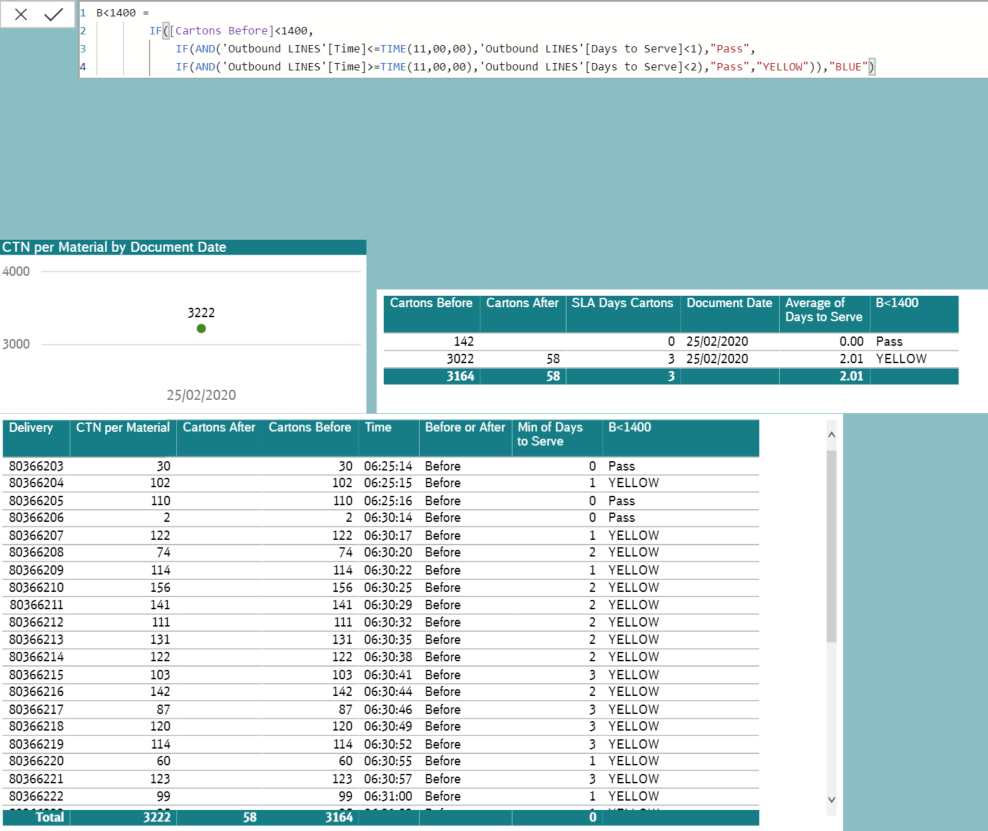
However, if I attempt to sum the amount of cartons received prior to 11:00am it gives me for ALL days, which of course stops my IF statements from working (please excuse all the visuals, my various attempts at getting this right (the condensed table gives me an accurate read on SLA by day:
 

Ash_za_3-1601413763799.png


I created a reference table using the outbound information, extracting the order date (Doc Date) and Cartons. I then grouped cartons by date and created a relationship using Document Date from them but I do not get the desired result. 

Apologies if this post is all over the place, I have been struggling for almost 11 hours with this now.

End Result - Dynamic Target Days based on Order TIME and Quantity of Cartons.

1 ACCEPTED SOLUTION
v-jingzhang
Community Support
Community Support

 You may create a measure like below to calculate the amount of CTN.

Sum per day = CALCULATE(SUM(Delivery[CTN Qty]),ALLEXCEPT(Delivery,Delivery[Document Date]))


When using ALLEXCEPT function, it will keep the filters on Date and remove all filters on other fields. Then you can use this measure in other measures to get what you need. Please take care about the filtered context for evaluating the measures.


Documentations in case you need: 

https://docs.microsoft.com/en-us/dax/allexcept-function-dax

https://dax.guide/allexcept/


View solution in original post

2 REPLIES 2
v-jingzhang
Community Support
Community Support

 You may create a measure like below to calculate the amount of CTN.

Sum per day = CALCULATE(SUM(Delivery[CTN Qty]),ALLEXCEPT(Delivery,Delivery[Document Date]))


When using ALLEXCEPT function, it will keep the filters on Date and remove all filters on other fields. Then you can use this measure in other measures to get what you need. Please take care about the filtered context for evaluating the measures.


Documentations in case you need: 

https://docs.microsoft.com/en-us/dax/allexcept-function-dax

https://dax.guide/allexcept/


Thank you so much!!

Helpful resources

Announcements
Power BI DataViz World Championships

Power BI Dataviz World Championships

The Power BI Data Visualization World Championships is back! Get ahead of the game and start preparing now!

December 2025 Power BI Update Carousel

Power BI Monthly Update - December 2025

Check out the December 2025 Power BI Holiday Recap!

FabCon Atlanta 2026 carousel

FabCon Atlanta 2026

Join us at FabCon Atlanta, March 16-20, for the ultimate Fabric, Power BI, AI and SQL community-led event. Save $200 with code FABCOMM.