cancel
Showing results for 
Search instead for 
Did you mean: 

The Power BI Data Visualization World Championships is back! Get ahead of the game and start preparing now! Learn more

Reply
diegocprado
Regular Visitor

Sum of Moving Averages for a Card Visual

Hi, I'm using the Moving Average as a Goal for my Entrances data for a association program. I also need it to be dynamically filtered by Source/Medium (facebook, google, email...), that the user select in the Dashboard.


I'm using the following code to calculate this Moving Average, and it's working nice in Time Series Visuals:


MM Entrances = 

//Selecting the date in the range
VAR _LastDate =
    MAX ( 'Date'[Date] )

//Defining the duration to be considered for average calcualtion
VAR _Duration = [Duration Calculation]

//Filtering the Calendar Table for the defined range
VAR _CalculationPeriod =
    FILTER (
        ALL ( 'Date'[Date] ),                            -- Removing any external filter context applied
        AND (
            'Date'[Date] > _LastDate - _Duration,  -- Calculate the range start date
            'Date'[Date] <= _LastDate              -- Calcualte the range end date
        )
    )

//Calculating the Moving Average
VAR _MovingAverage =
    
        CALCULATE (
            AVERAGEX('Date',[Total Entrances]),  --Calculating average of the total value
            _CalculationPeriod,
            ALLEXCEPT('Funnel','Funnel'[Source/ Medium])
        )
    
RETURN
    _MovingAverage


My Graphic is all-right with this: Captura de tela 2021-09-26 015342.png

 

But i need it to also be in a Card Visual, and it's showing the Moving Average for the Last Date.


I need to get the SUM of all Moving Averages for the selected Period in order to make it work.

My thoughts right now are: I should have a virtual table to summarize the filtered data for Entrances, by date, in a column, and then calculate the Moving Average by day in another column. So i can SUM the Moving Averages and show it in a card.

I have failed in all my atempts to do so. And it may be a easier way to do it.. Can you please help my and my team the way out of this problem? 


3 REPLIES 3
Anonymous
Not applicable

Hi @diegocprado ,


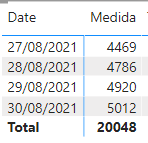
I think 20048 is the sum of all value in 27/08/2021-30/08/2021. But without some data sample, I could not clarify your scenario. You could try to use ISINSCOPE() to change the total value.

Eyelyn9_0-1632810585443.png

Or provide some data about your tables or share me with your pbix file after removing sensitive data.


Best Regards,
Eyelyn Qin
If this post helps, then please consider Accept it as the solution to help the other members find it more quickly.

Fowmy
Super User
Super User

@diegocprado 

Can you try the following measure which is a modification to yours?

MM Entrances =
VAR _LastDate =
    MAX ( 'Date'[Date] )
VAR _Duration = [Duration Calculation]
VAR _CalculationPeriod =
    DATESINPERIOD ( 'Date'[Date], _LastDate, - _Duration, MONTH )
VAR _MovingAverage =
    CALCULATE (
        AVERAGEX ( VALUES ('Date'[Date] ), [Total Entrances] ),
        _CalculationPeriod,
        ALLEXCEPT ( 'Funnel', 'Funnel'[Source/ Medium] )
    )
RETURN
    _MovingAverage
Did I answer your question? Mark my post as a solution! and hit thumbs up


Subscribe and learn Power BI from these videos

Website LinkedIn PBI User Group

It made the same thing as my previous one..

I've almost got a solution here: 

Medida = 

//Selecting the date in the range
VAR _LastDate =
    MAX ( 'Date'[Date] )

//Defining the duration to be considered for average calcualtion
VAR _Duration = [Days to MM]

//Filtering the Calendar Table for the defined range
VAR _CalculationPeriod =
    FILTER (
        ALL ( 'Date'[Date] ),                            -- Removing any external filter context applied
        AND (
            'Date'[Date] > _LastDate - _Duration,  -- Calculate the range start date
            'Date'[Date] <= _LastDate              -- Calcualte the range end date
        )
    )

//Calculating the Moving Average
VAR _MovingAverage =
    
        CALCULATE (
            AVERAGEX('Date',[Total NU]),  --Calculating average of the total value
            _CalculationPeriod,
            ALLEXCEPT('Funnel', 'Funnel'[Source/Medium])
        )

return

sumx(
    SUMMARIZE(
        'Funnel',
        'Funnel'[Date],
        "MM NU", 
        _MovingAverage),
        [MM NU])


But for some reason, the sum of the Data from de Measure is diferent from the real number (if you sum it manually, offline).
Captura de tela 2021-09-26 061913.png It should SUM less than 20.000

Helpful resources

Announcements
Power BI DataViz World Championships

Power BI Dataviz World Championships

The Power BI Data Visualization World Championships is back! Get ahead of the game and start preparing now!

December 2025 Power BI Update Carousel

Power BI Monthly Update - December 2025

Check out the December 2025 Power BI Holiday Recap!

FabCon Atlanta 2026 carousel

FabCon Atlanta 2026

Join us at FabCon Atlanta, March 16-20, for the ultimate Fabric, Power BI, AI and SQL community-led event. Save $200 with code FABCOMM.