- Power BI forums
- Get Help with Power BI
- Desktop
- Service
- Report Server
- Power Query
- Mobile Apps
- Developer
- DAX Commands and Tips
- Custom Visuals Development Discussion
- Health and Life Sciences
- Power BI Spanish forums
- Translated Spanish Desktop
- Training and Consulting
- Instructor Led Training
- Dashboard in a Day for Women, by Women
- Galleries
- Data Stories Gallery
- Themes Gallery
- Contests Gallery
- QuickViz Gallery
- Quick Measures Gallery
- Visual Calculations Gallery
- Notebook Gallery
- Translytical Task Flow Gallery
- TMDL Gallery
- R Script Showcase
- Webinars and Video Gallery
- Ideas
- Custom Visuals Ideas (read-only)
- Issues
- Issues
- Events
- Upcoming Events
Learn from the best! Meet the four finalists headed to the FINALS of the Power BI Dataviz World Championships! Register now
- Power BI forums
- Forums
- Get Help with Power BI
- Desktop
- Re: Sum hours
- Subscribe to RSS Feed
- Mark Topic as New
- Mark Topic as Read
- Float this Topic for Current User
- Bookmark
- Subscribe
- Printer Friendly Page

- Mark as New
- Bookmark
- Subscribe
- Mute
- Subscribe to RSS Feed
- Permalink
- Report Inappropriate Content
Sum hours
Hello everyone!
I need to get the sum of hours in a given field and I know that the total sum that exceeds 24 hours .
I've tried using the code below , but it didn't work:
Column = (LEFT([HE];FIND(":";[HE])-1)*60+RIGHT([HE];LEN([HE])-FIND(":";[HE]))*1)/60
Where [HE] = hours
Can anyone help me?
Thank you in advance
Solved! Go to Solution.


- Mark as New
- Bookmark
- Subscribe
- Mute
- Subscribe to RSS Feed
- Permalink
- Report Inappropriate Content
Hi,
For example, you have a table like below, the “time” column is date type:
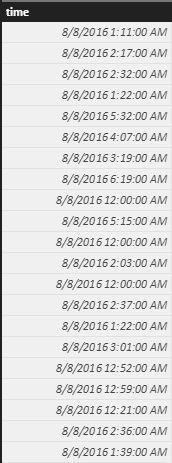
You can create a measure :
Measure = sumx('table', hour('table'[time])) + TRUNC(sumx('table', MINUTE('table'[time]))/60) & ":" & mod(sumx('table', MINUTE('table'[time])), 60) & ":00"
The result is what you want:
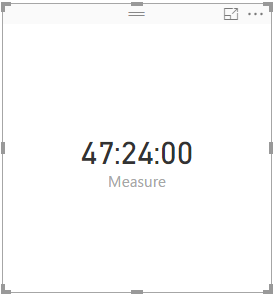
- Mark as New
- Bookmark
- Subscribe
- Mute
- Subscribe to RSS Feed
- Permalink
- Report Inappropriate Content
Hi,
For example, you have a table like below, the “time” column is date type:
You can create a measure :
Measure = sumx('table', hour('table'[time])) + TRUNC(sumx('table', MINUTE('table'[time]))/60) & ":" & mod(sumx('table', MINUTE('table'[time])), 60) & ":00"
The result is what you want:
- Mark as New
- Bookmark
- Subscribe
- Mute
- Subscribe to RSS Feed
- Permalink
- Report Inappropriate Content
Thanks for the solution. It worked fine for me, but I had to make a minor adjustment:
When it resulted rounded hours, the minutes showed up without a leading zero, such as "15:0:00", hence I adjusted it as below.
Duration =
sumx('table', hour('table'[time])) + TRUNC(sumx(Base_Pautas; MINUTE(Base_Pautas[Duração Real]))/60)  & ":" &
 mod(sumx('table', MINUTE('table'[time])); 60) &
 IF(len(mod(sumx(Base_Pautas; MINUTE('table', MINUTE('table'[time])); 60))>1;":00";"0:00")


- Mark as New
- Bookmark
- Subscribe
- Mute
- Subscribe to RSS Feed
- Permalink
- Report Inappropriate Content
- Mark as New
- Bookmark
- Subscribe
- Mute
- Subscribe to RSS Feed
- Permalink
- Report Inappropriate Content


- Mark as New
- Bookmark
- Subscribe
- Mute
- Subscribe to RSS Feed
- Permalink
- Report Inappropriate Content
Hi @Thiago
maybe this thread can help you
http://community.powerbi.com/t5/Desktop/Duration-Troubles/m-p/44560/highlight/true#M17204
Lima - Peru
- Mark as New
- Bookmark
- Subscribe
- Mute
- Subscribe to RSS Feed
- Permalink
- Report Inappropriate Content
Hi @Vvelarde! Thanks for the answer!
It didn't work!
I tried to implement, but the result was not expected.
See example below, where the total should be 47 hours and 24 minutes. When I used your code, the result was almost 633 hours!
I believe it has some configuration that I have not learned to use..
HE
01:11:00
02:17:00
02:32:00
01:22:00
05:32:00
04:07:00
03:19:00
06:19:00
00:00:00
05:15:00
00:00:00
02:03:00
00:00:00
02:37:00
01:22:00
03:01:00
00:52:00
00:59:00
00:21:00
02:36:00
01:39:00
47:24:00
- Mark as New
- Bookmark
- Subscribe
- Mute
- Subscribe to RSS Feed
- Permalink
- Report Inappropriate Content
Seems quite possible there is a better way to do this, but... I do think this will "work"
MyMeasure = 24 * sumx(Table1, round(Table1[MyTime],99))
MyTime was a DateTime type for me (not a string), and I'm just using round to force it into a floating point number (where 1.0 is a full day).

Helpful resources

Power BI DataViz World Championships - June 2026
A new Power BI DataViz World Championship is coming this June! Don't miss out on submitting your entry.

Join our Fabric User Panel
Share feedback directly with Fabric product managers, participate in targeted research studies and influence the Fabric roadmap.

Power BI Community Update - March 2026
Check out the March 2026 Power BI update to learn about new features.

| User | Count |
|---|---|
| 52 | |
| 34 | |
| 34 | |
| 19 | |
| 17 |


| User | Count |
|---|---|
| 64 | |
| 64 | |
| 41 | |
| 27 | |
| 24 |


