Join us at FabCon Atlanta from March 16 - 20, 2026, for the ultimate Fabric, Power BI, AI and SQL community-led event. Save $200 with code FABCOMM.
Register now!The Power BI Data Visualization World Championships is back! Get ahead of the game and start preparing now! Learn more
Hi there,
I want to create a custom column in which i sum a range of columns from the dataset. It needs to be a range, as the it will be a generic report which needs to be able to handle different csv files, all with a variation of columns (different names and amounts)
Currently my dataset contains 116 rows and i need to sum everything but the first one (2:116).
with R-script it is possible, but powerBI returns an error. i used the following script:
dataset$new <- rowSums(dataset[2:116], na.rm=TRUE)
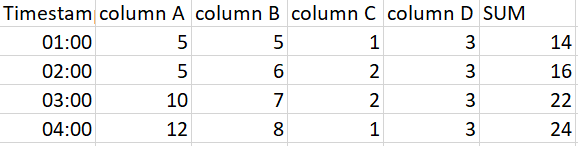
R-script is not preferable, but more of backup option. Is there a way to reach the same result but without R? I dont want to use the columns names, but the number. in the picture below: 2 through 5, not column A + column B + etc.
example dataset:
Solved! Go to Solution.
Hi @Anonymous,
Please try below steps.
1. Select [TimeStamp] column then Unpivot other columns.
2. Add a custom column.
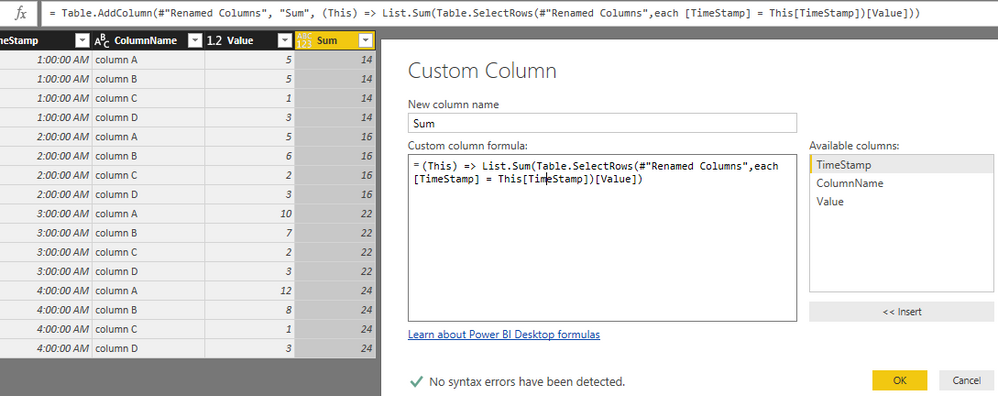
3. Pivot table to convert it to original structure.
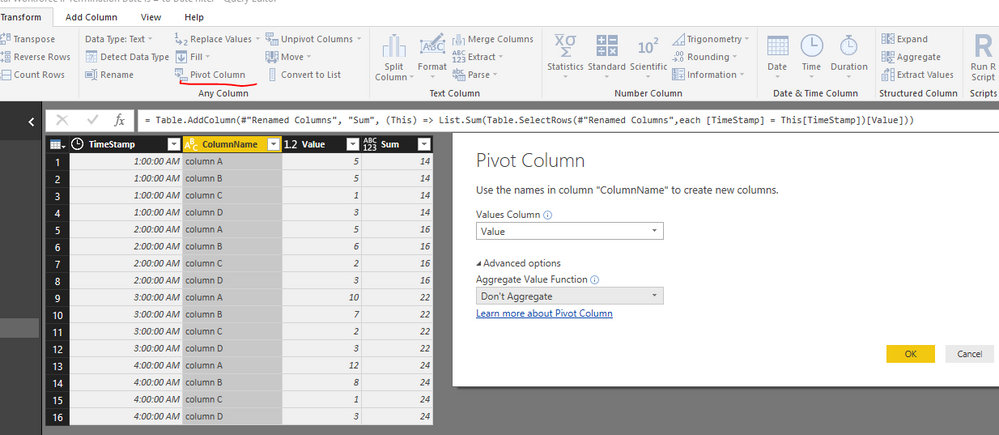
Power Query reference:
let
Source = Excel.Workbook(File.Contents("C:\Users\xxxx\Desktop\Sample Data.xlsx"), null, true),
Test4_Sheet = Source{[Item="Test4",Kind="Sheet"]}[Data],
#"Promoted Headers" = Table.PromoteHeaders(Test4_Sheet, [PromoteAllScalars=true]),
#"Changed Type" = Table.TransformColumnTypes(#"Promoted Headers",{{"TimeStamp", type time}, {"column A", Int64.Type}, {"column B", Int64.Type}, {"column C", Int64.Type}, {"column D", Int64.Type}}),
#"Unpivoted Other Columns" = Table.UnpivotOtherColumns(#"Changed Type", {"TimeStamp"}, "Attribute", "Value"),
#"Renamed Columns" = Table.RenameColumns(#"Unpivoted Other Columns",{{"Attribute", "ColumnName"}}),
#"Added Custom" = Table.AddColumn(#"Renamed Columns", "Sum", (This) => List.Sum(Table.SelectRows(#"Renamed Columns",each [TimeStamp] = This[TimeStamp])[Value])),
#"Pivoted Column" = Table.Pivot(#"Added Custom", List.Distinct(#"Added Custom"[ColumnName]), "ColumnName", "Value")
in
#"Pivoted Column"
Result.

Best regards,
Yuliana Gu
Hi @Anonymous,
Please try below steps.
1. Select [TimeStamp] column then Unpivot other columns.
2. Add a custom column.
3. Pivot table to convert it to original structure.
Power Query reference:
let
Source = Excel.Workbook(File.Contents("C:\Users\xxxx\Desktop\Sample Data.xlsx"), null, true),
Test4_Sheet = Source{[Item="Test4",Kind="Sheet"]}[Data],
#"Promoted Headers" = Table.PromoteHeaders(Test4_Sheet, [PromoteAllScalars=true]),
#"Changed Type" = Table.TransformColumnTypes(#"Promoted Headers",{{"TimeStamp", type time}, {"column A", Int64.Type}, {"column B", Int64.Type}, {"column C", Int64.Type}, {"column D", Int64.Type}}),
#"Unpivoted Other Columns" = Table.UnpivotOtherColumns(#"Changed Type", {"TimeStamp"}, "Attribute", "Value"),
#"Renamed Columns" = Table.RenameColumns(#"Unpivoted Other Columns",{{"Attribute", "ColumnName"}}),
#"Added Custom" = Table.AddColumn(#"Renamed Columns", "Sum", (This) => List.Sum(Table.SelectRows(#"Renamed Columns",each [TimeStamp] = This[TimeStamp])[Value])),
#"Pivoted Column" = Table.Pivot(#"Added Custom", List.Distinct(#"Added Custom"[ColumnName]), "ColumnName", "Value")
in
#"Pivoted Column"
Result.
Best regards,
Yuliana Gu
Hi Yuliana,
Thank you thatshould work the way i want it too. Little question though, in your code you use "(this)", can you explain what that does?
I also found a way to do it with R-script without any errors:
let
Source = Source,
#"Removed Other Columns" = Table.SelectColumns(Source, ListColumns),
#"Run R Script" = R.Execute("dataset$Total <- as.integer(rowSums(dataset[2:"&Parameter&"], na.rm = TRUE))#(lf)temp <- as.vector(c(""Timestamp"", ""Total""))#(lf)dataset <- dataset[, temp]#(lf)output <- dataset",[dataset=#"Removed Other Columns"]),
#"""output""" = #"Run R Script"{[Name="output"]}[Value]
in
#"""output"""I use a parameter to handle the dynamic part of the report. Meaning that whenever the user connects to the report he/she will first fill in how many products there are present in the dataset. Using the parameter only works when i fill it in through the advanced editor, not in the r-script window.
I first load the source query, filter out the products that i don't need (using a list will ensure it will always work, independent from the amount or names of the product). Then i create a new column (Total) which holds the sum of all columns between column 2 and the parameter.
Depending on the goal of the file both solutions seem to work, i did not test speed or performance impact.
I hope this will also help other people who encounter simulair problems 🙂
The Power BI Data Visualization World Championships is back! Get ahead of the game and start preparing now!
| User | Count |
|---|---|
| 41 | |
| 38 | |
| 36 | |
| 31 | |
| 28 |
| User | Count |
|---|---|
| 128 | |
| 88 | |
| 79 | |
| 68 | |
| 63 |