Learn from the best! Meet the four finalists headed to the FINALS of the Power BI Dataviz World Championships! Register now
Hi there,
I want to create a custom column in which i sum a range of columns from the dataset. It needs to be a range, as the it will be a generic report which needs to be able to handle different csv files, all with a variation of columns (different names and amounts)
Currently my dataset contains 116 rows and i need to sum everything but the first one (2:116).
with R-script it is possible, but powerBI returns an error. i used the following script:
dataset$new <- rowSums(dataset[2:116], na.rm=TRUE)
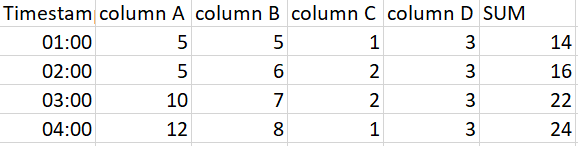
R-script is not preferable, but more of backup option. Is there a way to reach the same result but without R? I dont want to use the columns names, but the number. in the picture below: 2 through 5, not column A + column B + etc.
example dataset:
Solved! Go to Solution.
Hi @Anonymous,
Please try below steps.
1. Select [TimeStamp] column then Unpivot other columns.
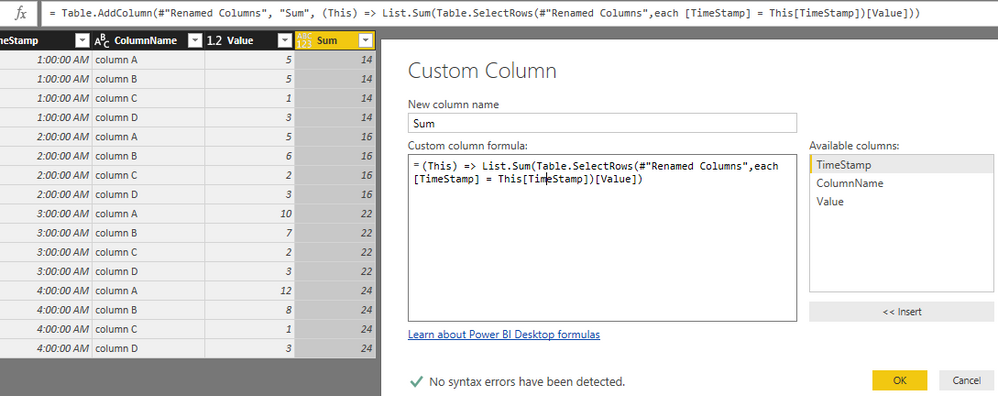
2. Add a custom column.
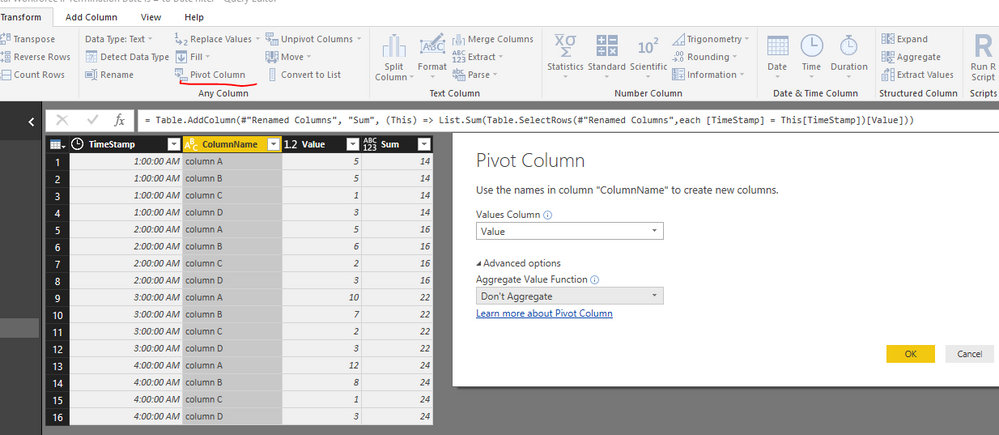
3. Pivot table to convert it to original structure.
Power Query reference:
let
Source = Excel.Workbook(File.Contents("C:\Users\xxxx\Desktop\Sample Data.xlsx"), null, true),
Test4_Sheet = Source{[Item="Test4",Kind="Sheet"]}[Data],
#"Promoted Headers" = Table.PromoteHeaders(Test4_Sheet, [PromoteAllScalars=true]),
#"Changed Type" = Table.TransformColumnTypes(#"Promoted Headers",{{"TimeStamp", type time}, {"column A", Int64.Type}, {"column B", Int64.Type}, {"column C", Int64.Type}, {"column D", Int64.Type}}),
#"Unpivoted Other Columns" = Table.UnpivotOtherColumns(#"Changed Type", {"TimeStamp"}, "Attribute", "Value"),
#"Renamed Columns" = Table.RenameColumns(#"Unpivoted Other Columns",{{"Attribute", "ColumnName"}}),
#"Added Custom" = Table.AddColumn(#"Renamed Columns", "Sum", (This) => List.Sum(Table.SelectRows(#"Renamed Columns",each [TimeStamp] = This[TimeStamp])[Value])),
#"Pivoted Column" = Table.Pivot(#"Added Custom", List.Distinct(#"Added Custom"[ColumnName]), "ColumnName", "Value")
in
#"Pivoted Column"
Result.

Best regards,
Yuliana Gu
Hi @Anonymous,
Please try below steps.
1. Select [TimeStamp] column then Unpivot other columns.
2. Add a custom column.
3. Pivot table to convert it to original structure.
Power Query reference:
let
Source = Excel.Workbook(File.Contents("C:\Users\xxxx\Desktop\Sample Data.xlsx"), null, true),
Test4_Sheet = Source{[Item="Test4",Kind="Sheet"]}[Data],
#"Promoted Headers" = Table.PromoteHeaders(Test4_Sheet, [PromoteAllScalars=true]),
#"Changed Type" = Table.TransformColumnTypes(#"Promoted Headers",{{"TimeStamp", type time}, {"column A", Int64.Type}, {"column B", Int64.Type}, {"column C", Int64.Type}, {"column D", Int64.Type}}),
#"Unpivoted Other Columns" = Table.UnpivotOtherColumns(#"Changed Type", {"TimeStamp"}, "Attribute", "Value"),
#"Renamed Columns" = Table.RenameColumns(#"Unpivoted Other Columns",{{"Attribute", "ColumnName"}}),
#"Added Custom" = Table.AddColumn(#"Renamed Columns", "Sum", (This) => List.Sum(Table.SelectRows(#"Renamed Columns",each [TimeStamp] = This[TimeStamp])[Value])),
#"Pivoted Column" = Table.Pivot(#"Added Custom", List.Distinct(#"Added Custom"[ColumnName]), "ColumnName", "Value")
in
#"Pivoted Column"
Result.
Best regards,
Yuliana Gu
Hi Yuliana,
Thank you thatshould work the way i want it too. Little question though, in your code you use "(this)", can you explain what that does?
I also found a way to do it with R-script without any errors:
let
Source = Source,
#"Removed Other Columns" = Table.SelectColumns(Source, ListColumns),
#"Run R Script" = R.Execute("dataset$Total <- as.integer(rowSums(dataset[2:"&Parameter&"], na.rm = TRUE))#(lf)temp <- as.vector(c(""Timestamp"", ""Total""))#(lf)dataset <- dataset[, temp]#(lf)output <- dataset",[dataset=#"Removed Other Columns"]),
#"""output""" = #"Run R Script"{[Name="output"]}[Value]
in
#"""output"""I use a parameter to handle the dynamic part of the report. Meaning that whenever the user connects to the report he/she will first fill in how many products there are present in the dataset. Using the parameter only works when i fill it in through the advanced editor, not in the r-script window.
I first load the source query, filter out the products that i don't need (using a list will ensure it will always work, independent from the amount or names of the product). Then i create a new column (Total) which holds the sum of all columns between column 2 and the parameter.
Depending on the goal of the file both solutions seem to work, i did not test speed or performance impact.
I hope this will also help other people who encounter simulair problems 🙂
A new Power BI DataViz World Championship is coming this June! Don't miss out on submitting your entry.
Share feedback directly with Fabric product managers, participate in targeted research studies and influence the Fabric roadmap.
| User | Count |
|---|---|
| 45 | |
| 35 | |
| 30 | |
| 15 | |
| 15 |
| User | Count |
|---|---|
| 58 | |
| 56 | |
| 38 | |
| 21 | |
| 21 |