Join us at FabCon Atlanta from March 16 - 20, 2026, for the ultimate Fabric, Power BI, AI and SQL community-led event. Save $200 with code FABCOMM.
Register now!Get Fabric Certified for FREE during Fabric Data Days. Don't miss your chance! Request now
Hi All!
I am struggling to group by product with a filter on it.
I would like to create the column "Sum_Apple", having the sum of the Apple price for each customer.
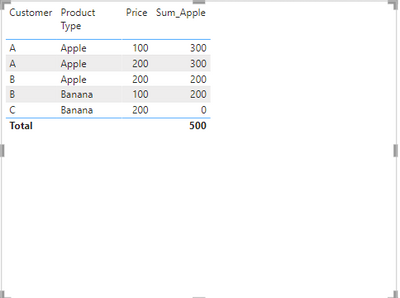
| Customer | Product Type | Price | Sum_Apple |
| A | Apple | 100 | 300 |
| A | Apple | 200 | 300 |
| B | Apple | 200 | 200 |
| B | Banana | 100 | 200 |
| C | Banana | 200 | 0 |
| C | Banana | 200 | 0 |
I have been using CALCULATE(SUM(Table[Price],ALLEXCEPT(Table[Customer])), which calculates fine the total price for all products, but in the moment I add the filter (Product = "Apple"), then it only shows the price for each product, not at customer level.
Any suggestion?
Thank you in advance!
Solved! Go to Solution.
Hi @crisxp ,
Please try this:-
Sum_Apple =
CALCULATE (
SUM ( 'Table'[Price] ),
FILTER (
ALLEXCEPT ( 'Table', 'Table'[Customer] ),
'Table'[Product Type] = "Apple"
)
) + 0
Output:-
Thanks,
Samarth
Best Regards,
Samarth
If this post helps, please consider accepting it as the solution to help the other members find it more quickly.
Appreciate your Kudos!!
Connect on Linkedin
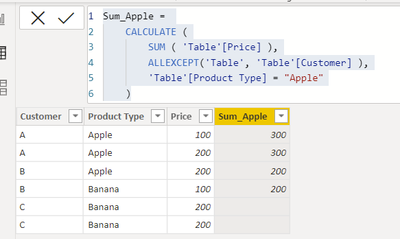
Try the following it works for me with the data you sent:
Sum_Apple =
CALCULATE (
SUM ( 'Table'[Price] ),
ALLEXCEPT('Table', 'Table'[Customer] ),
'Table'[Product Type] = "Apple"
)
Try the following it works for me with the data you sent:
Sum_Apple =
CALCULATE (
SUM ( 'Table'[Price] ),
ALLEXCEPT('Table', 'Table'[Customer] ),
'Table'[Product Type] = "Apple"
)
Thank you @Samarth_18 , I knew I was getting stucked in something that should be pretty easy. Thanks for your quick solution!!
Hi @crisxp ,
Please try this:-
Sum_Apple =
CALCULATE (
SUM ( 'Table'[Price] ),
FILTER (
ALLEXCEPT ( 'Table', 'Table'[Customer] ),
'Table'[Product Type] = "Apple"
)
) + 0
Output:-
Thanks,
Samarth
Best Regards,
Samarth
If this post helps, please consider accepting it as the solution to help the other members find it more quickly.
Appreciate your Kudos!!
Connect on Linkedin
Check out the November 2025 Power BI update to learn about new features.
Advance your Data & AI career with 50 days of live learning, contests, hands-on challenges, study groups & certifications and more!