Don't miss your chance to take the Fabric Data Engineer (DP-700) exam on us!
Learn moreNext up in the FabCon + SQLCon recap series: The roadmap for Microsoft SQL and Maximizing Developer experiences in Fabric. All sessions are available on-demand after the live show. Register now
dear PowerBI masters,
I have a problem with a database, based on multiple tables. The data structure is as follows:
table 1 contains the list of "methods" and the respective "time labor", "time machine" and "grouping"
| Metods | hour labor | hour machine | grouping |
| ABC | 12 | 5 | 2 |
| DEF | 24 | 6 | 6 |
| GHI | 11 | 9 | 8 |
table 2 associates the methods to each product ID. One product ID is linked to one or more methods.
| Product ID | Method |
| 111 | ABC |
| 111 | DEF |
| 222 | DEF |
| 222 | GHI |
| 333 | ABC |
| 333 | DEF |
| 333 | GHI |
| 444 | DEF |
table 3 contains instead the quantities, by Product ID, month, year and classification. Little complexity, the same ID can have multiple rows with same classification, year and month.
| Product ID | Classification | Year | Month | Quantity |
| 111 | … | … | … | … |
I would need a resulting table that, for each "Method" in table 1 is able to sum the "Quantity" in table 3 - maintaining the classification, year and month - for all items that are linked to that "Method" in table 2, i.e.
| Metods | hour labor | hour machine | grouping | Product ID | Classification | Year | Month | Quantity |
| ABC | 12 | 5 | 2 | 111 | … | … | … | … |
| ABC | 12 | 5 | 2 | 333 | ||||
| DEF | 24 | 6 | 6 | 111 | ||||
| DEF | 24 | 6 | 6 | 222 | ||||
| DEF | 24 | 6 | 6 | 444 | ||||
| GHI | 11 | 9 | 8 | 222 | ||||
| GHI | 11 | 9 | 8 | 333 |
not sure what is the best way to do it. Can you please suggest? Should I create a new table combining the existing tables?
Solved! Go to Solution.
Hi, @Anonymous
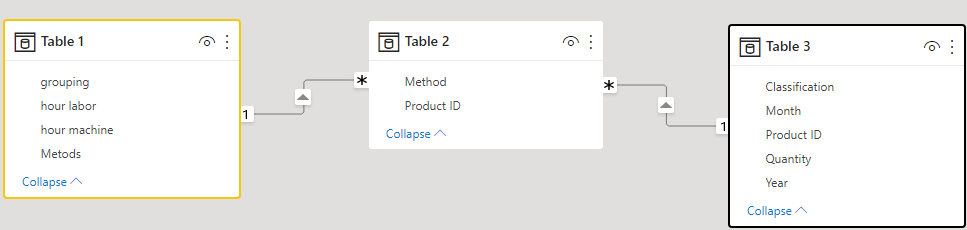
You can establish the following relationship between 3 tables.
Result:
Is this the result you expect? If not, give examples of your desired outcome.
Best Regards,
Community Support Team _Charlotte
If this post helps, then please consider Accept it as the solution to help the other members find it more quickly.
Hi, @Anonymous
You can establish the following relationship between 3 tables.
Result:
Is this the result you expect? If not, give examples of your desired outcome.
Best Regards,
Community Support Team _Charlotte
If this post helps, then please consider Accept it as the solution to help the other members find it more quickly.
I created the relationships, but PBI allows me only to create multiple-to-multiple relationships.
I managed it to create two additional tables, by using the function "merge", and even if the results is a very long table, it works.
thanks
If you have recently started exploring Fabric, we'd love to hear how it's going. Your feedback can help with product improvements.
A new Power BI DataViz World Championship is coming this June! Don't miss out on submitting your entry.
Share feedback directly with Fabric product managers, participate in targeted research studies and influence the Fabric roadmap.
| User | Count |
|---|---|
| 50 | |
| 44 | |
| 42 | |
| 19 | |
| 19 |
| User | Count |
|---|---|
| 69 | |
| 68 | |
| 33 | |
| 32 | |
| 32 |