Don't miss your chance to take the Fabric Data Engineer (DP-600) exam for FREE! Find out how by attending the DP-600 session on April 23rd (pacific time), live or on-demand.
Learn moreJoin the FabCon + SQLCon recap series. Up next: Power BI, Real-Time Intelligence, IQ and AI, and Data Factory take center stage. All sessions are available on-demand after the live show. Register now
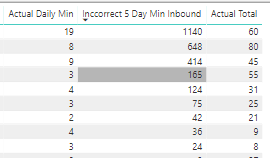
I have location I am trying to set a min and max up for a shipping schedule. If filtered for a single day, everything looks fine but when include multiple days (like 5 days as shown in table below), start seeing inbound as a ratio of "Actual Total".
For example, Actual Daily Min top line has 19 for daily min, but over a 5 day period it multiplying 19 * 60 (or the Actual Total) to get 1140 where I just want it to be : 19 *5 . In this example I want the total to reflect 19*5 or 95.
I have a lookup value for the Actual Daily Min that inputs a value for every row in my table so I imagine I need to create a measure to accomplish my 19 *5 or whatever total based on date range. That is where I am stuck.
Thank you for looking and appreciate any guidance you can provide
What are the current measures you're using? I'm most interested in how you're calculating [Actual Total] and [Incorrect 5 day Min Inbound]
Actual Total is a distinct count of shipment numbers
Incorrect 5 day Min Inbound is from a Lookup Value from a static table that will be updated monthly
So then wouldn't the fix be updating your static table with the correct values?
I don't believe so because it will change depending on how it is filter; day, week, month.
It is setup in the static table to be daily.
I believe I need to create a measure to avoid the calculated column, row by row taking the lookup value found in the static table and multipling by number of loads.
For example: I want it to calculate 5 days times 4 loads minimum a day for total of 20 loads in a 5 day period but it is taking 4 load minimum per day and multiplying by 9 loads(since 9 loads actually shipped over the 5 day period).
Check out the April 2026 Power BI update to learn about new features.
If you have recently started exploring Fabric, we'd love to hear how it's going. Your feedback can help with product improvements.
A new Power BI DataViz World Championship is coming this June! Don't miss out on submitting your entry.
| User | Count |
|---|---|
| 48 | |
| 46 | |
| 41 | |
| 20 | |
| 17 |
| User | Count |
|---|---|
| 69 | |
| 67 | |
| 32 | |
| 27 | |
| 26 |