cancel
Showing results for 
Search instead for 
Did you mean: 

The Power BI Data Visualization World Championships is back! Get ahead of the game and start preparing now! Learn more

Reply
Anonymous
Not applicable

Sum First logins

Hi All,


I'm trying to calculate the number of first logins by date. Here's a simplified version of my dataset:


User ID     Login Date

123           01/01/18

123           02/01/18

123           06/01/18

456           02/01/18

456           08/01/18

789           01/01/18

789           04/01/18


I have used  this formula, calculate(MIN(PA[Date]),ALLEXCEPT(PA,PA[user_Id])), to pull out the first login date by user ID, but I would like to calculate the sum of first logins by date to create a table like so:


Date              New Logins

01/01/18       2

02/01/18       1


Any advice wuld be appreciated.


Thanks,

Chris

1 ACCEPTED SOLUTION
Yemeng_Hu
Frequent Visitor

Hi Chris, 


Here you go:


First_logIn_Date = Calculate(
                                   Min(Login Date), 
                                   AllExcept (PA, PA[User ID])
                                   )

New_Customer_count = Calculate( DistinctCount(PA[Customer ID], 
                                                         Filter( PA,
                                                         PA[Login_Date] = PA[First_login_Date]))

First_login_Date is a calculated column, and New_customer_count is a measure. 


Thanks,

Yemeng

View solution in original post

4 REPLIES 4
Yemeng_Hu
Frequent Visitor

Hi Chris, 


Here you go:


First_logIn_Date = Calculate(
                                   Min(Login Date), 
                                   AllExcept (PA, PA[User ID])
                                   )

New_Customer_count = Calculate( DistinctCount(PA[Customer ID], 
                                                         Filter( PA,
                                                         PA[Login_Date] = PA[First_login_Date]))

First_login_Date is a calculated column, and New_customer_count is a measure. 


Thanks,

Yemeng

v-yulgu-msft
Microsoft Employee
Microsoft Employee

Hi @Anonymous,


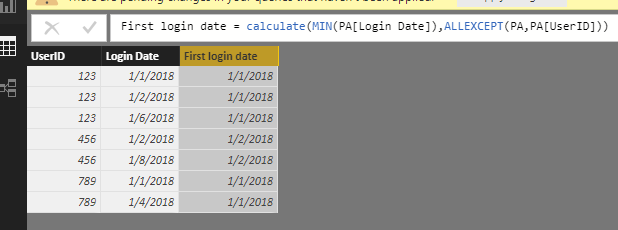
1.PNG


Based on above table, you can create a calculated column to get your desired result.

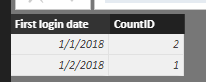
Result table = SUMMARIZE(PA,PA[First login date],"CountID",DISTINCTCOUNT(PA[UserID]))

2.PNG


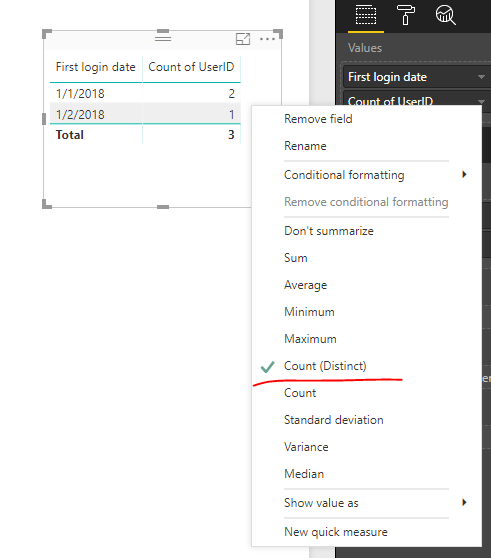
Alternatively, you could directly use a table visual to display data like below:

3.PNG


Best regards,

Yuliana Gu

Community Support Team _ Yuliana Gu
If this post helps, then please consider Accept it as the solution to help the other members find it more quickly.
Anonymous
Not applicable

Thanks Yuliana. Does the first login need to be a specific format? It's not allowing me to add  PA[First Login date] to the formula. When I try adding to a table, it only shows one date. It's only when I add userID to the tabel that i get the full list of first login dates.


Thanks,

Chris


Hi @Anonymous,


PA[First Login date] has to be a calculated column rather than a measure.


Regards,

Yuliana Gu

Community Support Team _ Yuliana Gu
If this post helps, then please consider Accept it as the solution to help the other members find it more quickly.

Helpful resources

Announcements
November Power BI Update Carousel

Power BI Monthly Update - November 2025

Check out the November 2025 Power BI update to learn about new features.

Fabric Data Days Carousel

Fabric Data Days

Advance your Data & AI career with 50 days of live learning, contests, hands-on challenges, study groups & certifications and more!

FabCon Atlanta 2026 carousel

FabCon Atlanta 2026

Join us at FabCon Atlanta, March 16-20, for the ultimate Fabric, Power BI, AI and SQL community-led event. Save $200 with code FABCOMM.

Top Solution Authors
Top Kudoed Authors