Join us at FabCon Atlanta from March 16 - 20, 2026, for the ultimate Fabric, Power BI, AI and SQL community-led event. Save $200 with code FABCOMM.
Register now!Learn from the best! Meet the four finalists headed to the FINALS of the Power BI Dataviz World Championships! Register now
Hi Team,
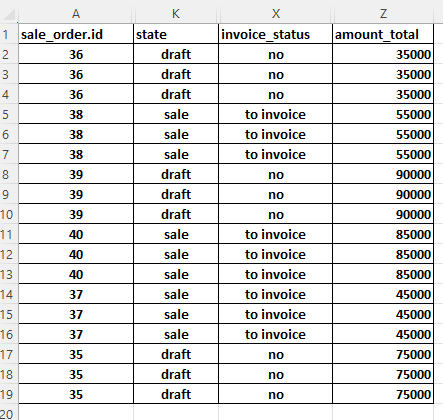
I am trying to sum distinct values from amount_total column based on state and invoice_status columns. State should be "draft" and invoice_status should be "no"
Answer: 200000
Thanks for all your help
Solved! Go to Solution.
create a measure like
Sum of distinct values =
var distinctAmounts = CALCULATETABLE(VALUES('Table'[amount_total]),
TREATAS( { ( "draft", "no") }, 'Table'[state], 'Table'[invoice_status])
)
return SUMX(distinctAmount, [amount_total])
Hi John,
Really appreciate your help in solving my problem. What is TREATAS.
Your solution worked great.
Thanks again
TREATAS is a means of moving or creating filters. If you want to filter a number of columns by different values then you can create a table using {} table constructor and then use TREATAS to say this column of this table matches the first value, this column of that table matches the 2nd value etc.
Also handy if you want to move an existing filter from one table to another, e.g. TREATAS(VALUES('Table1'[id]), 'Table2'[id])
create a measure like
Sum of distinct values =
var distinctAmounts = CALCULATETABLE(VALUES('Table'[amount_total]),
TREATAS( { ( "draft", "no") }, 'Table'[state], 'Table'[invoice_status])
)
return SUMX(distinctAmount, [amount_total])
Share feedback directly with Fabric product managers, participate in targeted research studies and influence the Fabric roadmap.
Check out the February 2026 Power BI update to learn about new features.
| User | Count |
|---|---|
| 50 | |
| 49 | |
| 35 | |
| 15 | |
| 14 |
| User | Count |
|---|---|
| 91 | |
| 75 | |
| 41 | |
| 26 | |
| 25 |