Don't miss your chance to take the Fabric Data Engineer (DP-600) exam for FREE! Find out how by attending the DP-600 session on April 23rd (pacific time), live or on-demand.
Learn moreNext up in the FabCon + SQLCon recap series: The roadmap for Microsoft SQL and Maximizing Developer experiences in Fabric. All sessions are available on-demand after the live show. Register now
I have created a measure that tells me if a "cell" contains a specific partial text. How can I count/sum that measure?
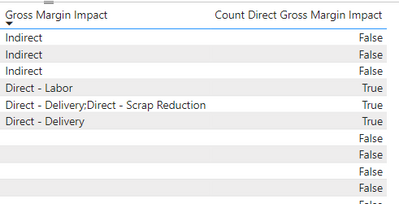
Ex:
The table looks something like this:
And the measure looks for "Direct - " using the following formula:
Solved! Go to Solution.
Hi @DemingPDCA ,
You could modify the measure as follows.
Count Direct Gross Margin Impact =
COUNTROWS (
FILTER (
'Division Quality Project Tracker',
CONTAINSSTRING (
'Division Quality Project Tracker'[Gross Margin Impact],
"Direct - "
)
)
) + 0
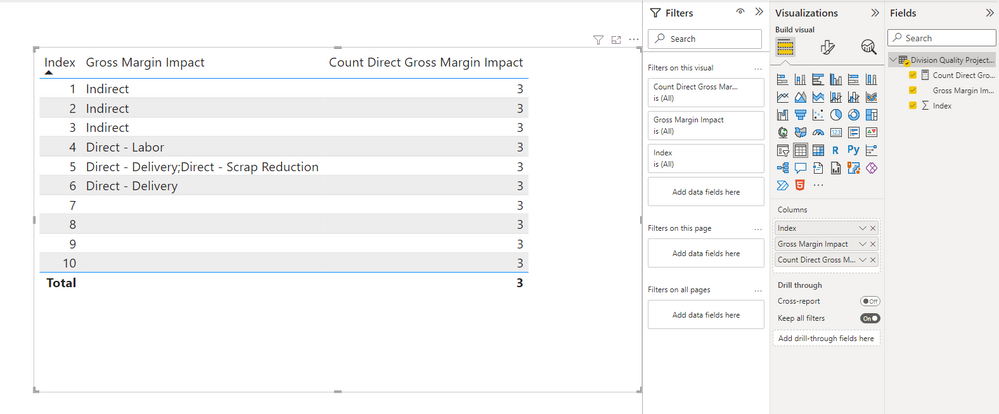
You can see that it has a total of 3, and if you want each row to return a total, you can add ALLSELECTED function.
Count Direct Gross Margin Impact =
COUNTROWS (
FILTER (
ALLSELECTED ( 'Division Quality Project Tracker' ),
CONTAINSSTRING (
'Division Quality Project Tracker'[Gross Margin Impact],
"Direct - "
)
)
)
Best Regards,
Stephen Tao
If this post helps, then please consider Accept it as the solution to help the other members find it more quickly.
Hi @DemingPDCA ,
You could modify the measure as follows.
Count Direct Gross Margin Impact =
COUNTROWS (
FILTER (
'Division Quality Project Tracker',
CONTAINSSTRING (
'Division Quality Project Tracker'[Gross Margin Impact],
"Direct - "
)
)
) + 0
You can see that it has a total of 3, and if you want each row to return a total, you can add ALLSELECTED function.
Count Direct Gross Margin Impact =
COUNTROWS (
FILTER (
ALLSELECTED ( 'Division Quality Project Tracker' ),
CONTAINSSTRING (
'Division Quality Project Tracker'[Gross Margin Impact],
"Direct - "
)
)
)
Best Regards,
Stephen Tao
If this post helps, then please consider Accept it as the solution to help the other members find it more quickly.
HI @DemingPDCA
Please try the following:
COunt =
SUMX(
VALUES(Table[Column in your Fact table for granularity definition]),
var __check = CONTAINSSTRING(SELECTEDVALUE('Division Quality Project Tracker'[Gross Margin Impact]), "Direct - ")
Return
IF(__check = TRUE(),1,0)
)
Based on your request its hard to say what to put into the VALUES() function. In the end my formula iterates through a list of items which and executes tzhe check. if it is true the the result is 1 else it is 0. In the end all 1 are summed up.
Best regards
Michael
-----------------------------------------------------
If this post helps, then please consider Accept it as the solution to help the other members find it more quickly.
Appreciate your thumbs up!
@ me in replies or I'll lose your thread.
If you have recently started exploring Fabric, we'd love to hear how it's going. Your feedback can help with product improvements.
A new Power BI DataViz World Championship is coming this June! Don't miss out on submitting your entry.
| User | Count |
|---|---|
| 46 | |
| 43 | |
| 39 | |
| 19 | |
| 15 |
| User | Count |
|---|---|
| 68 | |
| 65 | |
| 31 | |
| 28 | |
| 24 |