Join us at FabCon Atlanta from March 16 - 20, 2026, for the ultimate Fabric, Power BI, AI and SQL community-led event. Save $200 with code FABCOMM.
Register now!The Power BI Data Visualization World Championships is back! Get ahead of the game and start preparing now! Learn more
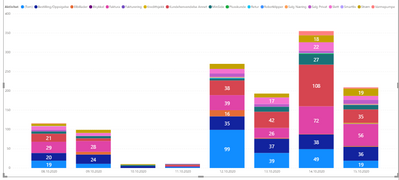
Hi, this bar chart looks kind of silly but I want to show the variety of different customer care categories per day during a week. I don't mind all the cateogies that are small, I would like an easy way to see the name of the largest categories. A grouped bar chart I think is even worse. Is it possible to have something like top 5 categories and the rest as one group to see correct total? Any suggestions?
JG
Solved! Go to Solution.
The problem with the solution from Curbal is it does not allow any segmentation of the data for a dynamic TopN. It only ranks them based on the total in the data table.
You can create a category table that also contains an 'Other' entry that you join into your main data table.
Categories =
UNION (
DISTINCT ( 'Table'[Category] ),
ROW ( "Category", "Other" )
)
Then you can write a measure like this to calculate the top 5 and group the rest in the 'Other' row.
Top 5 + Other
VAR Top_N =
CALCULATETABLE ( Categories, TOPN ( 5, ALL ( 'Categories' ), [Amount] ) )
RETURN
IF (
NOT ISFILTERED ( 'Categories'[Category] ), CALCULATE ( [Amount], ALL ( 'Categories' ) ),
IF ( SELECTEDVALUE ( 'Categories'[Category] ) = "Other",
CALCULATE ( [Amount], EXCEPT ( ALL ( 'Categories' ), Top_N ) ),
CALCULATE ( [Amount], INTERSECT ( 'Categories', Top_N ) )
)
)
[Amount] is simply the measure you are showing in your chart.
Then you replace the Category in your whart with the Category from the new Categories table you created (the one with the 'Other' row in it) to your chart.
Hi @JGG ,
Is your issue solved now?
If not,check the blog below:
https://www.sqlbi.com/articles/showing-the-top-5-products-and-others-row/
Best Regards,
Kelly
Did I answer your question? Mark my post as a solution!
The problem with the solution from Curbal is it does not allow any segmentation of the data for a dynamic TopN. It only ranks them based on the total in the data table.
You can create a category table that also contains an 'Other' entry that you join into your main data table.
Categories =
UNION (
DISTINCT ( 'Table'[Category] ),
ROW ( "Category", "Other" )
)
Then you can write a measure like this to calculate the top 5 and group the rest in the 'Other' row.
Top 5 + Other
VAR Top_N =
CALCULATETABLE ( Categories, TOPN ( 5, ALL ( 'Categories' ), [Amount] ) )
RETURN
IF (
NOT ISFILTERED ( 'Categories'[Category] ), CALCULATE ( [Amount], ALL ( 'Categories' ) ),
IF ( SELECTEDVALUE ( 'Categories'[Category] ) = "Other",
CALCULATE ( [Amount], EXCEPT ( ALL ( 'Categories' ), Top_N ) ),
CALCULATE ( [Amount], INTERSECT ( 'Categories', Top_N ) )
)
)
[Amount] is simply the measure you are showing in your chart.
Then you replace the Category in your whart with the Category from the new Categories table you created (the one with the 'Other' row in it) to your chart.
The Power BI Data Visualization World Championships is back! Get ahead of the game and start preparing now!
Check out the November 2025 Power BI update to learn about new features.
| User | Count |
|---|---|
| 59 | |
| 46 | |
| 42 | |
| 23 | |
| 17 |
| User | Count |
|---|---|
| 190 | |
| 122 | |
| 96 | |
| 66 | |
| 47 |