cancel
Showing results for 
Search instead for 
Did you mean: 

Learn from the best! Meet the four finalists headed to the FINALS of the Power BI Dataviz World Championships! Register now

Reply
shashar11
Frequent Visitor

Suggestion needed

Hello -


I need suggestions for building a PBI visual. Please see the below sample data:


Employee IDSold ItemsPrice
1Fruits10
1Flowers5
1Vegetable15
2Flowers5
3Fruits10
3Flowers5
4Vegetables15
4Fruits10
5Fruits10


The visual should show the items sold at the highest price by any employee.

The output should be like- Employee ID- 1 sold vegetables, Employee Id-2 sold Flowers, Employee Id- 3 sold Fruits,

EmploeeID -4 sold Vegetables and Employee Id 5 sold Fruits.

Can someone please suggest?


Thank you!


1 ACCEPTED SOLUTION
v-frfei-msft
Community Support
Community Support

Hi @shashar11 ,


Here we go.


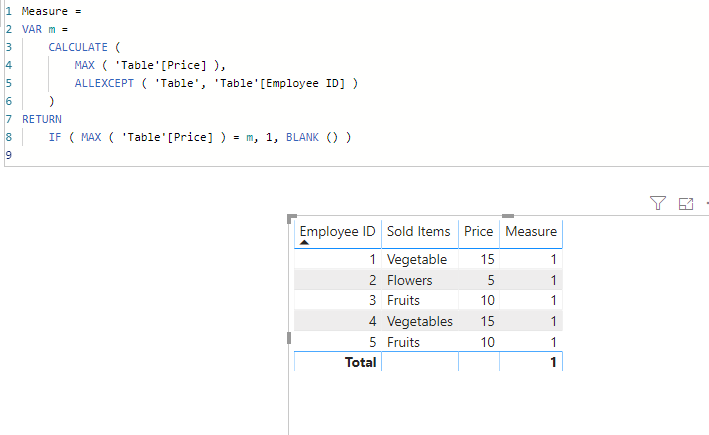
Measure = 
VAR m =
    CALCULATE (
        MAX ( 'Table'[Price] ),
        ALLEXCEPT ( 'Table', 'Table'[Employee ID] )
    )
RETURN
    IF ( MAX ( 'Table'[Price] ) = m, 1, BLANK () )

Capture.PNG


Pbix as attached.


Community Support Team _ Frank
If this post helps, then please consider Accept it as the solution to help the others find it more quickly.

View solution in original post

4 REPLIES 4
v-frfei-msft
Community Support
Community Support

Hi @shashar11 ,


Here we go.


Measure = 
VAR m =
    CALCULATE (
        MAX ( 'Table'[Price] ),
        ALLEXCEPT ( 'Table', 'Table'[Employee ID] )
    )
RETURN
    IF ( MAX ( 'Table'[Price] ) = m, 1, BLANK () )

Capture.PNG


Pbix as attached.


Community Support Team _ Frank
If this post helps, then please consider Accept it as the solution to help the others find it more quickly.

Thank you so much! I appreciate your help on this.

VasTg
Memorable Member
Memorable Member

@shashar11 


Create a measure like below and use it in the visual. Replace the table name as desired


Measure = VAR EMP_ID = MAX('Table (2)'[Employee ID])
RETURN CALCULATE(MAX('Table (2)'[Sold Items]),FILTER(ALL('Table (2)'),'Table (2)'[Employee ID]=EMP_ID && 'Table (2)'[Price]=MAX('Table (2)'[Price])))


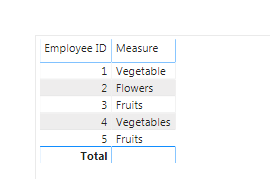
Output:

 image.png


If it helps, mark it as a solution

Kudos are nice too

Connect on LinkedIn

@VasTg 


Thanks for your suggestion. However, when I used your measure I got no/blank output.


Measure 21 = VAR EMP_ID = MAX(Emp_Test[Employee ID])

RETURN CALCULATE(MAX(Emp_Test[Sold Items]),FILTER(ALL(Emp_Test),Emp_Test[Employee ID]=EMP_ID && Emp_Test[Price]=MAX(Emp_Test[Price])))
 
Please note: I just replaced the table name ->Emp_Test
Let me know what I am doing wrong?
 
 
Thanks!


Helpful resources

Announcements
Join our Fabric User Panel

Join our Fabric User Panel

Share feedback directly with Fabric product managers, participate in targeted research studies and influence the Fabric roadmap.

February Power BI Update Carousel

Power BI Monthly Update - February 2026

Check out the February 2026 Power BI update to learn about new features.

FabCon Atlanta 2026 carousel

FabCon Atlanta 2026

Join us at FabCon Atlanta, March 16-20, for the ultimate Fabric, Power BI, AI and SQL community-led event. Save $200 with code FABCOMM.