Join us at FabCon Atlanta from March 16 - 20, 2026, for the ultimate Fabric, Power BI, AI and SQL community-led event. Save $200 with code FABCOMM.
Register now!View all the Fabric Data Days sessions on demand. View schedule
Hi!
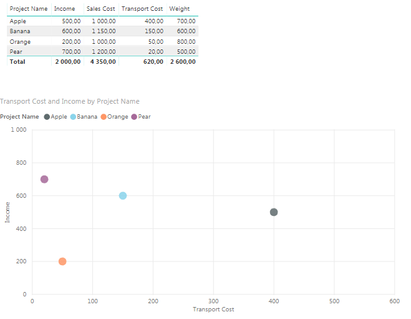
I want to calculate the difference between two rows based on filters applied from a plot.
The data is as an example below. When I mark "Apple" and "Banana" in the plot, I would like to have Power BI calculate the delta of weight of those two. (For this example: 100) Similar to any other two selected projects in the scatter plot.
I very much appreciate any effort of help! ![]()
Solved! Go to Solution.
Hi @jsils ,
You can create a new measure “delta”.
delta =
ABS (
CALCULATE (
SUM ( 'Table'[Weight] ),
FILTER ( 'Table', 'Table'[Name] = MAX ( 'Table'[Name] ) )
)
- CALCULATE (
SUM ( 'Table'[Weight] ),
FILTER ( 'Table', 'Table'[Name] <> MAX ( 'Table'[Name] ) )
)
)
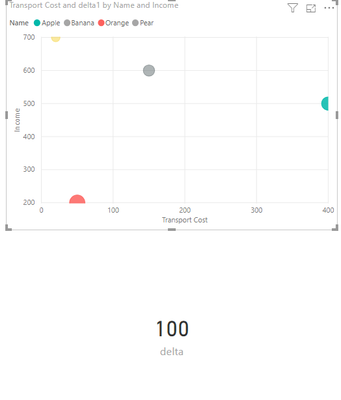
Then you can select a visual to display it. For example, I used the card visual.
Now, you can mark any two names and the delta will give a difference between them.
Best Regards,
Eads
If this post helps, then please consider Accept it as the solution to help the other members find it more quickly.
Hi @jsils ,
You can create a new measure “delta”.
delta =
ABS (
CALCULATE (
SUM ( 'Table'[Weight] ),
FILTER ( 'Table', 'Table'[Name] = MAX ( 'Table'[Name] ) )
)
- CALCULATE (
SUM ( 'Table'[Weight] ),
FILTER ( 'Table', 'Table'[Name] <> MAX ( 'Table'[Name] ) )
)
)
Then you can select a visual to display it. For example, I used the card visual.
Now, you can mark any two names and the delta will give a difference between them.
Best Regards,
Eads
If this post helps, then please consider Accept it as the solution to help the other members find it more quickly.
Check out the November 2025 Power BI update to learn about new features.
Advance your Data & AI career with 50 days of live learning, contests, hands-on challenges, study groups & certifications and more!